You are not logged in.
- Topics: Active | Unanswered
#1 2026-10-08 20:13
- HerrAbisZ
- Member

- From: noch Wien
- Registered: 2023-10-26
- Posts: 38
- Website
Icon by Thunderbird cannot be changed in 32-bit Trinity
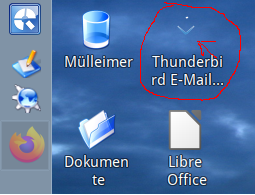
The current Thunderbird icon isn't very visible on the desktop, but I can't change it.
I don't have the necessary permissions ?
BITTE helft einander! Mehr auf meinem Blog http://herrabisz.wordpress.com/ http://www.youtube.com/user/HerrAbisZ2 + 3
Offline
#2 2026-10-08 22:01
- q4osteam
- Q4OS Team

- Registered: 2015-12-06
- Posts: 6,425
- Website
Re: Icon by Thunderbird cannot be changed in 32-bit Trinity
You could remove the shortcut from the desktop and create a new user one so you get permissions to change the icon.
Offline
#3 2026-10-09 07:43
- HerrAbisZ
- Member
- From: noch Wien
- Registered: 2023-10-26
- Posts: 38
- Website
Re: Icon by Thunderbird cannot be changed in 32-bit Trinity
Thanks, but the same icon keeps showing up.
And if I change it to a different icon and then change it back, will the original icon—the one that's hard to see—come back
BITTE helft einander! Mehr auf meinem Blog http://herrabisz.wordpress.com/ http://www.youtube.com/user/HerrAbisZ2 + 3
Offline
#4 2026-10-09 10:29
- q4osteam
- Q4OS Team
- Registered: 2015-12-06
- Posts: 6,425
- Website
Re: Icon by Thunderbird cannot be changed in 32-bit Trinity
Would you post a screenshot of the "hard to see" icon please?
Are you able to change to another arbitrary icon?
Offline
#5 2026-10-09 11:24
- HerrAbisZ
- Member
- From: noch Wien
- Registered: 2023-10-26
- Posts: 38
- Website
Re: Icon by Thunderbird cannot be changed in 32-bit Trinity
Bitte schön
BITTE helft einander! Mehr auf meinem Blog http://herrabisz.wordpress.com/ http://www.youtube.com/user/HerrAbisZ2 + 3
Offline
#6 2026-10-09 11:36
- q4osteam
- Q4OS Team
- Registered: 2015-12-06
- Posts: 6,425
- Website
Re: Icon by Thunderbird cannot be changed in 32-bit Trinity
Well, select the icon with left mouse click and press "Del" key. Log out and in. Are you able to remove this icon from the desktop?
Offline
#7 2026-10-09 11:56
- HerrAbisZ
- Member
- From: noch Wien
- Registered: 2023-10-26
- Posts: 38
- Website
Re: Icon by Thunderbird cannot be changed in 32-bit Trinity
Now it is delet
BITTE helft einander! Mehr auf meinem Blog http://herrabisz.wordpress.com/ http://www.youtube.com/user/HerrAbisZ2 + 3
Offline
#8 2026-10-09 12:04
- q4osteam
- Q4OS Team
- Registered: 2015-12-06
- Posts: 6,425
- Website
Re: Icon by Thunderbird cannot be changed in 32-bit Trinity
Now create new shortcut > right mouse click on the desktop > create new > link to app > application tab > command = thunderbird > first tab: select icon > click ok, done
Offline
#9 2026-10-09 12:43
- HerrAbisZ
- Member
- From: noch Wien
- Registered: 2023-10-26
- Posts: 38
- Website
Re: Icon by Thunderbird cannot be changed in 32-bit Trinity
It`s the same sh...
I take Icon "agent"
Last edited by HerrAbisZ (2026-10-09 12:43)
BITTE helft einander! Mehr auf meinem Blog http://herrabisz.wordpress.com/ http://www.youtube.com/user/HerrAbisZ2 + 3
Offline
#10 2026-10-10 06:55
- bin
- Member

- From: U.K.
- Registered: 2016-01-28
- Posts: 1,608
Re: Icon by Thunderbird cannot be changed in 32-bit Trinity
Had this issue a while back
Offline
- Registered users online in this topic: 0, guests: 1