You are not logged in.
- Topics: Active | Unanswered
#1 2026-08-19 18:11
- green-moomin
- Member
- Registered: 2026-08-05
- Posts: 18
Audio problems with laptop speakers and headphones
When I play something on VLC (or Youtube videos in web browsers etc), the audio output is either from my laptop speakers AND headphones (left side only), or nothing at all. VLC isn't the problem and my headphones work fine on other OSs.
I have installed kmix, PulseAudio and pavucontrol.
In my screenshot, "Headphone" and "Speaker" are unmuted in kmix. In Volume Control, everything else (DisplayPort 1, 2, 3) is muted except for "Port: Speaker". If I only mute "Speaker" in kmix, there is no output from my headphones. What is happening here?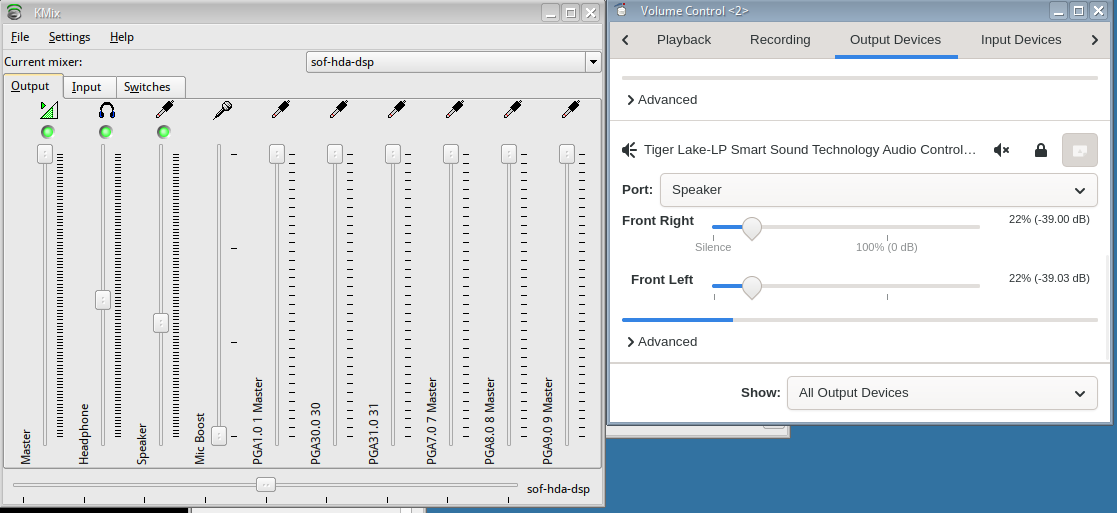
Selected outputs from inxi -F:
System:
Host: mycomputer Kernel: 6.12.101+deb13-amd64 arch: x86_64 bits: 64
Desktop: TDE (Trinity) v: R14.1.5 Distro: Q4OS 6.8-deb13u1
Audio:
Device-1: Intel Tiger Lake-LP Smart Sound Audio
driver: sof-audio-pci-intel-tgl
API: ALSA v: k6.12.101+deb13-amd64 status: kernel-api
Server-1: aRts v: 1.5.10 status: active
Server-2: PipeWire v: 1.4.2 status: active
Last edited by green-moomin (2026-08-19 18:43)
Offline
#2 2026-08-20 11:04
- q4osteam
- Q4OS Team

- Registered: 2015-12-06
- Posts: 6,424
- Website
Re: Audio problems with laptop speakers and headphones
Thanks, the inxi output is valuable.
The likely cause is PulseAudio. Q4OS 6 uses PipeWire, and the pipewire-audio
package conflicts with pulseaudio - installing PulseAudio removes it, and you
are left with two sound servers competing at every login. That matches what
you see: sometimes both outputs, sometimes nothing.
Please try:
sudo apt purge pulseaudio
sudo apt install pipewire-audio
Reboot, then check:
pactl infoIt should say "Server Name: PulseAudio (on PipeWire 1.4.2)".
Then in Volume Control, on the Output Devices tab, change Port: from
Speaker to Headphones. That dropdown is what selects the output.
One more thing: please do not touch the Speaker and Headphone switches in
KMix. KMix talks to the sound card directly, while PipeWire uses those same
switches to mute the speakers when you plug headphones in. Setting them by
hand overrides that - which is why you get both outputs at once, and why
muting Speaker also silences the headphones. Use Volume Control instead.
If the Port list still offers no "Headphones" entry afterwards, please post:
pactl list cards
amixer -c0 | grep -i jack
dmesg | grep -i sof | tail -30
Offline
#3 2026-08-20 12:49
- green-moomin
- Member
- Registered: 2026-08-05
- Posts: 18
Re: Audio problems with laptop speakers and headphones
The outputs from removing pulseaudio and installing pipewire-audio are:
$ sudo apt purge pulseaudio
Package 'pulseaudio' is not installed, so not removed
$ sudo apt install pipewire-audio
pipewire-audio is already the newest version (1.4.2-1).
The pactl info outputs "Server Name: PulseAudio (on PipeWire 1.4.2)"
Next, in Volume Control, the only "Port:" option is "Speaker." There is no "Headphones" to choose.
Here are the outputs showing audio hardware details:
$ pactl list cards
Card #48
        Name: alsa_card.pci-0000_00_1f.3-platform-skl_hda_dsp_generic
        Driver: alsa
        Owner Module: n/a
        Properties:
                api.acp.auto-port = "false"
                api.acp.auto-profile = "false"
                api.alsa.card = "0"
                api.alsa.card.longname = "HP-xxxx-xxxx-xxxx"
                api.alsa.card.name = "sof-hda-dsp"
                api.alsa.path = "hw:0"
                api.alsa.split-enable = "true"
                api.alsa.use-acp = "true"
                api.dbus.ReserveDevice1 = "Audio0"
                api.dbus.ReserveDevice1.Priority = "-20"
                device.api = "alsa"
                device.bus = "pci"
                device.bus_path = "pci-0000:00:1f.3-platform-skl_hda_dsp_generic"
                device.description = "Tiger Lake-LP Smart Sound Technology Audio Controller"
                device.enum.api = "udev"
                device.icon_name = "audio-card-analog-pci"
                device.name = "alsa_card.pci-0000_00_1f.3-platform-skl_hda_dsp_generic"
                device.nick = "sof-hda-dsp"
                device.plugged.usec = "7008645"
                device.product.id = "0xa0c8"
                device.product.name = "Tiger Lake-LP Smart Sound Technology Audio Controller"
                device.subsystem = "sound"
                sysfs.path = "/devices/pci0000:00/0000:00:1f.3/skl_hda_dsp_generic/sound/card0"
                device.vendor.id = "0x8086"
                device.vendor.name = "Intel Corporation"
                media.class = "Audio/Device"
                spa.object.id = "2"
                factory.id = "15"
                client.id = "47"
                object.id = "48"
                object.serial = "48"
                object.path = "alsa:acp:sofhdadsp"
                alsa.card = "0"
                alsa.card_name = "sof-hda-dsp"
                alsa.long_card_name = "HP-xxxx-xxxx-xxxx"
                alsa.driver_name = "snd_soc_skl_hda_dsp"
                alsa.mixer_name = "Realtek ALC285"
                alsa.components = "HDA:80862812,80860101,00100000 HDA:10ec0285,103c8ab8,00100002 cfg-dmics:4"
                alsa.id = "sofhdadsp"
                device.string = "0"
        Profiles:
                off: Off (sinks: 0, sources: 0, priority: 0, available: yes)
                HiFi (HDMI1, HDMI2, HDMI3, Headphones, Mic1, Mic2): Play HiFi quality Music (HDMI1, HDMI2, HDMI3, Headphones, Mic1, Mic2) (sinks: 4, sources: 2, priority: 10300, available: no)
                HiFi (HDMI1, HDMI2, HDMI3, Mic1, Mic2, Speaker): Play HiFi quality Music (HDMI1, HDMI2, HDMI3, Mic1, Mic2, Speaker) (sinks: 4, sources: 2, priority: 10200, available: yes)
                pro-audio: Pro Audio (sinks: 5, sources: 3, priority: 1, available: yes)
        Active Profile: HiFi (HDMI1, HDMI2, HDMI3, Mic1, Mic2, Speaker)
        Ports:
                [Out] HDMI3: HDMI / DisplayPort 3 Output (type: HDMI, priority: 700, latency offset: 0 usec, availability group: HDMI/DP,pcm=5, not available)
                        Properties:
                                port.type = "hdmi"
                                port.availability-group = "HDMI/DP,pcm=5"
                                device.icon_name = "video-display"
                                card.profile.port = "0"
                        Part of profile(s): HiFi (HDMI1, HDMI2, HDMI3, Mic1, Mic2, Speaker), HiFi (HDMI1, HDMI2, HDMI3, Headphones, Mic1, Mic2)
                [Out] HDMI2: HDMI / DisplayPort 2 Output (type: HDMI, priority: 600, latency offset: 0 usec, availability group: HDMI/DP,pcm=4, not available)
                        Properties:
                                port.type = "hdmi"
                                port.availability-group = "HDMI/DP,pcm=4"
                                device.icon_name = "video-display"
                                card.profile.port = "1"
                        Part of profile(s): HiFi (HDMI1, HDMI2, HDMI3, Mic1, Mic2, Speaker), HiFi (HDMI1, HDMI2, HDMI3, Headphones, Mic1, Mic2)
                [Out] HDMI1: HDMI / DisplayPort 1 Output (type: HDMI, priority: 500, latency offset: 0 usec, availability group: HDMI/DP,pcm=3, not available)
                        Properties:
                                port.type = "hdmi"
                                port.availability-group = "HDMI/DP,pcm=3"
                                device.icon_name = "video-display"
                                card.profile.port = "2"
                        Part of profile(s): HiFi (HDMI1, HDMI2, HDMI3, Mic1, Mic2, Speaker), HiFi (HDMI1, HDMI2, HDMI3, Headphones, Mic1, Mic2)
                [Out] Speaker: Speaker (type: Speaker, priority: 100, latency offset: 0 usec, availability unknown)
                        Properties:
                                port.type = "speaker"
                                device.icon_name = "audio-speakers"
                                card.profile.port = "3"
                        Part of profile(s): HiFi (HDMI1, HDMI2, HDMI3, Mic1, Mic2, Speaker)
                [In] Mic2: Stereo Microphone (type: Mic, priority: 200, latency offset: 0 usec, availability group: Mic, not available)
                        Properties:
                                port.type = "mic"
                                port.availability-group = "Mic"
                                device.icon_name = "audio-input-microphone"
                                card.profile.port = "4"
                        Part of profile(s): HiFi (HDMI1, HDMI2, HDMI3, Mic1, Mic2, Speaker), HiFi (HDMI1, HDMI2, HDMI3, Headphones, Mic1, Mic2)
                [In] Mic1: Digital Microphone (type: Mic, priority: 100, latency offset: 0 usec, availability unknown)
                        Properties:
                                port.type = "mic"
                                device.icon_name = "audio-input-microphone"
                                card.profile.port = "5"
                        Part of profile(s): HiFi (HDMI1, HDMI2, HDMI3, Mic1, Mic2, Speaker), HiFi (HDMI1, HDMI2, HDMI3, Headphones, Mic1, Mic2)
                [Out] Headphones: Headphones (type: Headphones, priority: 200, latency offset: 0 usec, availability group: Headphone, not available)
                        Properties:
                                port.type = "headphones"
                                port.availability-group = "Headphone"
                                device.icon_name = "audio-headphones"
                                card.profile.port = "6"
                        Part of profile(s): HiFi (HDMI1, HDMI2, HDMI3, Headphones, Mic1, Mic2)

$ dmesg | grep -i sof | tail -30
[    0.020062] software IO TLB: area num 8.
[    0.507599] pps_core: Software ver. 5.3.6 - Copyright 2005-2007 Rodolfo Giometti <giometti@linux.it>
[    0.531798] PCI-DMA: Using software bounce buffering for IO (SWIOTLB)
[    0.531799] software IO TLB: mapped [mem 0x000000002e22c000-0x000000003222c000] (64MB)
[    1.290047] integrity: Loaded X.509 cert 'Microsoft Windows Production PCA 2011: a92902398e16c49778cd90f99e4f9ae17c55af53'
[    1.290064] integrity: Loaded X.509 cert 'Microsoft Corporation UEFI CA 2011: 13adbf4309bd82709c8cd54f316ed522988a1bd4'
[    5.412422] snd_hda_intel 0000:00:1f.3: Digital mics found on Skylake+ platform, using SOF driver
[    6.124078] sof-audio-pci-intel-tgl 0000:00:1f.3: enabling device (0000 -> 0002)
[    6.124307] sof-audio-pci-intel-tgl 0000:00:1f.3: DSP detected with PCI class/subclass/prog-if 0x040100
[    6.124371] sof-audio-pci-intel-tgl 0000:00:1f.3: bound 0000:00:02.0 (ops i915_audio_component_bind_ops [i915])
[    6.131453] sof-audio-pci-intel-tgl 0000:00:1f.3: use msi interrupt mode
[    6.187070] sof-audio-pci-intel-tgl 0000:00:1f.3: hda codecs found, mask 5
[    6.187077] sof-audio-pci-intel-tgl 0000:00:1f.3: using HDA machine driver skl_hda_dsp_generic now
[    6.187080] sof-audio-pci-intel-tgl 0000:00:1f.3: NHLT device BT(0) detected, ssp_mask 0x4
[    6.187083] sof-audio-pci-intel-tgl 0000:00:1f.3: BT link detected in NHLT tables: 0x4
[    6.187085] sof-audio-pci-intel-tgl 0000:00:1f.3: DMICs detected in NHLT tables: 4
[    6.193129] sof-audio-pci-intel-tgl 0000:00:1f.3: Firmware paths/files for ipc type 0:
[    6.193133] sof-audio-pci-intel-tgl 0000:00:1f.3:  Firmware file:     intel/sof/sof-tgl.ri
[    6.193136] sof-audio-pci-intel-tgl 0000:00:1f.3:  Topology file:     intel/sof-tplg/sof-hda-generic-4ch.tplg
[    6.193795] sof-audio-pci-intel-tgl 0000:00:1f.3: Firmware info: version 2:2:0-57864
[    6.193798] sof-audio-pci-intel-tgl 0000:00:1f.3: Firmware: ABI 3:22:1 Kernel ABI 3:23:1
[    6.193804] sof-audio-pci-intel-tgl 0000:00:1f.3: unknown sof_ext_man header type 3 size 0x30
[    6.305526] sof-audio-pci-intel-tgl 0000:00:1f.3: Firmware info: version 2:2:0-57864
[    6.305531] sof-audio-pci-intel-tgl 0000:00:1f.3: Firmware: ABI 3:22:1 Kernel ABI 3:23:1
[    6.339269] sof-audio-pci-intel-tgl 0000:00:1f.3: Topology: ABI 3:22:1 Kernel ABI 3:23:1
[    7.029482] input: sof-hda-dsp Mic as /devices/pci0000:00/0000:00:1f.3/skl_hda_dsp_generic/sound/card0/input22
[    7.029545] input: sof-hda-dsp Headphone as /devices/pci0000:00/0000:00:1f.3/skl_hda_dsp_generic/sound/card0/input23
[    7.029573] input: sof-hda-dsp HDMI/DP,pcm=3 as /devices/pci0000:00/0000:00:1f.3/skl_hda_dsp_generic/sound/card0/input24
[    7.029609] input: sof-hda-dsp HDMI/DP,pcm=4 as /devices/pci0000:00/0000:00:1f.3/skl_hda_dsp_generic/sound/card0/input25
[    7.029658] input: sof-hda-dsp HDMI/DP,pcm=5 as /devices/pci0000:00/0000:00:1f.3/skl_hda_dsp_generic/sound/card0/input26
Hope this is useful.
Offline
#4 2026-08-20 17:51
- q4osteam
- Q4OS Team
- Registered: 2015-12-06
- Posts: 6,424
- Website
Re: Audio problems with laptop speakers and headphones
It looks like PipeWire is working correctly, but there is an issue with the headphone jack detection/port availability.
Could you please run the following with the headphones physically plugged in, and then again after unplugging them?
$ amixer -c0 | grep -i jack
Also, please show:
$ wpctl status
and:
$ pactl list sinks
This should help us determine whether the problem is the ALSA jack state, or how WirePlumber/PipeWire is interpreting it.
We would also recommend leaving the Speaker/Headphone switches in KMix untouched for now, since changing those directly can interfere with PipeWire's port handling.
Offline
#5 2026-08-20 20:12
- green-moomin
- Member
- Registered: 2026-08-05
- Posts: 18
Re: Audio problems with laptop speakers and headphones
The output of "wpctl status" is
PipeWire 'pipewire-0' [1.4.2, user2@mycomputer, cookie:2234807986]
 └─ Clients:
        33. WirePlumber                         [1.4.2, user2@mycomputer, pid:1450]
        34. pipewire                            [1.4.2, user2@mycomputer, pid:1452]
        47. WirePlumber [export]                [1.4.2, user2@mycomputer, pid:1450]
        85. Firefox                             [1.4.2, user2@mycomputer, pid:1831]
        88. xdg-desktop-portal                  [1.4.2, user2@mycomputer, pid:1889]
        89. PipeWire ALSA [tdeinit]             [1.4.2, user2@mycomputer, pid:2257]
        90. wpctl                               [1.4.2, user2@mycomputer, pid:46974]

Audio
 ├─ Devices:
 │      48. Tiger Lake-LP Smart Sound Technology Audio Controller [alsa]
 │
 ├─ Sinks:
 │      57. Tiger Lake-LP Smart Sound Technology Audio Controller HDMI / DisplayPort 3 Output [vol: 1.00 MUTED]
 │      58. Tiger Lake-LP Smart Sound Technology Audio Controller HDMI / DisplayPort 2 Output [vol: 1.00 MUTED]
 │      59. Tiger Lake-LP Smart Sound Technology Audio Controller HDMI / DisplayPort 1 Output [vol: 1.00 MUTED]
 │  *   60. Tiger Lake-LP Smart Sound Technology Audio Controller Speaker [vol: 0.03]
 │
 ├─ Sources:
 │      61. Tiger Lake-LP Smart Sound Technology Audio Controller Stereo Microphone [vol: 1.00]
 │  *   62. Tiger Lake-LP Smart Sound Technology Audio Controller Digital Microphone [vol: 1.00]
 │
 ├─ Filters:
 │
 └─ Streams:

Video
 ├─ Devices:
 │      52. HP HD Camera                        [v4l2]
 │      53. HP HD Camera                        [v4l2]
 │
 ├─ Sinks:
 │
 ├─ Sources:
 │  *   80. HP HD Camera (V4L2)
 │
 ├─ Filters:
 │
 └─ Streams:

Settings
 └─ Default Configured Devices:
         0. Audio/Sink    alsa_output.pci-0000_00_1f.3-platform-skl_hda_dsp_generic.HiFi__HDMI2__sink
         1. Audio/Source  alsa_input.pci-0000_00_1f.3-platform-skl_hda_dsp_generic.HiFi__Mic1__source
The output of "pactl list sinks" is
Sink #57
State: SUSPENDED
Name: alsa_output.pci-0000_00_1f.3-platform-skl_hda_dsp_generic.HiFi__HDMI3__sink
Description: Tiger Lake-LP Smart Sound Technology Audio Controller HDMI / DisplayPort 3 Output
Driver: PipeWire
Sample Specification: s24-32le 2ch 48000Hz
Channel Map: front-left,front-right
Owner Module: 4294967295
Mute: yes
Volume: front-left: 65536 / 100% / 0.00 dB, front-right: 65536 / 100% / 0.00 dB
balance 0.00
Base Volume: 65536 / 100% / 0.00 dB
Monitor Source: alsa_output.pci-0000_00_1f.3-platform-skl_hda_dsp_generic.HiFi__HDMI3__sink.monitor
Latency: 0 usec, configured 0 usec
Flags: HARDWARE DECIBEL_VOLUME LATENCY
Properties:
alsa.card = "0"
alsa.card_name = "sof-hda-dsp"
alsa.class = "generic"
alsa.components = "HDA:80862812,80860101,00100000 HDA:10ec0285,103c8ab8,00100002 cfg-dmics:4"
alsa.device = "5"
alsa.driver_name = "snd_soc_skl_hda_dsp"
alsa.id = "HDMI3 (*)"
alsa.long_card_name = "HP-xxxx-xxxx-xxxx"
alsa.mixer_device = "_ucm0001.hw:sofhdadsp"
alsa.mixer_name = "Realtek ALC285"
alsa.name = ""
alsa.resolution_bits = "16"
alsa.subclass = "generic-mix"
alsa.subdevice = "0"
alsa.subdevice_name = "subdevice #0"
alsa.sync.id = "00000000:00000000:00000000:00000000"
api.alsa.card.longname = "HP-xxxx-xxxx-xxxx"
api.alsa.card.name = "sof-hda-dsp"
api.alsa.open.ucm = "true"
api.alsa.path = "hw:sofhdadsp,5"
api.alsa.pcm.card = "0"
api.alsa.pcm.stream = "playback"
audio.channels = "2"
audio.position = "FL,FR"
card.profile.device = "0"
device.api = "alsa"
device.class = "sound"
device.icon_name = "video-display"
device.id = "48"
device.profile.description = "HDMI / DisplayPort 3 Output"
device.profile.name = "HiFi: HDMI3: sink"
device.routes = "1"
factory.name = "api.alsa.pcm.sink"
media.class = "Audio/Sink"
device.description = "Tiger Lake-LP Smart Sound Technology Audio Controller"
node.name = "alsa_output.pci-0000_00_1f.3-platform-skl_hda_dsp_generic.HiFi__HDMI3__sink"
node.nick = "HDMI / DisplayPort 3 Output"
node.pause-on-idle = "false"
object.path = "alsa:acp:sofhdadsp:0:playback"
port.group = "playback"
priority.driver = "664"
priority.session = "664"
factory.id = "19"
clock.quantum-limit = "8192"
client.id = "47"
node.driver = "true"
node.loop.name = "data-loop.0"
library.name = "audioconvert/libspa-audioconvert"
object.id = "57"
object.serial = "57"
api.acp.auto-port = "false"
api.acp.auto-profile = "false"
api.alsa.card = "0"
api.alsa.split-enable = "true"
api.alsa.use-acp = "true"
api.dbus.ReserveDevice1 = "Audio0"
api.dbus.ReserveDevice1.Priority = "-20"
device.bus = "pci"
device.bus_path = "pci-0000:00:1f.3-platform-skl_hda_dsp_generic"
device.enum.api = "udev"
device.name = "alsa_card.pci-0000_00_1f.3-platform-skl_hda_dsp_generic"
device.nick = "sof-hda-dsp"
device.plugged.usec = "7008645"
device.product.id = "0xa0c8"
device.product.name = "Tiger Lake-LP Smart Sound Technology Audio Controller"
device.subsystem = "sound"
sysfs.path = "/devices/pci0000:00/0000:00:1f.3/skl_hda_dsp_generic/sound/card0"
device.vendor.id = "0x8086"
device.vendor.name = "Intel Corporation"
spa.object.id = "2"
device.string = "0"
Ports:
[Out] HDMI3: HDMI / DisplayPort 3 Output (type: HDMI, priority: 700, availability group: HDMI/DP,pcm=5, not available)
Active Port: [Out] HDMI3
Formats:
pcm
Sink #58
State: SUSPENDED
Name: alsa_output.pci-0000_00_1f.3-platform-skl_hda_dsp_generic.HiFi__HDMI2__sink
Description: Tiger Lake-LP Smart Sound Technology Audio Controller HDMI / DisplayPort 2 Output
Driver: PipeWire
Sample Specification: s24-32le 2ch 48000Hz
Channel Map: front-left,front-right
Owner Module: 4294967295
Mute: yes
Volume: front-left: 65536 / 100% / 0.00 dB, front-right: 65536 / 100% / 0.00 dB
balance 0.00
Base Volume: 65536 / 100% / 0.00 dB
Monitor Source: alsa_output.pci-0000_00_1f.3-platform-skl_hda_dsp_generic.HiFi__HDMI2__sink.monitor
Latency: 0 usec, configured 0 usec
Flags: HARDWARE DECIBEL_VOLUME LATENCY
Properties:
alsa.card = "0"
alsa.card_name = "sof-hda-dsp"
alsa.class = "generic"
alsa.components = "HDA:80862812,80860101,00100000 HDA:10ec0285,103c8ab8,00100002 cfg-dmics:4"
alsa.device = "4"
alsa.driver_name = "snd_soc_skl_hda_dsp"
alsa.id = "HDMI2 (*)"
alsa.long_card_name = "HP-xxxx-xxxx-xxxx"
alsa.mixer_device = "_ucm0001.hw:sofhdadsp"
alsa.mixer_name = "Realtek ALC285"
alsa.name = ""
alsa.resolution_bits = "16"
alsa.subclass = "generic-mix"
alsa.subdevice = "0"
alsa.subdevice_name = "subdevice #0"
alsa.sync.id = "00000000:00000000:00000000:00000000"
api.alsa.card.longname = "HP-xxxx-xxxx-xxxx"
api.alsa.card.name = "sof-hda-dsp"
api.alsa.open.ucm = "true"
api.alsa.path = "hw:sofhdadsp,4"
api.alsa.pcm.card = "0"
api.alsa.pcm.stream = "playback"
audio.channels = "2"
audio.position = "FL,FR"
card.profile.device = "1"
device.api = "alsa"
device.class = "sound"
device.icon_name = "video-display"
device.id = "48"
device.profile.description = "HDMI / DisplayPort 2 Output"
device.profile.name = "HiFi: HDMI2: sink"
device.routes = "1"
factory.name = "api.alsa.pcm.sink"
media.class = "Audio/Sink"
device.description = "Tiger Lake-LP Smart Sound Technology Audio Controller"
node.name = "alsa_output.pci-0000_00_1f.3-platform-skl_hda_dsp_generic.HiFi__HDMI2__sink"
node.nick = "HDMI / DisplayPort 2 Output"
node.pause-on-idle = "false"
object.path = "alsa:acp:sofhdadsp:1:playback"
port.group = "playback"
priority.driver = "680"
priority.session = "680"
factory.id = "19"
clock.quantum-limit = "8192"
client.id = "47"
node.driver = "true"
node.loop.name = "data-loop.0"
library.name = "audioconvert/libspa-audioconvert"
object.id = "58"
object.serial = "58"
api.acp.auto-port = "false"
api.acp.auto-profile = "false"
api.alsa.card = "0"
api.alsa.split-enable = "true"
api.alsa.use-acp = "true"
api.dbus.ReserveDevice1 = "Audio0"
api.dbus.ReserveDevice1.Priority = "-20"
device.bus = "pci"
device.bus_path = "pci-0000:00:1f.3-platform-skl_hda_dsp_generic"
device.enum.api = "udev"
device.name = "alsa_card.pci-0000_00_1f.3-platform-skl_hda_dsp_generic"
device.nick = "sof-hda-dsp"
device.plugged.usec = "7008645"
device.product.id = "0xa0c8"
device.product.name = "Tiger Lake-LP Smart Sound Technology Audio Controller"
device.subsystem = "sound"
sysfs.path = "/devices/pci0000:00/0000:00:1f.3/skl_hda_dsp_generic/sound/card0"
device.vendor.id = "0x8086"
device.vendor.name = "Intel Corporation"
spa.object.id = "2"
device.string = "0"
Ports:
[Out] HDMI2: HDMI / DisplayPort 2 Output (type: HDMI, priority: 600, availability group: HDMI/DP,pcm=4, not available)
Active Port: [Out] HDMI2
Formats:
pcm
Sink #59
State: SUSPENDED
Name: alsa_output.pci-0000_00_1f.3-platform-skl_hda_dsp_generic.HiFi__HDMI1__sink
Description: Tiger Lake-LP Smart Sound Technology Audio Controller HDMI / DisplayPort 1 Output
Driver: PipeWire
Sample Specification: s24-32le 2ch 48000Hz
Channel Map: front-left,front-right
Owner Module: 4294967295
Mute: yes
Volume: front-left: 65532 / 100% / -0.00 dB, front-right: 65532 / 100% / -0.00 dB
balance 0.00
Base Volume: 65536 / 100% / 0.00 dB
Monitor Source: alsa_output.pci-0000_00_1f.3-platform-skl_hda_dsp_generic.HiFi__HDMI1__sink.monitor
Latency: 0 usec, configured 0 usec
Flags: HARDWARE DECIBEL_VOLUME LATENCY
Properties:
alsa.card = "0"
alsa.card_name = "sof-hda-dsp"
alsa.class = "generic"
alsa.components = "HDA:80862812,80860101,00100000 HDA:10ec0285,103c8ab8,00100002 cfg-dmics:4"
alsa.device = "3"
alsa.driver_name = "snd_soc_skl_hda_dsp"
alsa.id = "HDMI1 (*)"
alsa.long_card_name = "HP-xxxx-xxxx-xxxx"
alsa.mixer_device = "_ucm0001.hw:sofhdadsp"
alsa.mixer_name = "Realtek ALC285"
alsa.name = ""
alsa.resolution_bits = "16"
alsa.subclass = "generic-mix"
alsa.subdevice = "0"
alsa.subdevice_name = "subdevice #0"
alsa.sync.id = "00000000:00000000:00000000:00000000"
api.alsa.card.longname = "HP-xxxx-xxxx-xxxx"
api.alsa.card.name = "sof-hda-dsp"
api.alsa.open.ucm = "true"
api.alsa.path = "hw:sofhdadsp,3"
api.alsa.pcm.card = "0"
api.alsa.pcm.stream = "playback"
audio.channels = "2"
audio.position = "FL,FR"
card.profile.device = "2"
device.api = "alsa"
device.class = "sound"
device.icon_name = "video-display"
device.id = "48"
device.profile.description = "HDMI / DisplayPort 1 Output"
device.profile.name = "HiFi: HDMI1: sink"
device.routes = "1"
factory.name = "api.alsa.pcm.sink"
media.class = "Audio/Sink"
device.description = "Tiger Lake-LP Smart Sound Technology Audio Controller"
node.name = "alsa_output.pci-0000_00_1f.3-platform-skl_hda_dsp_generic.HiFi__HDMI1__sink"
node.nick = "HDMI / DisplayPort 1 Output"
node.pause-on-idle = "false"
object.path = "alsa:acp:sofhdadsp:2:playback"
port.group = "playback"
priority.driver = "696"
priority.session = "696"
factory.id = "19"
clock.quantum-limit = "8192"
client.id = "47"
node.driver = "true"
node.loop.name = "data-loop.0"
library.name = "audioconvert/libspa-audioconvert"
object.id = "59"
object.serial = "59"
api.acp.auto-port = "false"
api.acp.auto-profile = "false"
api.alsa.card = "0"
api.alsa.split-enable = "true"
api.alsa.use-acp = "true"
api.dbus.ReserveDevice1 = "Audio0"
api.dbus.ReserveDevice1.Priority = "-20"
device.bus = "pci"
device.bus_path = "pci-0000:00:1f.3-platform-skl_hda_dsp_generic"
device.enum.api = "udev"
device.name = "alsa_card.pci-0000_00_1f.3-platform-skl_hda_dsp_generic"
device.nick = "sof-hda-dsp"
device.plugged.usec = "7008645"
device.product.id = "0xa0c8"
device.product.name = "Tiger Lake-LP Smart Sound Technology Audio Controller"
device.subsystem = "sound"
sysfs.path = "/devices/pci0000:00/0000:00:1f.3/skl_hda_dsp_generic/sound/card0"
device.vendor.id = "0x8086"
device.vendor.name = "Intel Corporation"
spa.object.id = "2"
device.string = "0"
Ports:
[Out] HDMI1: HDMI / DisplayPort 1 Output (type: HDMI, priority: 500, availability group: HDMI/DP,pcm=3, not available)
Active Port: [Out] HDMI1
Formats:
pcm
Sink #60
State: SUSPENDED
Name: alsa_output.pci-0000_00_1f.3-platform-skl_hda_dsp_generic.HiFi__Speaker__sink
Description: Tiger Lake-LP Smart Sound Technology Audio Controller Speaker
Driver: PipeWire
Sample Specification: s32le 2ch 48000Hz
Channel Map: front-left,front-right
Owner Module: 4294967295
Mute: no
Volume: front-left: 2048 / 3% / -90.31 dB, front-right: 2048 / 3% / -90.31 dB
balance 0.00
Base Volume: 65536 / 100% / 0.00 dB
Monitor Source: alsa_output.pci-0000_00_1f.3-platform-skl_hda_dsp_generic.HiFi__Speaker__sink.monitor
Latency: 0 usec, configured 0 usec
Flags: HARDWARE HW_MUTE_CTRL HW_VOLUME_CTRL DECIBEL_VOLUME LATENCY
Properties:
alsa.card = "0"
alsa.card_name = "sof-hda-dsp"
alsa.class = "generic"
alsa.components = "HDA:80862812,80860101,00100000 HDA:10ec0285,103c8ab8,00100002 cfg-dmics:4"
alsa.device = "0"
alsa.driver_name = "snd_soc_skl_hda_dsp"
alsa.id = "HDA Analog (*)"
alsa.long_card_name = "HP-xxxx-xxxx-xxxx"
alsa.mixer_device = "_ucm0001.hw:sofhdadsp"
alsa.mixer_name = "Realtek ALC285"
alsa.name = ""
alsa.resolution_bits = "16"
alsa.subclass = "generic-mix"
alsa.subdevice = "0"
alsa.subdevice_name = "subdevice #0"
alsa.sync.id = "00000000:00000000:00000000:00000000"
api.alsa.card.longname = "HP-xxxx-xxxx-xxxx"
api.alsa.card.name = "sof-hda-dsp"
api.alsa.open.ucm = "true"
api.alsa.path = "hw:sofhdadsp"
api.alsa.pcm.card = "0"
api.alsa.pcm.stream = "playback"
audio.channels = "2"
audio.position = "FL,FR"
card.profile.device = "3"
device.api = "alsa"
device.class = "sound"
device.icon_name = "audio-speakers"
device.id = "48"
device.profile.description = "Speaker"
device.profile.name = "HiFi: Speaker: sink"
device.routes = "1"
factory.name = "api.alsa.pcm.sink"
media.class = "Audio/Sink"
device.description = "Tiger Lake-LP Smart Sound Technology Audio Controller"
node.name = "alsa_output.pci-0000_00_1f.3-platform-skl_hda_dsp_generic.HiFi__Speaker__sink"
node.nick = "Speaker"
node.pause-on-idle = "false"
object.path = "alsa:acp:sofhdadsp:3:playback"
port.group = "playback"
priority.driver = "1000"
priority.session = "1000"
factory.id = "19"
clock.quantum-limit = "8192"
client.id = "47"
node.driver = "true"
node.loop.name = "data-loop.0"
library.name = "audioconvert/libspa-audioconvert"
object.id = "60"
object.serial = "60"
api.acp.auto-port = "false"
api.acp.auto-profile = "false"
api.alsa.card = "0"
api.alsa.split-enable = "true"
api.alsa.use-acp = "true"
api.dbus.ReserveDevice1 = "Audio0"
api.dbus.ReserveDevice1.Priority = "-20"
device.bus = "pci"
device.bus_path = "pci-0000:00:1f.3-platform-skl_hda_dsp_generic"
device.enum.api = "udev"
device.name = "alsa_card.pci-0000_00_1f.3-platform-skl_hda_dsp_generic"
device.nick = "sof-hda-dsp"
device.plugged.usec = "7008645"
device.product.id = "0xa0c8"
device.product.name = "Tiger Lake-LP Smart Sound Technology Audio Controller"
device.subsystem = "sound"
sysfs.path = "/devices/pci0000:00/0000:00:1f.3/skl_hda_dsp_generic/sound/card0"
device.vendor.id = "0x8086"
device.vendor.name = "Intel Corporation"
spa.object.id = "2"
device.string = "0"
Ports:
[Out] Speaker: Speaker (type: Speaker, priority: 100, availability unknown)
Active Port: [Out] Speaker
Formats:
pcmOffline
#6 2026-08-21 09:54
- q4osteam
- Q4OS Team
- Registered: 2015-12-06
- Posts: 6,424
- Website
Re: Audio problems with laptop speakers and headphones
`wpctl status` confirms that PipeWire and WirePlumber are running normally. However, all three HDMI/DisplayPort outputs are reported as `not available`, while the Speaker is available.
This suggests that the issue may be at the ALSA/UCM jack/port detection level rather than with PulseAudio/PipeWire itself.
Could you please run these commands and post the output?
$ amixer -c0 | grep -i jack
$ cat /proc/asound/card0/codec#0 | grep -i -A5 -B2 jack
$ wpctl inspect 48
Also, please run the first command once with the headphones unplugged and once with them plugged in.
We'd like to see whether ALSA actually changes the jack state when the headphones are connected. That should help us determine whether we're dealing with a kernel/ALSA detection problem or a WirePlumber/UCM configuration problem.
For now, we'd leave KMix alone and avoid manually changing the Speaker/Headphone switches.
Offline
#7 2026-08-21 13:52
- green-moomin
- Member
- Registered: 2026-08-05
- Posts: 18
Re: Audio problems with laptop speakers and headphones
Ok thanks. I haven't touched the speaker/headphones settings since your first reply.
Here is the output from "cat /proc/asound/card0/codec#0 | grep -i -A5 -B2 jack":
  Pincap 0x00003724: IN Detect
    Vref caps: HIZ 50 GRD 80 100
  Pin Default 0x03a11040: [Jack] Mic at Ext Left
    Conn = 1/8, Color = Black
    DefAssociation = 0x4, Sequence = 0x0
  Pin-ctls: 0x24: IN VREF_80
  Unsolicited: tag=02, enabled=1
  Power states:  D0 D1 D2 D3 EPSS
--
  Pincap 0x0001001c: OUT HP EAPD Detect
  EAPD 0x2: EAPD
  Pin Default 0x03211020: [Jack] HP Out at Ext Left
    Conn = 1/8, Color = Black
    DefAssociation = 0x2, Sequence = 0x0
  Pin-ctls: 0xc0: OUT HP
  Unsolicited: tag=01, enabled=1
  Power states:  D0 D1 D2 D3 EPSS
output from "wpctl inspect 48":
id 48, type PipeWire:Interface:Device
    alsa.card = "0"
    alsa.card_name = "sof-hda-dsp"
    alsa.components = "HDA:80862812,80860101,00100000 HDA:10ec0285,103c8ab8,00100002 cfg-dmics:4"
    alsa.driver_name = "snd_soc_skl_hda_dsp"
    alsa.id = "sofhdadsp"
    alsa.long_card_name = "HP-xxxx-xxxx-xxxx"
    alsa.mixer_name = "Realtek ALC285"
    api.acp.auto-port = "false"
    api.acp.auto-profile = "false"
    api.alsa.card = "0"
    api.alsa.card.longname = "HP-xxxx-xxxx-xxxx"
    api.alsa.card.name = "sof-hda-dsp"
    api.alsa.path = "hw:0"
    api.alsa.split-enable = "true"
    api.alsa.use-acp = "true"
    api.dbus.ReserveDevice1 = "Audio0"
    api.dbus.ReserveDevice1.Priority = "-20"
  * client.id = "47"
  * device.api = "alsa"
    device.bus = "pci"
    device.bus-path = "pci-0000:00:1f.3-platform-skl_hda_dsp_generic"
  * device.description = "Tiger Lake-LP Smart Sound Technology Audio Controller"
    device.enum.api = "udev"
    device.icon-name = "audio-card-analog-pci"
  * device.name = "alsa_card.pci-0000_00_1f.3-platform-skl_hda_dsp_generic"
  * device.nick = "sof-hda-dsp"
    device.plugged.usec = "8187091"
    device.product.id = "0xa0c8"
    device.product.name = "Tiger Lake-LP Smart Sound Technology Audio Controller"
    device.string = "0"
    device.subsystem = "sound"
    device.sysfs.path = "/devices/pci0000:00/0000:00:1f.3/skl_hda_dsp_generic/sound/card0"
    device.vendor.id = "0x8086"
    device.vendor.name = "Intel Corporation"
  * factory.id = "15"
  * media.class = "Audio/Device"
    object.path = "alsa:acp:sofhdadsp"
  * object.serial = "48"
    spa.object.id = "2"
Offline
#8 2026-08-21 21:36
- q4osteam
- Q4OS Team
- Registered: 2015-12-06
- Posts: 6,424
- Website
Re: Audio problems with laptop speakers and headphones
Jack detection controls are created on the
ALSA "CARD" interface, and plain "amixer" only lists simple mixer controls, so
"amixer -c0 | grep -i jack" prints an empty result on every machine. The correct
command is:
amixer -c0 contents | grep -i -A2 jack
Please run that twice - once with the headphones unplugged, once with them plugged
in - and post both outputs. That single pair of outputs decides the whole case, and
we will explain below why.
Meanwhile there are three things worth fixing right away, all of them visible in the
output you already posted.
1) Your speaker volume is at 3%
-------------------------------
"wpctl status" showed "60. Speaker [vol: 0.03]", and pactl reported -90.31 dB, which
is essentially silence. That explains the "or nothing at all" part of your report:
wpctl set-volume @DEFAULT_AUDIO_SINK@ 60%
2) Your saved default output is HDMI2, which is muted and not connected
-----------------------------------------------------------------------
Your "Default Configured Devices" line points at the HDMI2 sink. That is stale saved
state. Clear it:
systemctl --user stop wireplumber
rm -rf ~/.local/state/wireplumber
systemctl --user start wireplumber
3) KMix is re-applying its saved mixer state at every login
------------------------------------------------------------
To clear it:
pkill kmix
rm -f ~/.trinity/share/config/kmixrc ~/.trinity/share/config/kmixctrlrc
Then log out and back in. Also please check the automatic mute control, which KMix
can silently leave switched off:
amixer -c0 contents | grep -i -A3 'Auto-Mute'
If it reports "Disabled", set it back with:
amixer -c0 sset 'Auto-Mute Mode' Enabled
With Auto-Mute disabled the card will never mute the speakers when you plug
headphones in, no matter what PipeWire does.
A workaround you can try immediately
-------------------------------------
You can ask for the headphone profile directly rather than waiting for detection:
pactl set-card-profile alsa_card.pci-0000_00_1f.3-platform-skl_hda_dsp_generic 'HiFi (HDMI1, HDMI2, HDMI3, Headphones, Mic1, Mic2)'
If that is accepted, headphones should start working properly in stereo and the
speakers should go quiet on their own. If it is refused because the profile is marked
unavailable, please say so and post the error.
If jack detection really is dead, this fixes it properly
---------------------------------------------------------
Only do this if the two "amixer contents" outputs show the jack control not changing
when you plug the headphones in. It tells PipeWire to skip the use-case configuration
for this card and fall back to the classic profile handling, where speakers and
headphones become two ports of one single profile that you can switch between freely,
regardless of jack detection.
A note on the path, because Trinity is special here: WirePlumber reads its per-user
drop-ins from $XDG_CONFIG_HOME/wireplumber/wireplumber.conf.d/, and a Q4OS Trinity
session sets XDG_CONFIG_HOME to ~/.configtde, not the usual ~/.config. Only one of the
two directories is ever read, and a file in the wrong one is ignored silently, with no
error anywhere. The simplest safe route is to create the file in both - the one that
does not apply is simply inert:
mkdir -p ~/.config/wireplumber/wireplumber.conf.d
mkdir -p ~/.configtde/wireplumber/wireplumber.conf.d
Create 51-alsa-noucm.conf in both directories, containing:
monitor.alsa.rules = [
{
matches = [
{ device.name = "alsa_card.pci-0000_00_1f.3-platform-skl_hda_dsp_generic" }
]
actions = {
update-props = {
api.alsa.use-ucm = false
}
}
}
]
Then apply it with:
systemctl --user restart wireplumber
After that, "Output Devices" in Volume Control should offer Speaker and Headphones as
two ports you can select by hand.
One more thing
---------------
Could you post your laptop model? The headphone quirks for the Realtek ALC285 codec
in your machine are model-specific, so it helps to know exactly which one it is:
cat /sys/class/dmi/id/sys_vendor /sys/class/dmi/id/product_name
And please do not reinstall pulseaudio - your PipeWire setup is correct, as your
"pactl info" already confirmed.
Offline
#9 2026-08-24 16:25
- green-moomin
- Member
- Registered: 2026-08-05
- Posts: 18
Re: Audio problems with laptop speakers and headphones
Thank you for the detailed answer. I followed the steps and the audio is working properly now.
My laptop model is "HP EliteBook 830 G8 Notebook PC."
The command "amixer -c0 contents | grep -i -A2 jack" with headphones plugged in gives output:
numid=14,iface=CARD,name='HDMI/DP,pcm=3 Jack'
  ; type=BOOLEAN,access=r-------,values=1
  : values=off
numid=20,iface=CARD,name='HDMI/DP,pcm=4 Jack'
  ; type=BOOLEAN,access=r-------,values=1
  : values=off
numid=26,iface=CARD,name='HDMI/DP,pcm=5 Jack'
  ; type=BOOLEAN,access=r-------,values=1
  : values=off
numid=12,iface=CARD,name='Headphone Jack'
  ; type=BOOLEAN,access=r-------,values=1
  : values=on
numid=11,iface=CARD,name='Mic Jack'
  ; type=BOOLEAN,access=r-------,values=1
  : values=off
numid=13,iface=CARD,name='Speaker Phantom Jack'
  ; type=BOOLEAN,access=r-------,values=1
  : values=on
"amixer -c0 contents | grep -i -A2 jack" headphones not plugged in:
numid=14,iface=CARD,name='HDMI/DP,pcm=3 Jack'
  ; type=BOOLEAN,access=r-------,values=1
  : values=off
numid=20,iface=CARD,name='HDMI/DP,pcm=4 Jack'
  ; type=BOOLEAN,access=r-------,values=1
  : values=off
numid=26,iface=CARD,name='HDMI/DP,pcm=5 Jack'
  ; type=BOOLEAN,access=r-------,values=1
  : values=off
numid=12,iface=CARD,name='Headphone Jack'
  ; type=BOOLEAN,access=r-------,values=1
  : values=off
numid=11,iface=CARD,name='Mic Jack'
  ; type=BOOLEAN,access=r-------,values=1
  : values=off
numid=13,iface=CARD,name='Speaker Phantom Jack'
  ; type=BOOLEAN,access=r-------,values=1
  : values=on
I also noticed that the following Pulseaudio related packages are installed in Synaptic Package Manager: libpulse-mainloop-glib0, libpulse0, libpulse0:i386, libpulsedsp, pavucontrol, pavucontrol-qt, pipewire-pulse, pulseaudio-utils. Do any of these need to be uninstalled?
Offline
#10 2026-08-25 09:50
- q4osteam
- Q4OS Team
- Registered: 2015-12-06
- Posts: 6,424
- Website
Re: Audio problems with laptop speakers and headphones
You don't need, but you may uninstall pavucontrol, pavucontrol-qt,
Offline
- Registered users online in this topic: 0, guests: 1