You are not logged in.
- Topics: Active | Unanswered
#1 2026-08-05 09:08
- green-moomin
- Member
- Registered: 2026-08-05
- Posts: 18
Default keyboard layout keeps reverting to GB
A similar question has already been asked in 2020 (forum/viewtopic.php?id=4341) and I'm looking for further advice.
I am using a USB keyboard with my laptop. The USB keyboard is US layout and my laptop is GB layout. I use the USB keyboard 90% of the time, so in Control Center, I set the Keyboard Layout to be US. I also modify the /etc/default/keyboard file (like in the above linked post) to:
# KEYBOARD CONFIGURATION FILE
# Consult the keyboard(5) manual page.
XKBMODEL="pc105"
XKBLAYOUT="us"
XKBVARIANT=""
BACKSPACE="guess"
However, every 12 hours or whenever I reboot/shutdown, the layout reverts to GB. The login screen also doesn't let me choose a keyboard layout. Is there a way to prevent this behavior?
Output of "uname -a"
Linux mycomputer 6.12.96+deb13-amd64 #1 SMP PREEMPT_DYNAMIC Debian 6.12.96-1 (2026-07-20) x86_64 GNU/Linux
Offline
#2 2026-08-05 09:26
- q4osteam
- Q4OS Team

- Registered: 2015-12-06
- Posts: 6,424
- Website
Re: Default keyboard layout keeps reverting to GB
Welcome to the forum 
What desktop environment are you using, Plasma/Trinity/other ?
Offline
#3 2026-08-05 10:03
- green-moomin
- Member
- Registered: 2026-08-05
- Posts: 18
Re: Default keyboard layout keeps reverting to GB
Hello, I am using Trinity.
inxi output gives me:
System:
Host: mycomputer Kernel: 6.12.96+deb13-amd64 arch: x86_64 bits: 64
Desktop: TDE (Trinity) v: R14.1.5 Distro: Q4OS 6.8-deb13u1
Offline
#4 2026-08-05 10:19
- q4osteam
- Q4OS Team
- Registered: 2015-12-06
- Posts: 6,424
- Website
Re: Default keyboard layout keeps reverting to GB
Open "Control Panel" > "Regional and Accessibility" > "Keyboard Layout".
Add "English (US)" so that both "English (GB)" and "English (US)" appear in "Active layouts". Then move "English (US)" to the top of the list to make it the default. Click "Apply", then "Close".
Log out and log back in. You should now see the keyboard layout indicator in the system tray with "US" selected as the active layout. Is that what you see?
Offline
#5 2026-08-05 10:21
- green-moomin
- Member
- Registered: 2026-08-05
- Posts: 18
Re: Default keyboard layout keeps reverting to GB
Yes that works, but the problem is the layout keeps reverting every ~12hours and every time I reboot.
Offline
#6 2026-08-05 10:26
- q4osteam
- Q4OS Team
- Registered: 2015-12-06
- Posts: 6,424
- Website
Re: Default keyboard layout keeps reverting to GB
So try to reboot and check the layout. Does it revert again ?
Offline
#7 2026-08-05 10:36
- green-moomin
- Member
- Registered: 2026-08-05
- Posts: 18
Re: Default keyboard layout keeps reverting to GB
yes it reverts to GB again
Offline
#8 2026-08-05 10:40
- q4osteam
- Q4OS Team
- Registered: 2015-12-06
- Posts: 6,424
- Website
Re: Default keyboard layout keeps reverting to GB
Do you see the GB keyboard indicator in the systray immediately after login, without touching any key ? What is the sorting in control panel module, did it change too ?
Last edited by q4osteam (2026-08-05 10:40)
Offline
#9 2026-08-05 11:47
- green-moomin
- Member
- Registered: 2026-08-05
- Posts: 18
Re: Default keyboard layout keeps reverting to GB
The keyboard indicator is not in the systray. The control panel module settings have not changed.
Offline
#10 2026-08-05 12:41
- q4osteam
- Q4OS Team
- Registered: 2015-12-06
- Posts: 6,424
- Website
Re: Default keyboard layout keeps reverting to GB
The keyboard indicator is not in the systray.
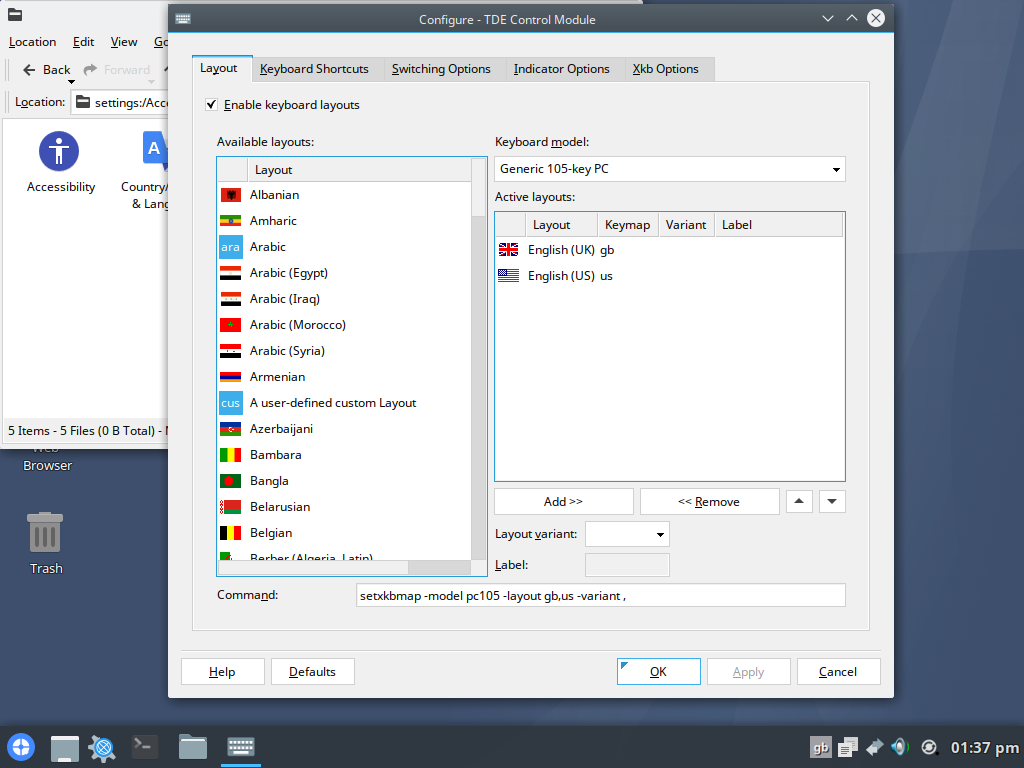
That's weird. It should show keyboard indicator, and when you click on the indicator you should be able to manually switch the layout.
What Q4OS version do you use, and what .iso did you download ?
Offline
#11 2026-08-09 22:53
- green-moomin
- Member
- Registered: 2026-08-05
- Posts: 18
Re: Default keyboard layout keeps reverting to GB
I updated the system and rebooted several times - my system now looks like your screenshot, except the keyboard keeps reverting to GB. I used the iso from the official Q4OS site.
System:
Host: mycomputer Kernel: 6.12.100+deb13-amd64 arch: x86_64 bits: 64
Desktop: TDE (Trinity) v: R14.1.5 Distro: Q4OS 6.8-deb13u1
Offline
#12 2026-08-10 08:22
- q4osteam
- Q4OS Team
- Registered: 2015-12-06
- Posts: 6,424
- Website
Re: Default keyboard layout keeps reverting to GB
Well, first reboot and log in.
- Do you see the "GB" keyboard layout indicator in the system tray?
Run `tdecmshell keyboard_layout` in a terminal. The keyboard layout settings window should open.
- Which language is in the first position, and which is in the second? A screenshot would be helpful.
If "GB" is in the first position, move "US" to the first position, then click Apply > OK
Don't reboot, open `tdecmshell keyboard_layout` again, and confirm whether the setting persists.
Then reboot, log in, repeat the same checks in complete as above, and post your findings.
Please follow the steps above as exact as possible. We will assess the results and suggest what to do next.
Offline
#13 2026-08-11 13:57
- green-moomin
- Member
- Registered: 2026-08-05
- Posts: 18
Re: Default keyboard layout keeps reverting to GB
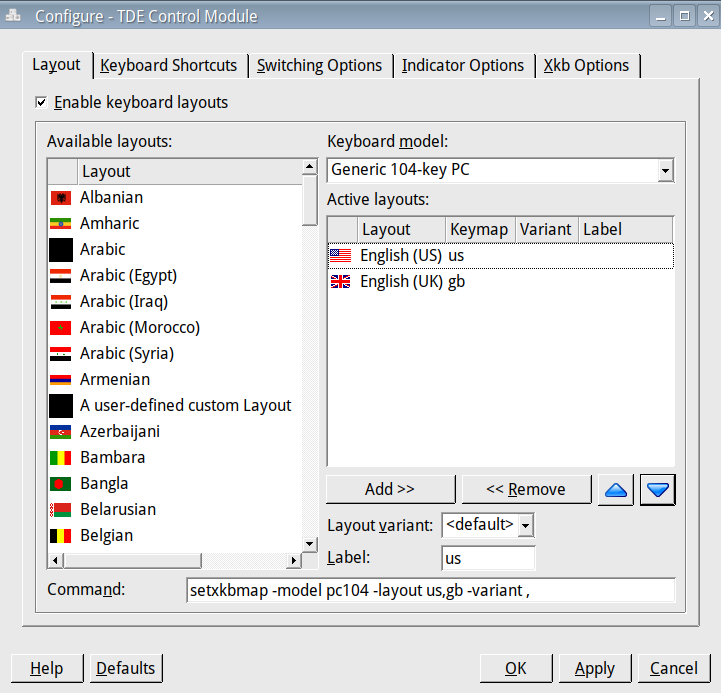
My keyboard layout settings look like your screenshot. The "us" option is above the "gb." When I re-open `tdecmshell keyboard_layout`, the setting persists. But the taskbar icon in the system tray is still "gb" and my US keyboard behaves like it is in GB layout.
When I reboot, log in, and repeat the same checks, the keyboard is still in GB layout. It only switches to US layout when I click the system tray icon (and then goes back to GB layout when I reboot again).
Offline
#14 2026-08-11 17:43
- q4osteam
- Q4OS Team
- Registered: 2015-12-06
- Posts: 6,424
- Website
Re: Default keyboard layout keeps reverting to GB
Please run in terminal and post the output:
$ cat /etc/X11/xorg.conf.d/00-keyboard.conf
Offline
#15 2026-08-11 19:59
- green-moomin
- Member
- Registered: 2026-08-05
- Posts: 18
Re: Default keyboard layout keeps reverting to GB
# Read and parsed by systemd-localed. It's probably wise not to edit this file
# manually too freely.
Section "InputClass"
Identifier "system-keyboard"
MatchIsKeyboard "on"
Option "XkbLayout" "gb"
Option "XkbVariant" ""
EndSection
Offline
#16 2026-08-11 20:31
- q4osteam
- Q4OS Team
- Registered: 2015-12-06
- Posts: 6,424
- Website
Re: Default keyboard layout keeps reverting to GB
Well, now try to disable this file:
$ cd /etc/X11/xorg.conf.d/
$ sudo mv 00-keyboard.conf .00-keyboard.conf.disabled
Reboot and post back
Offline
#17 2026-08-19 15:50
- green-moomin
- Member
- Registered: 2026-08-05
- Posts: 18
Re: Default keyboard layout keeps reverting to GB
Many thanks, it works now. The keyboard settings have not reverted in the last few days.
Offline
#18 2026-08-19 18:01
- q4osteam
- Q4OS Team
- Registered: 2015-12-06
- Posts: 6,424
- Website
Re: Default keyboard layout keeps reverting to GB
Thanks for the confirmation and detailed reporting, we will provide a fix on the next Q4OS media release.
Offline
#19 2026-09-16 16:51
- q4osteam
- Q4OS Team
- Registered: 2015-12-06
- Posts: 6,424
- Website
Re: Default keyboard layout keeps reverting to GB
This OP issue is now fixed within the new Q4OS 6.9 release https://www.q4os.org/forum/viewtopic.php?id=6273
Offline
- Registered users online in this topic: 0, guests: 1