You are not logged in.
- Topics: Active | Unanswered
Pages: 1
#1 2026-05-14 03:44
- ytrojan
- Member
- Registered: 2026-05-14
- Posts: 7
Desktop Profiler BLOCKED?! (Error Code 104)
I'm having some issues with setting up Q4OS on my old Inspiron 3847.
I couldn't get the Windows setup to connect to the Q4OS website. I had to download q4os6b-x64-loop.img.xz directly from SourceForge via Supermium (Basilisk on my Windows setup has the same issues as the Desktop Profiler) just to get it to work. But I did manage to get it working that way.
I have successfully connected to the internet in Q4OS, but now I can't profile my desktop because of a 104, likely for the same reason. Even the Minimal profile refuses to budge.
I have ruled out connectivity issues, as 1.1.1.1 loads absolutely fine. Everything else I've tested also works properly.
I suspect Cox is to blame. They might be DNS blocking the repository. I have similar issues with Debian's repository.
Any idea on how to get this thing set up? Even if I have to access the repository on my Windows setup like I did with the loop image?
Offline
#2 2026-05-18 11:44
- q4osteam
- Q4OS Team

- Registered: 2015-12-06
- Posts: 6,424
- Website
Re: Desktop Profiler BLOCKED?! (Error Code 104)
Welcome to the forum 
Please run commands in terminal:
$ wget -t2 http://www.q4os.org -O /tmp/test1
and post back the output
Offline
#3 2026-05-23 22:19
- ytrojan
- Member
- Registered: 2026-05-14
- Posts: 7
Re: Desktop Profiler BLOCKED?! (Error Code 104)
Just tested the wget 20 minutes ago, and I'm getting timeouts.
owner@debian:~$ wget -t2 http://www.q4os.org -O /tmp/test1
--2026-05-23 13:54:29-- http://www.q4os.org/
Resolving www.q4os.org (www.q4os.org)... 68.105.28.18
Connecting to www.q4os.org (www.q4os.org)|68.105.28.18|:80... failed: Connection timed out.
Retrying.--2026-05-23 13:56:44-- (try: 2) http://www.q4os.org/
Connecting to www.q4os.org (www.q4os.org)|68.105.28.18|:80... failed: Connection timed out.
Giving up.owner@debian:~$
I don't get timeouts when accessing the site on Windows (Supermium). 68.105.28.18 is a Cox IP. Is Cox DNS-blocking the repository? Or is something wrong on my end?
Offline
#4 2026-05-24 06:37
- bin
- Member

- From: U.K.
- Registered: 2016-01-28
- Posts: 1,608
Re: Desktop Profiler BLOCKED?! (Error Code 104)
I know that 'works for me' is no help but here in the UK the wget command works OK.
Running traceroute gives me
robin@flopsy:~$ traceroute q4os.org
traceroute to q4os.org (37.9.175.211), 30 hops max, 60 byte packets
 1  _gateway (192.168.50.1)  1.201 ms  4.175 ms  4.789 ms
 2  redbus-gw11.idnet.net (212.69.63.36)  11.270 ms  11.972 ms  11.964 ms
 3  redbus-gw7.idnet.net (212.69.63.138)  11.792 ms  11.761 ms  11.731 ms
 4  et-0-0-68-2.edge6.London15.Level3.net (212.187.166.185)  12.114 ms  12.957 ms  13.306 ms
 5  * * *
 6  COMSOURCE-S.ear1.Prague1.Level3.net (212.133.51.18)  36.853 ms  34.842 ms  32.004 ms
 7  * * *
 8  * * *
 9  * * *
10  185.87.13.247 (185.87.13.247)  46.762 ms  48.826 ms  50.352 ms
11  37.9.175.211 (37.9.175.211)  49.826 ms  39.411 ms  39.835 ms
So I can see that it goes off to my ISP, wanders around a bit a winds up at the right destination.
From the look of your message you don't get beyond first base.
Try running traceroute 68.105.28.18 and then traceroute q4os.org
Then change the DNS setting in network settings in Q4OS to 1.1.1.1 or 8.8.8.8 and repeat.
UPDATE:-
Sorry, re-reading your post I just realised that you are using the 'run in windows' thingy. I have no experience of this so what I said above may be complete rubbish. I guess it works as virtual machine in some way but hopefully the dev team can assist.
Last edited by bin (2026-05-24 06:49)
Offline
#5 2026-05-24 09:21
- q4osteam
- Q4OS Team
- Registered: 2015-12-06
- Posts: 6,424
- Website
Re: Desktop Profiler BLOCKED?! (Error Code 104)
Yes, please run commands above as suggested by @bin and post the complete output. What is your geo location ?
Offline
#6 2026-05-25 00:46
- ytrojan
- Member
- Registered: 2026-05-14
- Posts: 7
Re: Desktop Profiler BLOCKED?! (Error Code 104)
traceroute 68.105.28.18 worked fine at first.
traceroute to 68.105.28.18 (68.105.28.18), 30 hops max, 60 byte packets
1 _gateway (192.168.0.1) 10.968 ms 11.520 ms 11.515 ms
2 10.144.72.1 (10.144.72.1) 17.150 ms 24.978 ms 24.403 ms
3 100.120.111.174 (100.120.111.174) 24.967 ms 25.518 ms 25.513 ms
4 100.120.108.26 (100.120.108.26) 25.509 ms 25.496 ms 25.487 ms
5 nwstdsrj01-ae1.rd.lv.cox.net (68.1.0.85) 34.061 ms 34.054 ms 33.713 ms
6 100.118.199.9 (100.118.199.9) 33.388 ms 29.460 ms 29.067 ms
7 * * *
8 * * *
9 * * *
10 * * *
11 * * *
12 * xdns1.cox.net (68.105.28.18) 23.752 ms *
traceroute q4os.org, on the other hand...
traceroute to q4os.org (68.105.28.18), 30 hops max, 60 byte packets
1 _gateway (192.168.0.1) 1.604 ms 2.619 ms 2.874 ms
2 10.144.72.1 (10.144.72.1) 13.903 ms 21.947 ms 21.423 ms
3 100.120.111.174 (100.120.111.174) 22.693 ms 22.680 ms 23.008 ms
4 100.120.108.26 (100.120.108.26) 22.645 ms 22.620 ms 22.611 ms
5 nwstdsrj01-ae1.rd.lv.cox.net (68.1.0.85) 31.728 ms 31.718 ms 31.708 ms
6 100.118.199.9 (100.118.199.9) 31.691 ms 29.608 ms 28.713 ms
7 * * *
8 * * *
9 * * *
10 * * *
11 * * *
12 * * *
13 * * *
14 * * *
15 * * *
16 * * *
17 * * *
18 * * *
19 * * *
20 * * *
21 * * *
22 * * *
23 * * *
24 * * *
25 * * *
26 * * *
27 * * *
28 * * *
29 * * *
30 * * *
After messing around with my dns...
traceroute to q4os.org (68.105.28.18), 30 hops max, 60 byte packets
1 _gateway (192.168.0.1) 1.637 ms 1.907 ms 1.900 ms
2 10.144.72.1 (10.144.72.1) 10.838 ms 17.038 ms 17.386 ms
3 100.120.111.174 (100.120.111.174) 18.967 ms 18.959 ms 18.957 ms
4 100.120.108.26 (100.120.108.26) 18.942 ms 18.924 ms 18.926 ms
5 nwstdsrj01-ae1.rd.lv.cox.net (68.1.0.85) 26.694 ms 27.534 ms 27.528 ms
6 100.118.199.9 (100.118.199.9) 27.504 ms 25.167 ms 25.119 ms
7 * * *
8 * * *
9 * * *
10 * * *
11 * * *
12 * * *
13 * * *
14 * * *
15 * * *
16 * * *
17 * * *
18 * * *
19 * * *
20 * * *
21 * * *
22 * * *
23 * * *
24 * * *
25 * * *
26 * * *
27 * * *
28 * * ip68-105-28-18.at.at.cox.net (68.105.28.18) 33.457 ms
traceroute to 68.105.28.18 (68.105.28.18), 30 hops max, 60 byte packets
1 _gateway (192.168.0.1) 6.123 ms 6.753 ms 6.746 ms
2 10.144.72.1 (10.144.72.1) 15.152 ms 108.649 ms 110.976 ms
3 100.120.111.174 (100.120.111.174) 111.011 ms 111.009 ms 111.018 ms
4 100.120.108.26 (100.120.108.26) 111.000 ms 110.963 ms 110.975 ms
5 nwstdsrj01-ae1.rd.lv.cox.net (68.1.0.85) 111.000 ms 111.002 ms 110.984 ms
6 100.118.199.9 (100.118.199.9) 110.955 ms 104.253 ms 104.247 ms
7 * * *
8 * * *
9 * * *
10 * * *
11 * * *
12 * * *
13 * * *
14 * * *
15 * * *
16 * * *
17 * * *
18 * * *
19 * * *
20 * * *
21 * * *
22 * * *
23 * * *
24 * * *
25 * * *
26 * * *
27 * * *
28 * * *
29 * * *
30 * ip68-105-28-18.at.at.cox.net (68.105.28.18) 30.851 ms
...I noticed a pattern:
1 _gateway (192.168.0.1) 1.604 ms 2.619 ms 2.874 ms
2 10.144.72.1 (10.144.72.1) 13.903 ms 21.947 ms 21.423 ms
3 100.120.111.174 (100.120.111.174) 22.693 ms 22.680 ms 23.008 ms
4 100.120.108.26 (100.120.108.26) 22.645 ms 22.620 ms 22.611 ms
5 nwstdsrj01-ae1.rd.lv.cox.net (68.1.0.85) 31.728 ms 31.718 ms 31.708 ms
6 100.118.199.9 (100.118.199.9) 31.691 ms 29.608 ms 28.713 ms
7 * * *
8 * * *
9 * * *
10 * * *
11 * * *
12 * * *
13 * * *
14 * * *
15 * * *
16 * * *
17 * * *
18 * * *
19 * * *
20 * * *
21 * * *
22 * * *
23 * * *
24 * * *
25 * * *
26 * * *
27 * * *
28 * * *
29 * * *
30 * * *
It makes it to round 6 before running into a timeout.
I FINALLY made it beyond 6 by turning it to Auto (Address only)
traceroute to q4os.org (68.105.28.18), 30 hops max, 60 byte packets
1 _gateway (192.168.0.1) 4.114 ms 4.399 ms 4.386 ms
2 10.144.72.1 (10.144.72.1) 12.562 ms 19.225 ms 23.248 ms
3 100.120.111.174 (100.120.111.174) 23.243 ms 23.232 ms 23.221 ms
4 100.120.108.26 (100.120.108.26) 23.209 ms 23.198 ms 23.188 ms
5 nwstdsrj01-ae1.rd.lv.cox.net (68.1.0.85) 27.837 ms 27.829 ms 27.421 ms
6 100.118.199.9 (100.118.199.9) 27.797 ms 23.349 ms 23.325 ms
7 * * *
8 * * *
9 * * *
10 * * *
11 * * *
12 * * *
13 * * *
14 * * *
15 * * *
16 * * *
17 * * *
18 * * *
19 * * *
20 * * *
21 * * *
22 ip68-105-28-18.at.at.cox.net (68.105.28.18) 38.158 ms
I ran the desktop profiler again, and I got the same 104 issue, even using the alternative DNS services.
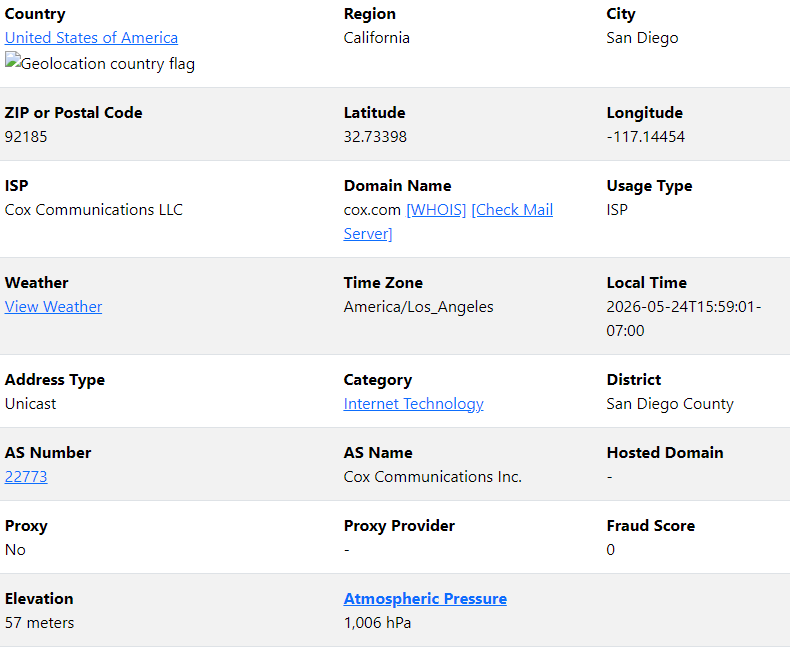
My geolocation is in the attached PNG.
Offline
#7 2026-05-25 08:45
- q4osteam
- Q4OS Team
- Registered: 2015-12-06
- Posts: 6,424
- Website
Re: Desktop Profiler BLOCKED?! (Error Code 104)
Resolving www.q4os.org (www.q4os.org)... 68.105.28.18
traceroute to q4os.org (68.105.28.18), 30 hops max, 60 byte packets
These lines are suspicious. "68.105.28.18" is not IPV4 address of Q4OS server, it should be "37.9.175.211".
First please run command in terminal:
$ nslookup q4os.org
Then boot Q4OS live media https://www.q4os.org/downloads1.html , do not make network configuration tweaks and run the same command:
$ nslookup q4os.org
Post back the results.
Offline
#8 2026-05-26 04:11
- ytrojan
- Member
- Registered: 2026-05-14
- Posts: 7
Re: Desktop Profiler BLOCKED?! (Error Code 104)
I tried it, and it does not give the Q4OS IP.
nslookup q4os.org
Server: 1.1.1.1
Address: 1.1.1.1#53Non-authoritative answer:
Name: q4os.org
Address: 68.105.28.18
As I don't have physical access to live media at the moment, I can't test it on hardware. But traceroute to the real IP works.
traceroute to 37.9.175.211 (37.9.175.211), 30 hops max, 60 byte packets
1 _gateway (192.168.0.1) 12.818 ms 12.789 ms 12.776 ms
2 10.144.72.1 (10.144.72.1) 19.978 ms 27.762 ms 27.758 ms
3 100.120.111.172 (100.120.111.172) 29.864 ms 29.856 ms 29.848 ms
4 100.120.108.24 (100.120.108.24) 29.827 ms 29.820 ms 29.793 ms
5 sdo-b1-link.ip.twelve99.net (62.115.48.24) 29.811 ms 29.806 ms 29.793 ms
6 sdo-b3-link.ip.twelve99.net (62.115.142.164) 31.678 ms 17.734 ms 20.316 ms
7 lax-bb2-link.ip.twelve99.net (62.115.138.214) 28.260 ms 18.478 ms 23.019 ms
8 dls-b23-link.ip.twelve99.net (62.115.140.247) 179.930 ms 171.055 ms lax-b22-link.ip.twelve99.net (62.115.140.157) 166.886 ms
9 atl-b24-link.ip.twelve99.net (62.115.140.32) 180.692 ms ash-bb2-link.ip.twelve99.net (62.115.137.38) 68.059 ms atl-b24-link.ip.twelve99.net (62.115.116.213) 179.207 ms
10 prs-bb2-link.ip.twelve99.net (62.115.140.106) 164.734 ms 165.666 ms atl-bb2-link.ip.twelve99.net (62.115.143.236) 181.063 ms
11 ffm-bb2-link.ip.twelve99.net (62.115.122.139) 170.519 ms ash-bb2-link.ip.twelve99.net (62.115.137.132) 76.856 ms ffm-bb2-link.ip.twelve99.net (62.115.122.139) 174.234 ms
12 prs-bb2-link.ip.twelve99.net (62.115.140.106) 170.318 ms prag-b4-link.ip.twelve99.net (62.115.124.29) 185.127 ms *
13 comsource-ic-364711.ip.twelve99-cust.net (62.115.52.199) 181.237 ms 173.688 ms 181.572 ms
14 prag-b4-link.ip.twelve99.net (62.115.124.29) 176.489 ms * 182.880 ms
15 comsource-ic-364711.ip.twelve99-cust.net (62.115.52.199) 181.038 ms 185.138.110.39 (185.138.110.39) 183.152 ms comsource-ic-364711.ip.twelve99-cust.net (62.115.52.199) 181.369 ms
16 185.138.110.35 (185.138.110.35) 182.103 ms 182.414 ms 185.87.13.245 (185.87.13.245) 183.532 ms
17 37.9.175.211 (37.9.175.211) 186.494 ms 185.852 ms 185.138.110.39 (185.138.110.39) 177.796 ms
I'll see if I can test it on a temporary VM, and report it back to you in the next few days.
Offline
#9 2026-05-26 10:38
- q4osteam
- Q4OS Team
- Registered: 2015-12-06
- Posts: 6,424
- Website
Re: Desktop Profiler BLOCKED?! (Error Code 104)
I'll see if I can test it on a temporary VM, and report it back to you in the next few days.
Well, we need to distinguish whether the issue is specific to the Q4OS for Windows setup, or to your Internet service provider or network.
Offline
#10 2026-05-27 05:51
- ytrojan
- Member
- Registered: 2026-05-14
- Posts: 7
Re: Desktop Profiler BLOCKED?! (Error Code 104)
Tried it in VirtualBox, same result.
nslookup q4os.org
Server: 68.105.28.18
Address: 68.105.28.18#53Non-authoritative answer:
Name: q4os.org
Address: 68.105.28.18
Offline
#11 2026-05-27 06:50
- bin
- Member
- From: U.K.
- Registered: 2016-01-28
- Posts: 1,608
Re: Desktop Profiler BLOCKED?! (Error Code 104)
Just a thought.
Please could you try:-
nslookup bbc.co.uk
I think it will come back to the same 68..... address
My guess is that you are using a Cox Panorama Wifi Gateway.
From what I can see these lock out any user change of DNS on the router so you are stuck with changing on your OS internet connection.
Since you can traceroute the IP address OK it must be DNS
I wonder if you are being affected by the somewhat unfriendly stance on restricting access to some European services.
SInce you can access the Q4OS web site that would seem unlikely.
However you might want to try this suggestion revealed by a bit of searching on this topic.
"Cox Panoramic routers include a feature that aggressively blocks foreign or unrecognized sites by mistaking them for malware or security threats.
Open a web browser and navigate to the Cox My Account portal or open the Cox Panoramic Wifi app.
Log in, go to the Internet or Wifi settings section, and locate Advanced Security.
Toggle the feature OFF."
See if it makes a difference but clearly it is your choice as to whether you do this or not.
Offline
#12 2026-05-28 00:21
- ytrojan
- Member
- Registered: 2026-05-14
- Posts: 7
Re: Desktop Profiler BLOCKED?! (Error Code 104)
Just tested BBC in my VM, and it spat this out.
nslookup q4os.org
Server: 68.105.28.18
Address: 68.105.28.18#53Non-authoritative answer:
Name: bbc.co.uk
Address: 68.105.28.18]
Just for kicks and giggles, I tried a few other sites that worked fine (Gamestop, EB Games Canada, the Mexican Government, and even FRANCE TV), and one that didn't (NHK gives me a "No Answer" thing). I think it's Anglophobia on behalf of Cox.
For the record, I don't own my internet router; my landlord does. I can't access the "Internet or Wifi" settings because I don't own my router.
I'm thinking about modding my /etc/hosts file in order to work around the issue. Should I try that?
Offline
#13 2026-05-28 06:50
- bin
- Member
- From: U.K.
- Registered: 2016-01-28
- Posts: 1,608
Re: Desktop Profiler BLOCKED?! (Error Code 104)
Just tested BBC in my VM, and it spat this out.
nslookup q4os.org
Server: 68.105.28.18
Address: 68.105.28.18#53Non-authoritative answer:
Name: bbc.co.uk
Address: 68.105.28.18]Just for kicks and giggles, I tried a few other sites that worked fine (Gamestop, EB Games Canada, the Mexican Government, and even FRANCE TV), and one that didn't (NHK gives me a "No Answer" thing). I think it's Anglophobia on behalf of Cox.
For the record, I don't own my internet router; my landlord does. I can't access the "Internet or Wifi" settings because I don't own my router.
I'm thinking about modding my /etc/hosts file in order to work around the issue. Should I try that?
There's not much you can do there I'm afraid. The issue is how you access DNS and that is locked down to the router which is your gateway.
Presumably Cox is the only service you can access?
Might be worth trying a VPN.
Offline
#14 2026-05-29 00:04
- ytrojan
- Member
- Registered: 2026-05-14
- Posts: 7
Re: Desktop Profiler BLOCKED?! (Error Code 104)
ytrojan wrote:Just tested BBC in my VM, and it spat this out.
nslookup q4os.org
Server: 68.105.28.18
Address: 68.105.28.18#53Non-authoritative answer:
Name: bbc.co.uk
Address: 68.105.28.18]Just for kicks and giggles, I tried a few other sites that worked fine (Gamestop, EB Games Canada, the Mexican Government, and even FRANCE TV), and one that didn't (NHK gives me a "No Answer" thing). I think it's Anglophobia on behalf of Cox.
For the record, I don't own my internet router; my landlord does. I can't access the "Internet or Wifi" settings because I don't own my router.
I'm thinking about modding my /etc/hosts file in order to work around the issue. Should I try that?
There's not much you can do there I'm afraid. The issue is how you access DNS and that is locked down to the router which is your gateway.
Presumably Cox is the only service you can access?
Might be worth trying a VPN.
Yes, Cox is the only service I can access.
I have a burning hatred for subscriptions, which is why I don't usually use VPN.
I suppose a free VPN might be good enough for setting up Q4OS, right?
Offline
#15 2026-05-29 06:37
- bin
- Member
- From: U.K.
- Registered: 2016-01-28
- Posts: 1,608
Re: Desktop Profiler BLOCKED?! (Error Code 104)
I have absolutely no experience whatsoever of VPNs.
It may help to open a new support thread to see what other members recommend
If that does work and if I read the situation correctly, you'll not only need one to set it up you'll also need one every time you try to check for updates or install any packages...
Offline
Pages: 1
- Registered users online in this topic: 0, guests: 1