You are not logged in.
- Topics: Active | Unanswered
Pages: 1
#1 2026-03-04 14:45
- Digidoc
- Member

- Registered: 2025-03-15
- Posts: 78
error in gparted
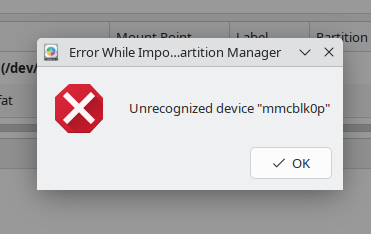
I have a laptop with a tf card slot. I have a 128gb card formatted as exfat I use with windows and q4os. When attempting to format, I get an error (screen shot is attached). This error does not occur with Mint or Windows, only Q4OS. It is nothing serious, but puts me off from recommending Q4OS to others. Thoughts? Solutions?
Thanks.
Offline
#2 2026-03-04 14:56
- q4osteam
- Q4OS Team

- Registered: 2015-12-06
- Posts: 6,430
- Website
Re: error in gparted
Try to install additional packages:
$ sudo apt install exfat-fuse exfatprogs
and post back the result
Offline
#3 2026-03-04 15:15
- Digidoc
- Member
- Registered: 2025-03-15
- Posts: 78
Re: error in gparted
Yes. I get a message about already having the newest version for exfat.
Offline
#4 2026-03-04 15:18
- q4osteam
- Q4OS Team
- Registered: 2015-12-06
- Posts: 6,430
- Website
Re: error in gparted
Do you have both packages "exfat-fuse" and "exfatprogs" installed ?
Offline
#5 2026-03-04 15:42
- Digidoc
- Member
- Registered: 2025-03-15
- Posts: 78
Re: error in gparted
yes to both. I rerun each install, and continue to get the error.
Offline
#6 2026-03-04 15:46
- q4osteam
- Q4OS Team
- Registered: 2015-12-06
- Posts: 6,430
- Website
Re: error in gparted
Well.Run in terminal when SD card is in the slot.
$ lsblk -f
$ sudo fdisk -l /dev/mmcblk0
$ sudo blkid /dev/mmcblk0
and post the output.
Offline
#7 2026-03-04 16:05
- Digidoc
- Member
- Registered: 2025-03-15
- Posts: 78
Re: error in gparted
i have another tf card about 50gb which formats fine with no errors. Let me switch to AC power, and i will continue to collect the images.
Offline
#8 2026-03-04 16:39
- Digidoc
- Member
- Registered: 2025-03-15
- Posts: 78
Re: error in gparted
I have 1 screen capture attached. I do not know how to do all 3 at once.
I went back and started over.
Gparted.
Device - Create new partition table:
GPT and a new exfat partition leaves 1mb unallocated.
MSDOS and a single exfat uses the entire drive.
Both options now work and the format completes without getting errors.
Did your earlier commands fix the problem?
-------
EDIT:
The actual device was not mmcblk0 but actually mmcblk0p1 The error was something to do with Gparted!
-------
BTW, this laptop has a touch screen. The forum text was so small I was struggling to see and edit my posts. I found (by accident) I could pinch and zoom the screen and now it works -great-. I also found (online) the details of capturing screen shots so errors can be viewed (and sometimes reported).
Thank you. Problem now solved!

Last edited by Digidoc (2026-03-04 17:34)
Offline
Pages: 1
- Registered users online in this topic: 0, guests: 1