You are not logged in.
- Topics: Active | Unanswered
Pages: 1
#1 2026-01-05 15:25
- Digidoc
- Member

- Registered: 2025-03-15
- Posts: 78
Reconnect Wi-Fi
I am running 32 bit Trinity on an old Lenovo laptop (4gb, 150gb, pentium dual). I was trying to get wifi working and found I needed to make a connection first. I ran: sudo rfkill and it shows:
ID TYPE DEVICE SOFT HARD
0 bluetooth tpacpi_bluetooth_sw blocked unblocked
1 wlan phy0 unblocked unblocked
It connects and works fine. My question is minor. Is there a way to make it reconnect automatically?
Last edited by Digidoc (2026-01-06 19:15)
Offline
#2 2026-01-05 17:45
- theasmitkid
- Member
- From: NCT of Delhi
- Registered: 2025-01-26
- Posts: 357
Re: Reconnect Wi-Fi
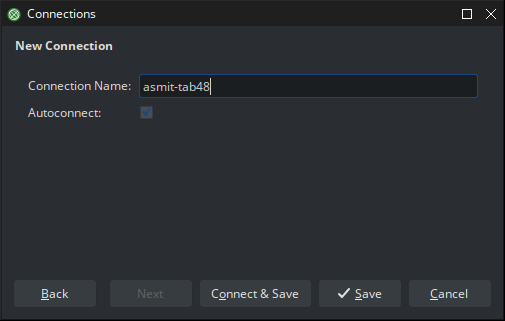
Right click on tdenetworkmanager applet, click edit connection, choose your connection, next next, check "Autoconnect to this network", save and connct
Last edited by theasmitkid (2026-01-05 17:45)
Coding & Robotics Enthusiast | Windows 7 x86 @ n2600 · 2GB · 320GB HDD (No graphics acceleration available in linux)
Offline
#3 2026-01-06 05:42
- Digidoc
- Member
- Registered: 2025-03-15
- Posts: 78
Re: Reconnect Wi-Fi
I cannot seem to find this option. Not on the older 32 big version. Your quote mentions Asus-E202SA and that seems to be a 64 bit processor?
Offline
#4 2026-01-06 09:48
- q4osteam
- Q4OS Team

- Registered: 2015-12-06
- Posts: 6,425
- Website
Re: Reconnect Wi-Fi
Right click on tdenetworkmanager applet
System tray > network icon
Offline
#5 2026-01-06 10:58
- theasmitkid
- Member
- From: NCT of Delhi
- Registered: 2025-01-26
- Posts: 357
Re: Reconnect Wi-Fi
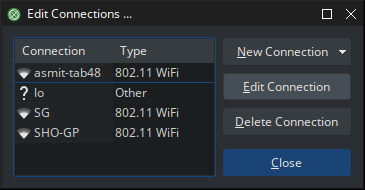
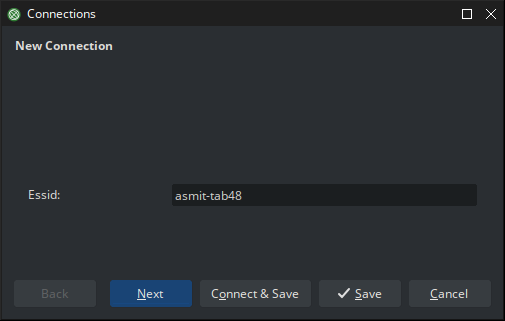
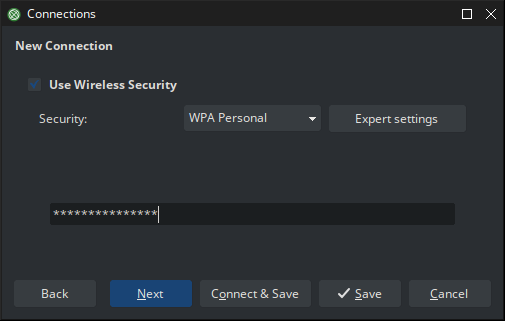
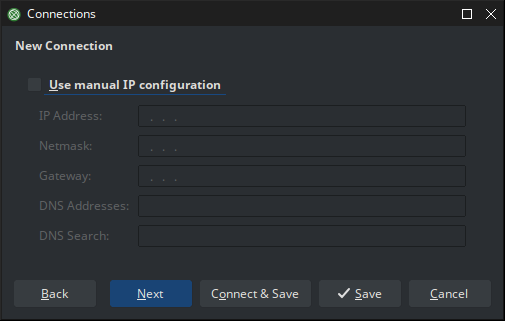
Coding & Robotics Enthusiast | Windows 7 x86 @ n2600 · 2GB · 320GB HDD (No graphics acceleration available in linux)
Offline
#6 2026-01-06 17:59
- Digidoc
- Member
- Registered: 2025-03-15
- Posts: 78
Re: Reconnect Wi-Fi
I am with you until your final screen. It appears the 32 bit edition -does not have- the autoconnect button. Is this something left out?
Offline
#7 2026-01-06 18:23
- q4osteam
- Q4OS Team
- Registered: 2015-12-06
- Posts: 6,425
- Website
Re: Reconnect Wi-Fi
@Digidoc
What Q4OS version are you using ?
$ get-q4os-version
$ uname -a
Offline
Pages: 1
- Registered users online in this topic: 0, guests: 1