You are not logged in.
- Topics: Active | Unanswered
#1 2026-05-20 17:34
- newolc
- Member
- Registered: 2026-05-13
- Posts: 3
Kolourpaint on Q4os doesn't support anti-aliasing.
I tried to post to the bug report forum, but cannot, therefore I'm opting to post the issue here instead.
I don't know if the issue comes from Trinity or Q4os, but nearly all the tools under KolourPaint are aliased, and there is no option to make them anti-aliased while that is, according to Google, a feature of KolourPaint. The only exception is the text tool, it's the only tool that doesn't have this problem.
If it wasn't for this problem, KolourPaint would have been a competent drawing tool as it is also lightweight, but I had to install Gimp which uses significantly more ram, about 1 gb, on a 8 gb ram stick, just to draw. That's a lot and it defeats the purpose of running Q4os on a less performant machine.
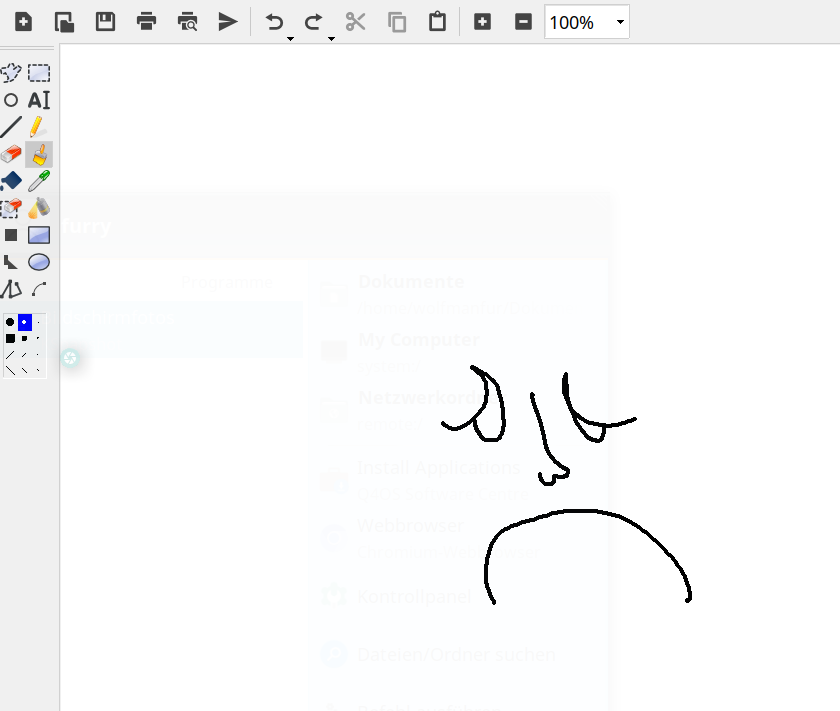
Last edited by newolc (2026-05-20 17:35)
Offline
#2 2026-11-10 05:24
- Qwertius
- Member

- Registered: 2017-10-24
- Posts: 81
Re: Kolourpaint on Q4os doesn't support anti-aliasing.
Hello Newolc
I use Kolourpaint on a daily basis - preferring it over other tools.
In KolourPaint, "Draw Anti-Aliased" is not a global canvas engine toggle; it only controls specific geometric rendering algorithms.
Tools affected by the setting
Line and Connected Lines
Curve (Bezier curves)
Ellipse / Circle
Polygon and Rounded Rectangle
Tools unaffected (Always Pixelated/Aliased)
Brush / Pen: Renders discrete bitmap stamps along the mouse path without sub-pixel edge blending.
Eraser: Hard-pixel clearing only.
Color Flood / Paint Bucket: Fill operations operate strictly on pixel boundaries.
If you draw diagonal lines using the Line or Curve tool with that option checked, you will see gray sub-pixel blending along the edges.
However, freehand drawing with the Brush or Pen remains strictly aliased pixel art by design in KolourPaint's code base.
Last edited by Qwertius (2026-11-10 05:32)
Offline
- Registered users online in this topic: 0, guests: 1