You are not logged in.
- Topics: Active | Unanswered
Pages: 1
#1 2026-10-05 23:02
- peixe80
- Member
- Registered: 2026-09-25
- Posts: 14
Order TDE menus
Is it possible to alphabetically order the entries of the TDE menus (Trinity Classic style)? I've been looking at "Edit Menu" and the Internet, but I can't find anything. I know I can do it manually, but it's tedious...
Thank you!
Last edited by peixe80 (2026-10-05 23:03)
Offline
#2 2026-10-06 07:18
- Taige
- Banned

- Registered: 2025-08-19
- Posts: 105
Re: Order TDE menus
You can automatically sort Tde (Trinity Classic style) menu items alphabetically using the native menu editor kmenuedit without having to manually move each item:
- 1. Right-click on the start menu button and select Edit Menu or launch the kmenuedit command from the terminal;
- 2. In the left column of the editor, select the root folder of the category you want to reorder or the main menu tree for a global reorder;
- 3. Go to the top menu bar and select Edit > Sort;
- 4. Now you need to choose whether to sort the items by Name or Description or you can use the Sort button directly in the KMenuEdit toolbar;
- 5. Click on File > Save to apply and update your system configuration;
Offline
#3 2026-10-06 23:51
- peixe80
- Member
- Registered: 2026-09-25
- Posts: 14
Re: Order TDE menus
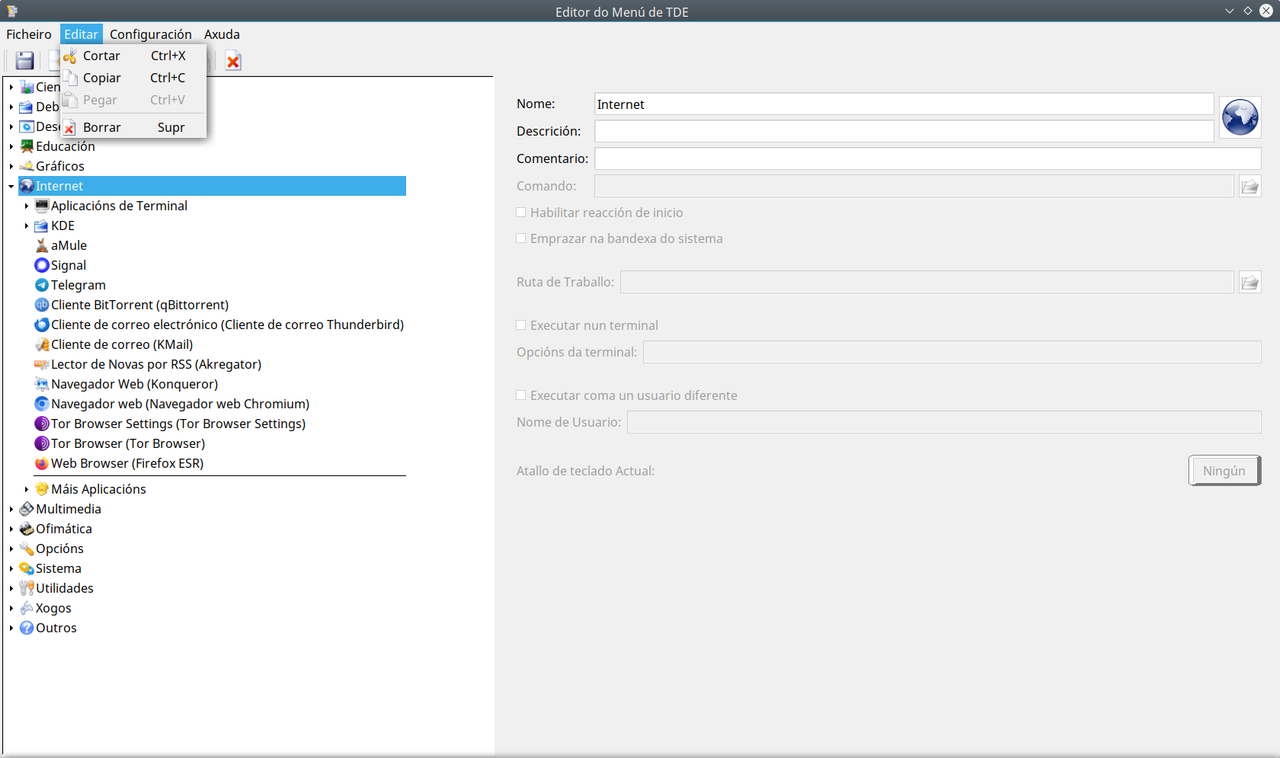
Thank you @Taige but I don't get the "Sort" option inside the "Edit" menu:
Offline
#4 2026-10-07 07:02
- Taige
- Banned
- Registered: 2025-08-19
- Posts: 105
Re: Order TDE menus
Thank you @Taige but I don't get the "Sort" option inside the "Edit" menu:
I think this missing option happens because tde is a fork of kde 3.
If the Sort option is not present in the Edit menu, instead of looking in the dropdown menus, look closely at the horizontal icon toolbar near the top of the tdemenuedit/kmenuedit window:
- 1. Click on the folder category you want to organize on the left panel;
- 2. Look at the icons on the top toolbar, it's next to Save, Cut, Copy, look for a button that shows an arrow pointing down next to letters or a list icon (the Sort button);
- 3. Clicking it should trigger the alphabetical sort function for that active directory;
or
- 1. Open the Menu Editor;
- 2. Go to the left panel where all the folders (Internet, Multimedia, etc.) are listed;
- 3. Right-click directly on the category folder you want to sort;
- 4. Check if Sort or Sort Alphabetically appears in that specific pop-up context menu;
or
change the Menu Settings, it depend on which exact panel applet menu style you use (Kicker, Kickoff or the TDE Classic Menu). You might be able to force automatic sorting straight from your desktop panel without altering the raw files:
- 1. Right-click on your taskbar panel and choose Configure Panel;
- 2. Go to Menu or Application Launcher settings;
- 3. Look for a checkbox that says "Sort applications alphabetically" or "Show entries in alphabetical order". Checking this overrides manual ordering globally;
Let me know if any of these methods work.
Offline
#5 2026-10-07 10:06
- peixe80
- Member
- Registered: 2026-09-25
- Posts: 14
Re: Order TDE menus
- 1. Click on the folder category you want to organize on the left panel;
- 2. Look at the icons on the top toolbar, it's next to Save, Cut, Copy, look for a button that shows an arrow pointing down next to letters or a list icon (the Sort button);
- 3. Clicking it should trigger the alphabetical sort function for that active directory
The "Sort" option doesn't exist in the horizontal icon toolbar:

- 1. Open the Menu Editor;
- 2. Go to the left panel where all the folders (Internet, Multimedia, etc.) are listed;
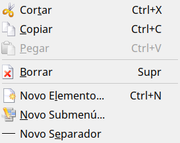
- 3. Right-click directly on the category folder you want to sort;
- 4. Check if Sort or Sort Alphabetically appears in that specific pop-up context menu
The "Sort" option doesn't exist in the context menu:
- 1. Right-click on your taskbar panel and choose Configure Panel;
- 2. Go to Menu or Application Launcher settings;
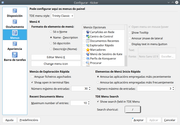
- 3. Look for a checkbox that says "Sort applications alphabetically" or "Show entries in alphabetical order". Checking this overrides manual ordering globally
That checkbox doesn't exist in the Menu settings:
Thank you!
Offline
#6 2026-10-07 10:44
- Taige
- Banned
- Registered: 2025-08-19
- Posts: 105
Re: Order TDE menus
Taige wrote:- 1. Click on the folder category you want to organize on the left panel;
- 2. Look at the icons on the top toolbar, it's next to Save, Cut, Copy, look for a button that shows an arrow pointing down next to letters or a list icon (the Sort button);
- 3. Clicking it should trigger the alphabetical sort function for that active directoryThe "Sort" option doesn't exist in the horizontal icon toolbar:
Taige wrote:- 1. Open the Menu Editor;
- 2. Go to the left panel where all the folders (Internet, Multimedia, etc.) are listed;
- 3. Right-click directly on the category folder you want to sort;
- 4. Check if Sort or Sort Alphabetically appears in that specific pop-up context menuThe "Sort" option doesn't exist in the context menu:
Taige wrote:- 1. Right-click on your taskbar panel and choose Configure Panel;
- 2. Go to Menu or Application Launcher settings;
- 3. Look for a checkbox that says "Sort applications alphabetically" or "Show entries in alphabetical order". Checking this overrides manual ordering globallyThat checkbox doesn't exist in the Menu settings:
Thank you!
I sincerely apologize for making you make another empty attempt. It seems that doing it manually is excluded, the only real way to get the automatic alphabetical sorting without going crazy is to try to do it via terminal, editing the file where Trinity stores the order of the menu:
- 1. Open the Terminal (Konsole);
- 2. To be safe, make a backup copy of your menu file with this command:
cp ~/.config/menus/applications-tdemenuedit.menu ~/.config/menus/applications-tdemenuedit.menu.bak
- 3. Now open the file with a text editor (KWrite or Nano):
kwrite ~/.config/menus/applications-tdemenuedit.menu
- 4. Look for the starting line (usually just below Applications);
- 5. Right below, paste this line: <DefaultLayout inline="false" sort_order="name"/>
- 6. Save the file and close the editor;
To make the changes effective, reload the Trinity panel by typing in the terminal: dcop kicker panel restart
If the dcop command doesn't work, simply log out and restart your desktop session.
I hope this time it can work.
Offline
#7 2026-10-07 13:24
- peixe80
- Member
- Registered: 2026-09-25
- Posts: 14
Re: Order TDE menus
The "applications-tdemenuedit.menu" file isn't in "~/.config/menus/", but in "~/.configtde/menus/".
This is the content of "~/.configtde/menus/applications-tdemenuedit.menu":
<!DOCTYPE Menu PUBLIC "-//freedesktop//DTD Menu 1.0//EN" "http://www.freedesktop.org/standards/me … 0/menu.dtd">
<Menu>
<Menu>
<Name>Multimedia</Name>
<Menu>
<Name>KDE</Name>
<Exclude>
<Filename>cantata.desktop</Filename>
</Exclude>
<Deleted/>
</Menu>
<Include>
<Filename>cantata.desktop</Filename>
<Filename>tde-k3b.desktop</Filename>
<Filename>tde-kmix.desktop</Filename>
<Filename>mpv.desktop</Filename>
<Filename>tde-amarok.desktop</Filename>
<Filename>freetube.desktop</Filename>
<Filename>vlc.desktop</Filename>
</Include>
<Exclude/>
<Layout>
<Merge type="files" />
<Filename>tde-amarok.desktop</Filename>
<Filename>cantata.desktop</Filename>
<Filename>gpodder.desktop</Filename>
<Filename>freetube.desktop</Filename>
<Filename>tde-k3b.desktop</Filename>
<Filename>tde-kmix.desktop</Filename>
<Filename>tde-krec.desktop</Filename>
<Filename>mpv.desktop</Filename>
<Filename>smplayer.desktop</Filename>
<Filename>vlc.desktop</Filename>
<Merge type="menus" />
<Menuname>More</Menuname>
</Layout>
</Menu>
<Menu>
<Name>Games</Name>
<Menu>
<Name>Arcade</Name>
<Layout/>
<Exclude>
<Filename>tde-kbounce.desktop</Filename>
</Exclude>
</Menu>
<Menu>
<Name>Logic Games</Name>
<Layout/>
<Exclude>
<Filename>tde-kmines.desktop</Filename>
</Exclude>
</Menu>
<Menu>
<Name>Card</Name>
<Layout/>
<Exclude>
<Filename>sol.desktop</Filename>
</Exclude>
</Menu>
<Include>
<Filename>tde-kbounce.desktop</Filename>
<Filename>tde-kmines.desktop</Filename>
<Filename>sol.desktop</Filename>
<Filename>org.kde.kpat.desktop</Filename>
</Include>
<Layout>
<Merge type="files" />
<Filename>tde-kbounce.desktop</Filename>
<Filename>tde-kmines.desktop</Filename>
<Filename>org.kde.kpat.desktop</Filename>
<Merge type="menus" />
<Menuname>Arcade</Menuname>
<Menuname>KDE</Menuname>
<Menuname>Logic Games</Menuname>
<Menuname>TacticStrategy</Menuname>
<Menuname>Card</Menuname>
<Menuname>Board</Menuname>
<Menuname>Kidsgames</Menuname>
</Layout>
<Menu>
<Name>KDE</Name>
<Menu>
<Name>Card</Name>
<Layout/>
<Exclude>
<Filename>org.kde.kpat.desktop</Filename>
</Exclude>
</Menu>
</Menu>
<Exclude/>
</Menu>
<Menu>
<Name>Internet</Name>
<Exclude>
<Filename>freetube.desktop</Filename>
<Filename>gpodder.desktop</Filename>
</Exclude>
<Layout>
<Merge type="menus" />
<Menuname>Terminal</Menuname>
<Menuname>KDE</Menuname>
<Merge type="files" />
<Filename>amule.desktop</Filename>
<Filename>signal-desktop.desktop</Filename>
<Filename>org.telegram.desktop._624e7959161bf64fe6052fda2c3eb232.desktop</Filename>
<Filename>org.qbittorrent.qBittorrent.desktop</Filename>
<Filename>thunderbird.desktop</Filename>
<Filename>tde-KMail.desktop</Filename>
<Filename>tde-akregator.desktop</Filename>
<Filename>tde-konqbrowser.desktop</Filename>
<Filename>chromium.desktop</Filename>
<Filename>torbrowser-settings.desktop</Filename>
<Filename>torbrowser.desktop</Filename>
<Filename>firefox-esr.desktop</Filename>
<Separator/>
<Menuname>More</Menuname>
</Layout>
</Menu>
<Menu>
<Name>Science</Name>
<Layout/>
<Exclude>
<Filename>libreoffice-math.desktop</Filename>
</Exclude>
</Menu>
<Menu>
<Name>.hidden</Name>
<Include>
<Filename>libreoffice-math.desktop</Filename>
<Filename>libreoffice-draw.desktop</Filename>
<Filename>gpodder.desktop</Filename>
</Include>
</Menu>
<Menu>
<Name>Utilities</Name>
<Menu>
<Name>Accessibility</Name>
<Layout/>
<Exclude>
<Filename>tde-kmag.desktop</Filename>
</Exclude>
</Menu>
<Menu>
<Name>Editors</Name>
<Layout/>
<Exclude>
<Filename>tde-kate.desktop</Filename>
<Filename>tde-kwrite.desktop</Filename>
</Exclude>
</Menu>
<Menu>
<Name>Desktop</Name>
<Layout/>
<Exclude>
<Filename>tde-klipper.desktop</Filename>
<Filename>tde-knotes.desktop</Filename>
<Filename>tde-kpager.desktop</Filename>
<Filename>tde-kcalc.desktop</Filename>
</Exclude>
</Menu>
<Menu>
<Name>File</Name>
<Layout/>
<Exclude>
<Filename>tde-ark.desktop</Filename>
<Filename>tde-fsview.desktop</Filename>
</Exclude>
</Menu>
<Menu>
<Name>Peripherals</Name>
<Layout/>
<Exclude>
<Filename>tde-kjobviewer.desktop</Filename>
</Exclude>
</Menu>
<Include>
<Filename>tde-kmag.desktop</Filename>
<Filename>tde-kwrite.desktop</Filename>
<Filename>tde-kate.desktop</Filename>
<Filename>tde-klipper.desktop</Filename>
<Filename>tde-knotes.desktop</Filename>
<Filename>tde-kpager.desktop</Filename>
<Filename>tde-kcalc.desktop</Filename>
<Filename>tde-ark.desktop</Filename>
<Filename>tde-fsview.desktop</Filename>
<Filename>tde-kjobviewer.desktop</Filename>
<Filename>q4os-imager.desktop</Filename>
<Filename>tde-KCharSelect.desktop</Filename>
</Include>
<Exclude/>
<Layout>
<Merge type="files" />
<Filename>tde-ark.desktop</Filename>
<Filename>tde-fsview.desktop</Filename>
<Filename>q4os-imager.desktop</Filename>
<Filename>tde-kate.desktop</Filename>
<Filename>tde-kcalc.desktop</Filename>
<Filename>tde-KCharSelect.desktop</Filename>
<Filename>tde-kjobviewer.desktop</Filename>
<Filename>tde-klipper.desktop</Filename>
<Filename>tde-kmag.desktop</Filename>
<Filename>tde-knotes.desktop</Filename>
<Filename>tde-kpager.desktop</Filename>
<Filename>tde-kwrite.desktop</Filename>
<Merge type="menus" />
<Menuname>Accessibility</Menuname>
<Menuname>Editors</Menuname>
<Menuname>Toys</Menuname>
<Menuname>Desktop</Menuname>
<Menuname>File</Menuname>
<Menuname>KDE</Menuname>
<Menuname>Peripherals</Menuname>
<Menuname>Personal Information Management</Menuname>
<Menuname>XUtilities</Menuname>
<Menuname>More</Menuname>
</Layout>
</Menu>
<Menu>
<Name>Settingsmenu</Name>
<Layout>
<Merge type="menus" />
<Menuname>KDE</Menuname>
<Merge type="files" />
<Filename>tde-audiocd.desktop</Filename>
<Filename>tde-kamera.desktop</Filename>
<Filename>gufw.desktop</Filename>
<Filename>lookswitcher-trinity_q4app.desktop</Filename>
<Filename>tde-libkcddb.desktop</Filename>
<Filename>tde-tdewalletmanager.desktop</Filename>
<Filename>system-config-printer.desktop</Filename>
</Layout>
<Exclude>
<Filename>tde-KControl.desktop</Filename>
</Exclude>
</Menu>
<Menu>
<Name>System</Name>
<Menu>
<Name>SuperUser</Name>
<Layout>
<Merge type="files" />
<Filename>tde-konsolesu.desktop</Filename>
<Filename>tde-konquerorsu.desktop</Filename>
<Filename>tde-krusader_root-mode.desktop</Filename>
</Layout>
<Include/>
<Exclude>
<Filename>tde-KControl.desktop</Filename>
</Exclude>
</Menu>
<Include>
<Filename>tde-kdcop.desktop</Filename>
<Filename>tde-tdepowersave.desktop</Filename>
<Filename>gparted.desktop</Filename>
<Filename>tde-d3lphin.desktop</Filename>
<Filename>tde-ksensors.desktop</Filename>
<Filename>tde-ksysguard.desktop</Filename>
<Filename>tde-tdenetworkmanager.desktop</Filename>
<Filename>system-config-printer.desktop</Filename>
<Filename>tde-konsole.desktop</Filename>
<Filename>psensor.desktop</Filename>
<Filename>tde-KControl.desktop</Filename>
<Filename>tde-tderandrtray.desktop</Filename>
<Filename>htop.desktop</Filename>
<Filename>tde-krusader.desktop</Filename>
<Filename>synaptic-tde.desktop</Filename>
<Filename>q4os-swcentre.desktop</Filename>
<Filename>tde-kuser.desktop</Filename>
<Filename>q4os-welcome-screen.desktop</Filename>
</Include>
<Exclude/>
<Layout>
<Merge type="menus" />
<Menuname>Terminal</Menuname>
<Menuname>KDE</Menuname>
<Menuname>SuperUser</Menuname>
<Merge type="files" />
<Filename>tde-tdehwdevicetray.desktop</Filename>
<Filename>tde-d3lphin.desktop</Filename>
<Filename>gparted.desktop</Filename>
<Filename>htop.desktop</Filename>
<Filename>tde-kdcop.desktop</Filename>
<Filename>tde-konsole.desktop</Filename>
<Filename>tde-krusader.desktop</Filename>
<Filename>tde-ksensors.desktop</Filename>
<Filename>tde-ksysguard.desktop</Filename>
<Filename>tde-kuser.desktop</Filename>
<Filename>system-config-printer.desktop</Filename>
<Filename>psensor.desktop</Filename>
<Filename>q4os-swcentre.desktop</Filename>
<Filename>q4os-welcome-screen.desktop</Filename>
<Filename>synaptic-tde.desktop</Filename>
<Filename>tde-KControl.desktop</Filename>
<Filename>tde-tdenetworkmanager.desktop</Filename>
<Filename>tde-tdepowersave.desktop</Filename>
<Filename>tde-tderandrtray.desktop</Filename>
<Separator/>
<Menuname>More</Menuname>
</Layout>
</Menu>
<Menu>
<Name>Graphics</Name>
<Layout>
<Merge type="menus" />
<Menuname>KDE</Menuname>
<Merge type="files" />
<Filename>tde-ksnapshot.desktop</Filename>
<Filename>tde-kolourpaint.desktop</Filename>
<Filename>tde-kooka.desktop</Filename>
<Filename>tde-gwenview.desktop</Filename>
<Filename>tde-digikam.desktop</Filename>
<Separator/>
<Menuname>More</Menuname>
</Layout>
<Exclude>
<Filename>libreoffice-draw.desktop</Filename>
</Exclude>
</Menu>
</Menu>
Where exactly do I have to paste the "<DefaultLayout inline="false" sort_order="name"/>" line?
Thank you!!
Offline
#8 2026-10-08 06:43
- bin
- Member

- From: U.K.
- Registered: 2016-01-28
- Posts: 1,608
Re: Order TDE menus
Is it possible to alphabetically order the entries of the TDE menus (Trinity Classic style)? I've been looking at "Edit Menu" and the Internet, but I can't find anything. I know I can do it manually, but it's tedious...
Thank you!
Go back to the Q4OS Welcome Screen - that's in the System Menu
Click Switch Start Menu
Classic Menu will already be checked, so just select Menu Structure 'Categories' and Apply
Job done
Offline
#9 2026-10-08 16:18
- peixe80
- Member
- Registered: 2026-09-25
- Posts: 14
Re: Order TDE menus
Go back to the Q4OS Welcome Screen - that's in the System Menu
Click Switch Start Menu
Classic Menu will already be checked, so just select Menu Structure 'Categories' and Apply
Job done
I already had it like that. However, I have reversed it to the default state and then I have remarked "Classic Menu" and "Categories", but it remains the same.
Thank you anyway.
Offline
#10 2026-10-09 07:33
- bin
- Member
- From: U.K.
- Registered: 2016-01-28
- Posts: 1,608
Re: Order TDE menus
bin wrote:Go back to the Q4OS Welcome Screen - that's in the System Menu
Click Switch Start Menu
Classic Menu will already be checked, so just select Menu Structure 'Categories' and Apply
Job doneI already had it like that. However, I have reversed it to the default state and then I have remarked "Classic Menu" and "Categories", but it remains the same.
Thank you anyway.
In which case swap to the Bourbon kicker maybe log out and back in then switch back to Classic/Category
Offline
#11 2026-10-09 10:32
- q4osteam
- Q4OS Team

- Registered: 2015-12-06
- Posts: 6,425
- Website
Re: Order TDE menus
@peixe80
Please go > welcome screen > switch start menu > menu type: classic > menu structure: categories
Open menu and report what you see. A screenshot would be helpful, if you have doubts the menu is correct.
Offline
#12 2026-10-09 15:47
- peixe80
- Member
- Registered: 2026-09-25
- Posts: 14
Re: Order TDE menus
In which case swap to the Bourbon kicker maybe log out and back in then switch back to Classic/Category
It's the same 
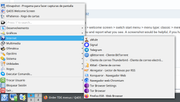
Please go > welcome screen > switch start menu > menu type: classic > menu structure: categories
Open menu and report what you see. A screenshot would be helpful, if you have doubts the menu is correct.
It's the same
Offline
#13 2026-10-09 19:49
- q4osteam
- Q4OS Team
- Registered: 2015-12-06
- Posts: 6,425
- Website
Re: Order TDE menus
Try to backup "configtde/menus/applications-tdemenuedit.menu" and then remove it:
$ rm .configtde/menus/applications-tdemenuedit.menu
$ dcop kicker kicker restart
Ritgh click on the panel taskbar > configure > menus > menu item format > name only
log out, log in
Offline
#14 2026-10-10 22:47
- peixe80
- Member
- Registered: 2026-09-25
- Posts: 14
Re: Order TDE menus
Try to backup "configtde/menus/applications-tdemenuedit.menu" and then remove it:
$ rm .configtde/menus/applications-tdemenuedit.menu
$ dcop kicker kicker restart
Ritgh click on the panel taskbar > configure > menus > menu item format > name only
log out, log in
Yes, this works, although it's broken again every time I manually delete or replace a symlink from "Edit Menu". To avoid it, I try to make all the modifications in .local/share/applications from terminal.
If there isn't a better way, I think this problem is solved  Thank you!
Offline
Pages: 1
- Registered users online in this topic: 0, guests: 1