You are not logged in.
- Topics: Active | Unanswered
Pages: 1
#1 2026-10-05 16:24
- green-moomin
- Member
- Registered: 2026-08-05
- Posts: 18
Automatically rename duplicate files
Hello, is there a way to automatically rename duplicate files/directories when I move them? I'm aware of the "rename command" but I'm looking for a GUI method. When I move several files to a different directory, I have to "suggest new name" for each instance of a duplicated file, then click "rename." Is there an "auto rename"-type option, similar to "auto skip" and "overwrite all"?
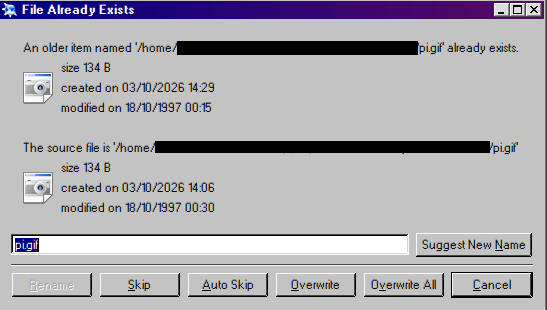
For example, Windows auto renames "my-report.pdf" to "my-report (1).pdf" so something like this would be helpful.
Offline
#2 2026-10-06 06:37
- Taige
- Banned

- Registered: 2025-08-19
- Posts: 105
Re: Automatically rename duplicate files
Hello, is there a way to automatically rename duplicate files/directories when I move them? I'm aware of the "rename command" but I'm looking for a GUI method. When I move several files to a different directory, I have to "suggest new name" for each instance of a duplicated file, then click "rename." Is there an "auto rename"-type option, similar to "auto skip" and "overwrite all"?
For example, Windows auto renames "my-report.pdf" to "my-report (1).pdf" so something like this would be helpful.
Thunar, the default file manager for Mint XFCE, if I remember correctly does just what you need, install it and give it a try.
Offline
Pages: 1
- Registered users online in this topic: 0, guests: 1