You are not logged in.
- Topics: Active | Unanswered
#1 2026-05-03 14:41
- bloodberry
- Member

- Registered: 2026-05-03
- Posts: 6
How do I view backgrund processes in Q4OS TDE?
I'm migrating from Windows 11 to Q4OS, so I'm used to having a 'hidden icons' tray in my taskbar, which would visualize applications that are currently running in the background. I installed Steam in my virtual machine, which is an app that minimizes itself to continue running in the background after you close it, so I'm not sure how to make sure it has completely shut down.
Offline
#2 2026-05-03 15:39
- theasmitkid
- Member
- From: NCT of Delhi
- Registered: 2025-01-26
- Posts: 357
Re: How do I view backgrund processes in Q4OS TDE?
Welcome to Q4OS Trinity!
Usually in Q4OS aswell, apps which minimize to tray on close, are shown in the system tray. For viewing all running process, just like in windows task manager, you can try using htop (terminal based)
If you prefer an GUI based task manager, you can check this out by seb3773
Coding & Robotics Enthusiast | Windows 7 x86 @ n2600 · 2GB · 320GB HDD (No graphics acceleration available in linux)
Offline
#3 2026-05-03 22:29
- bloodberry
- Member
- Registered: 2026-05-03
- Posts: 6
Re: How do I view backgrund processes in Q4OS TDE?
Thank you for your help! Although, I tried using Htop but I couldn't understand how to use it. I'd like to give the task manager you linked a try, but I'm not sure how I'm supposed to install it. I'm still a beginner so I hope you will excuse my amateurishness. 
Offline
#4 2026-05-04 07:00
- q4osteam
- Q4OS Team

- Registered: 2015-12-06
- Posts: 6,424
- Website
Re: How do I view backgrund processes in Q4OS TDE?
Welcome to the forum 
Run easy to use process manager integrated: Start menu > System > KSysGuard > Process table tab
Offline
#5 2026-05-04 08:55
- theasmitkid
- Member
- From: NCT of Delhi
- Registered: 2025-01-26
- Posts: 357
Re: How do I view backgrund processes in Q4OS TDE?
I'd like to give the task manager you linked a try, but I'm not sure how I'm supposed to install it...
You can try out the inbuilt system monitor that @q4osteam recommended.
To install the one I linked, you have to download this .deb, double click in file manager and follow the installer. If the installer doesn't run, you can try installing with these commands
Downloads is the folder where you downloaded the .deb, if you downloaded it in another location, replace ~/Downloads with that location (~/ is an alias for your home folder, which is /home/<your username>)
cd ~/Downloads
sudo apt-get install ./lxtask-mod.deb -y
Coding & Robotics Enthusiast | Windows 7 x86 @ n2600 · 2GB · 320GB HDD (No graphics acceleration available in linux)
Offline
#6 2026-05-05 17:01
- bloodberry
- Member
- Registered: 2026-05-03
- Posts: 6
Re: How do I view backgrund processes in Q4OS TDE?
Welcome to the forum
Run easy to use process manager integrated: Start menu > System > KSysGuard > Process table tab
Oh I see! I think I'll be using KSysGuard from now on  I never ran it before because I didn't think it worked as a task manager. I'm curious about one thing though, is there way to see the CPU usage of individual processes? Thanks!!
To install the one I linked, you have to download this .deb, double click in file manager and follow the installer. If the installer doesn't run, you can try installing with these commands
Thank you lots! The installer did not run for me, so it's good to know I can install it with that command if such a thing happened again. ^^
Offline
#7 2026-05-05 21:34
- theasmitkid
- Member
- From: NCT of Delhi
- Registered: 2025-01-26
- Posts: 357
Re: How do I view backgrund processes in Q4OS TDE?
i would highly recommend htop for that, maybe this explanation is helpful
Coding & Robotics Enthusiast | Windows 7 x86 @ n2600 · 2GB · 320GB HDD (No graphics acceleration available in linux)
Offline
#8 2026-05-06 05:52
- hchiper
- Member

- From: Belgium
- Registered: 2020-07-28
- Posts: 837
Re: How do I view backgrund processes in Q4OS TDE?
Oh I see! I think I'll be using KSysGuard from now on
Available in KSysGuard (3rd column).
If you don't see it, right-click on the list header and choose it in the drop-down menu.
Q4OS machine: Samsung R519 - Pentium T4200 2.0 GHz - 4 GB RAM - 500 GB SSD
Offline
#9 2026-05-07 19:30
- bloodberry
- Member
- Registered: 2026-05-03
- Posts: 6
Re: How do I view backgrund processes in Q4OS TDE?
i would highly recommend htop for that, maybe this explanation is helpful
Thank you for the article! It's really helpful! ^_^
Available in KSysGuard (3rd column).
If you don't see it, right-click on the list header and choose it in the drop-down menu.
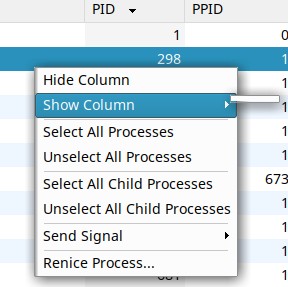
I can't right-click the headers of columns for some reason. Although I can right-click the columns themselves, I don't get any options to add any more columns from that menu.
Offline
#10 2026-05-07 22:19
- hchiper
- Member
- From: Belgium
- Registered: 2020-07-28
- Posts: 837
Re: How do I view backgrund processes in Q4OS TDE?
hchiper wrote:Available in KSysGuard (3rd column).
If you don't see it, right-click on the list header and choose it in the drop-down menu.I can't right-click the headers of columns for some reason. Although I can right-click the columns themselves, I don't get any options to add any more columns from that menu.
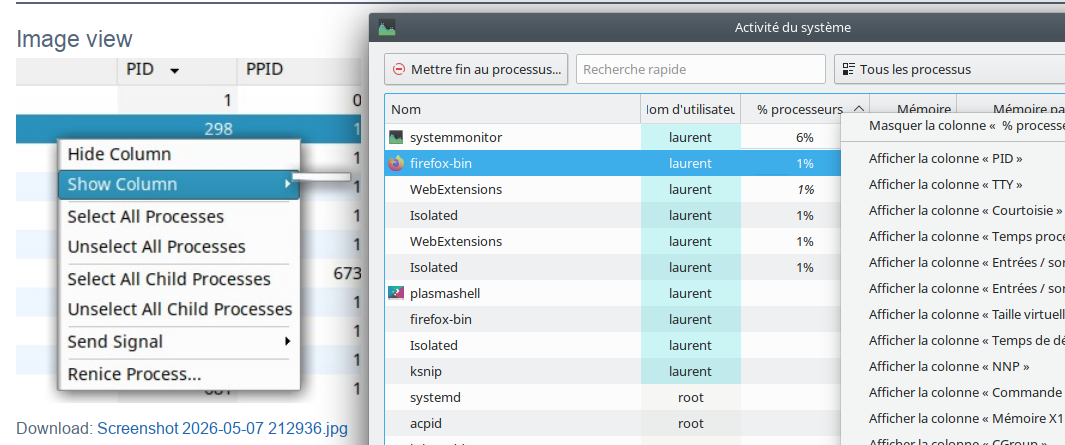
Apparently we have different versions of KSysGard (see attached image)...
Q4OS machine: Samsung R519 - Pentium T4200 2.0 GHz - 4 GB RAM - 500 GB SSD
Offline
#11 2026-05-08 14:53
- bloodberry
- Member
- Registered: 2026-05-03
- Posts: 6
Re: How do I view backgrund processes in Q4OS TDE?
Apparently we have different versions of KSysGard (see attached image)...
Ksysguard seems to be abondonware, so I guess it's not possible for me to install a newer version? I can get accustomed to Htop, so although it's not a big problem, it could've been nice I guess.
Offline
#12 2026-05-09 13:41
- theasmitkid
- Member
- From: NCT of Delhi
- Registered: 2025-01-26
- Posts: 357
Re: How do I view backgrund processes in Q4OS TDE?
Ksysguard seems to be abondonware...
It is still in active development by the trinity desktop team
I just tested out a few apps myself, and I think lxtask might be perfect for you. You can install the original version directly using apt via:
sudo apt-get install lxtask -yCoding & Robotics Enthusiast | Windows 7 x86 @ n2600 · 2GB · 320GB HDD (No graphics acceleration available in linux)
Offline
#13 2026-05-09 21:32
- bloodberry
- Member
- Registered: 2026-05-03
- Posts: 6
Re: How do I view backgrund processes in Q4OS TDE?
It is still in active development by the trinity desktop team
Ohh, I see!
I just tested out a few apps myself, and I think lxtask might be perfect for you. You can install the original version directly using apt via:
sudo apt-get install lxtask -y
Thank you so much for your help! I installed it and I like it so far.
Offline
- Registered users online in this topic: 0, guests: 1