You are not logged in.
- Topics: Active | Unanswered
#1 2026-05-04 22:14
- seb3773
- Member

- From: France
- Registered: 2023-11-01
- Posts: 285
Why TDE is so good : some explanations.
Since I joined this forum, I’ve repeatedly stated that Trinity Desktop Environment (TDE) is my absolute favorite desktop environment—by a huge margin. I’ve touched on the reasons before, but I realize my explanations have often been more like bold assertions than detailed justifications. So, let me try to break it down.
I discovered Q4OS (and thus Q4OS Trinity) at a time when, despite using Linux for years—mainly for embedded systems or specific professional software—I still hadn’t fully committed to replacing Windows. I knew it was the right move; I’ve always appreciated Linux, but I was never a fan of the graphical interfaces that came with it. The only hurdle was finding the right distro. It’s a bit of an adventure, and while some might regret that, I see it as one of Linux’s greatest strengths: the sheer range of possibilities.
After trying a few of the usual suspects, I stumbled upon Q4OS Trinity. And that was the turning point. Everything I needed: simple, efficient, clear, and incredibly responsive! I’d forgotten how well my old laptop could actually perform...
So, what’s the magic behind this? I’ll try to explain what I’ve understood and why I believe Q4OS TDE is the best choice for anyone who wants to use their machine—not just watch window animations.
The Technical Foundations: TQt3
Historically (Q4OS team, correct me if I’m wrong), TQt3 is an evolution of Qt 3.3.8, a library that dominated the Linux world in the early 2000s. In terms of lightweight design, it’s the undisputed featherweight champion. When it comes to raw resource usage (RAM and storage), TQt3 leaves GTK3/4 and Qt5/6 in the dust—no contest.
Memory footprint: TQt3 doesn’t bundle massive rendering engines (like Chromium/WebEngine) or the complex abstraction layers required for QML (QtQuick) or modern declarative interfaces.
Dependencies: TQt3’s dependencies are minimal and rock-solid. While Qt6 demands recent C++ libraries and cutting-edge graphics drivers, TQt3 gets by with just the essentials.
This makes it perfect for low-resource or older machines—a well-known and undisputed strength of Trinity. But here’s the subtle part often overlooked: it’s just as true for modern hardware (and likely always will be). The reason is simple: perceived responsiveness doesn’t depend solely on raw power, but on the latency of the execution path.
Even on a 2026 16-core CPU, the difference in “snappiness” between TDE and a modern GNOME is still glaring. Here’s why:
*The “Abstraction Tax”
Modern frameworks (GTK4, Qt6) have added massive abstraction layers to handle cross-platform support, complex HiDPI, and declarative interfaces. GTK4/Libadwaita or QtQuick run rendering engines that are almost mini game engines. TQt3, on the other hand, stays close to system calls and X11. To put it simply: the path from “pressing a key” to “displaying the character” is mathematically shorter in terms of CPU instructions.
In QtQuick/QML (Qt5/6) or GTK4, every element is a node in a complex render tree that must be recalculated, transformed, and sent to the GPU. TQt3 draws much more directly. Fewer steps = fewer CPU cycles before the first pixel moves.
*Rendering: Primitives vs. Scene Graph
In TQt3: Widget drawing is often handled by simple primitives. It’s “old school,” but extremely fast for the CPU to process.
In modern toolkits, every window is treated more or less like a complex texture in a 3D scene.
The fact that compton-tde uses OpenGL acceleration for compositing (shadows, transparency, vsync) allows for modern visual fluidity without sacrificing TQt3’s internal lightweight design. It’s the best of both worlds in terms of performance and compromise.
*Multithreading and “Bloat”
A TQt3 application is often a single, simple monolithic process. Modern environments spawn countless satellite processes (DBus services, indexers, daemons, previews, etc.). Even if a powerful CPU can handle it all, this complexity creates micro-latencies (jitter) that the human eye notices—especially if you’re used to Trinity’s instant response.
GTK4 and Qt6 are designed to be “universal” (touch, mobile, desktop), so they bundle massive event management libraries for gestures, rotation, etc. TQt3 is a pure product of the “keyboard/mouse” desktop era—direct, efficient, and to the point.
Another often-overlooked detail: on a powerful machine, RAM isn’t just about quantity—it’s about proximity (L1/L2/L3 cache). TQt3’s data structures are more compact, improving data locality and reducing cache misses compared to the massive objects and abstraction layers of GTK4, for example.
Moreover, Trinity and TQt3 code is predictable. In an environment like GNOME, a simple JavaScript extension can introduce annoying micro-stutters throughout the shell. TDE doesn’t have this issue and runs with the regularity of a Swiss clock.
It’s ironic: we have machines 100 times more powerful than in 2005, yet we’ve managed to create interfaces that sometimes feel slower due to the stacking of software layers—most of which are unnecessary for productivity. You could call this the “software tax.”
Today, it’s often considered “normal” for a desktop environment to consume 1.5 GB of RAM and constant CPU cycles just to display a menu and manage drop shadows. A Trinity (TDE) and TQt3 user refuses to pay that tax.
Let’s not forget: at its core, a desktop is just a launcher and a window manager. If it uses 2% CPU and 1 GB of RAM, that’s 2% and 1 GB not going to your professional software, compiler, rendering engine, VMs, or heavy calculations. I often call this the “illusion of modernity”: many modern environments (GNOME in particular) use JavaScript for their interface (GNOME Shell). It’s flexible for developers, but a heresy for pure performance.
In short, TQt3 is “performant” in the sense of efficiency: it does the job with the fewest steps possible. Modern toolkits are “performant” in terms of display capacity (complex effects, smooth transitions), but at the cost of greater software inertia.
And it’s absolutely brilliant that the Trinity team continues to modernize the engine (support for recent compilers, security patches, CMake integration) while preserving the architecture of an era when every CPU cycle was precious.
**A Word on the Classic Menu/Taskbar Workflow
There’s a tendency to think the “Menu + Taskbar” paradigm is outdated, but from a Fitts’s Law (interface ergonomics) perspective, it’s often the most efficient:
-Targets are fixed (the menu button is always in the corner).
-Window management is predictable (no “Overview” dynamically rearranging everything).
-The hierarchy is clear.
Well, this was a bit long  , but I hope this clarifies why I believe the current combination I use (TDE + Xlibre, especially for its fixes/patches and per-screen DPI, but this applies to TDE/X11 as well) is probably one of the most performant desktop environments in the world today. It’s the only one, in my view, that harnesses the raw power of modern hardware without wasting it on unnecessary abstraction layers. (And, *Yes*, I know there are even “lighter” alternatives, but none offer the same level of features/comfort as TDE.)
Debian & Q4OS (TDE!!), low-level C, ASM (z80/68k/x86/ARM64), embedded systems, CPU architectures (RISC-V, binary formats, assembly), retro-computing, metal music, guitar and sci-fi.
Offline
#2 2026-05-06 11:36
- FlexQ4
- Member
- Registered: 2017-02-19
- Posts: 274
Re: Why TDE is so good : some explanations.
Many Thanks @seb3773 for your clarifications an explanations!
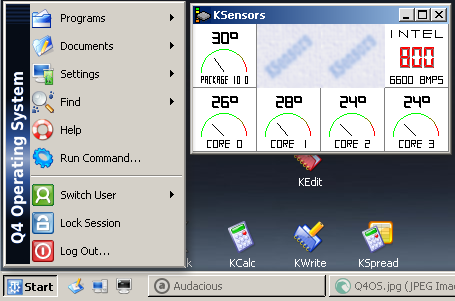
For me about 50% of the reasons why i'm relying on Q4OS-TDE is... the TDE  . I estimate it's snappyness an enjoy the decent, not exaggerated, colorful intuitivity - like known from Win2000-XP.
Offline
#3 2026-05-11 17:43
- Midas
- Member

- Registered: 2017-12-15
- Posts: 275
Re: Why TDE is so good : some explanations.
Many thanks for the education, seb3773. As a non-technical user, I feel rather enlightened by your exposé. 
TQt3 is a pure product of the “keyboard/mouse” desktop era—direct, efficient, and to the point.
It’s ironic: we have machines 100 times more powerful than in 2005, yet we’ve managed to create interfaces that sometimes feel slower due to the stacking of software layers—most of which are unnecessary for productivity. You could call this the "software tax."
FWIW and as someone who got into personal computing with MS-DOS, these quotes sum up very accurately my current weariness with modern day UX...
Offline
#4 2026-09-05 15:04
- capnkrr
- Member
- Registered: 2026-09-05
- Posts: 1
Re: Why TDE is so good : some explanations.
Hello all - New Forum member here. Q4 user for several months now; first found/used it to overwrite iOS in a '23 Macbook Pro (works *stellar*!).
Brief background: been using Linux since the mid 90's (early RH 4.x on a 386 laptop w/2MB RAM, 40MB HDD  ). RH it was OK but I gave that up after a few years of "Dependancy Hell" when I finally tried that 'other' kind of Linux which used APT... Never looked back. By then I had a fast modern machine (my 486DX ) and ran Libranet on it as my distro of choice until that rolled up in '05...
So, yes, another old school guy who remembers when storage was expensive and *always* at a premium, back when the hardware ran like molasses uphill in the winter when compared to today.
And that is why I am loving my Q4 experience. Absolutely impressed to find a distro that is truly minimal and customizable yet works so well. While I have liked and at times played with heavy DE's (like when Compiz first came out in '06), that was generally just experimentation, and for my daily driver systems the priorities are instead speed, simplicity, and minimalism. For that, I have not found any distro which does a better job than Q4.
Currently installing to/revitalizing an EOL Acer Chromebook 15 with its 2GB RAM, and a "tiny" 16GB eMMC*.
A huge Thanks to the dev team at Q4! Keep up the great work, it is very appreciated. I'll be sending in a donation to Jupiter4 this week.
-----
*(Old guy story - I remember saving up to buy a WD 10GB hard drive on sale for just $120! At the time, with that HUGE amount of space I thought I would never need to buy another drive in my lifetime. Har.  )
)
Offline
#5 2026-09-05 15:23
- q4osteam
- Q4OS Team

- Registered: 2015-12-06
- Posts: 6,426
- Website
Re: Why TDE is so good : some explanations.
@capnkrr
Welcome to the forum  and enjoy Q4OS.
Offline
- Registered users online in this topic: 0, guests: 1