You are not logged in.
- Topics: Active | Unanswered
Pages: 1
#1 2026-05-01 04:29
- Lotfi
- Member
- Registered: 2025-09-25
- Posts: 8
X11 instead of Wayland on startup
Hi everybody,
How can I set X11 as the default? I’m having issues selecting and copying text in Firefox and Librewolf. I don’t have this problem when I switch to X11. So, I’d like X11 to be the default at startup ( (instead of doing it manually every time I start up), until this issue is resolved on Wayland. Thanks.
My system: Andromeda Plasma 6
Last edited by Lotfi (2026-05-01 08:41)
Offline
#2 2026-05-01 11:22
- q4osteam
- Q4OS Team

- Registered: 2015-12-06
- Posts: 6,429
- Website
Re: X11 instead of Wayland on startup
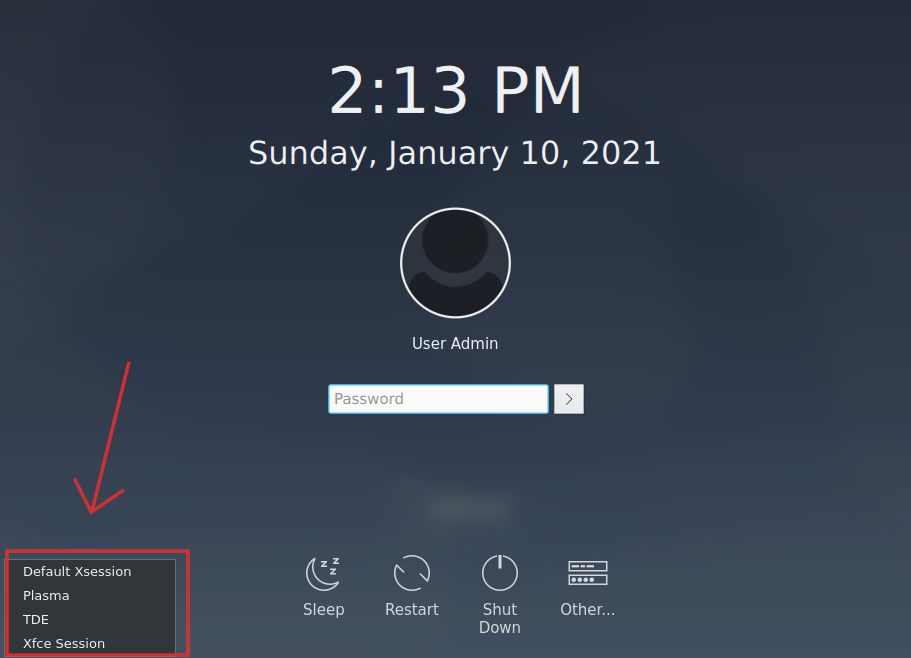
Just select X11 session on the login manager screen https://www.q4os.org/images_doc/dqa015/image13.png
Offline
#3 2026-05-01 17:11
- Lotfi
- Member
- Registered: 2025-09-25
- Posts: 8
Re: X11 instead of Wayland on startup
Thanks.
Actually, my PC is set to ‘Automatic Authentication’, and with that setting you always have to log out to select X11. I just wanted to avoid that step. That said, I’m not making a big deal of it. I can manage without it.
Offline
#4 2026-05-01 17:28
- q4osteam
- Q4OS Team
- Registered: 2015-12-06
- Posts: 6,429
- Website
Re: X11 instead of Wayland on startup
You can disable automatic login, Welcome screen > set autologin > revert to defaults > reboot.
Offline
#5 2026-05-01 17:57
- Lotfi
- Member
- Registered: 2025-09-25
- Posts: 8
Re: X11 instead of Wayland on startup
Yes, I think that’s what I’ll do in the end. It’s simpler. Thanks a lot.
Offline
#6 2026-05-01 20:23
- swarfendor437
- Member

- Registered: 2024-11-06
- Posts: 80
Re: X11 instead of Wayland on startup
From experience playing with a different distribution as a VM inside of Q4OS I set it up with autologin. On any OS you have to provide a password for the purposes of 'root' privileges, even when choosing autologin. I found that logging out from an 'autologin' session I could change to X11 and then forget about it. I think the same applies to Q4OS
ASUS PRIME X470-PRO, AMD Ryzen 7 1700X 8 Core, 16 Gb RAM, Asus GT1030 2 Gb DDR-5 Q4OS 5.9 (Aquarius)
Offline
#7 2026-05-02 02:26
- theasmitkid
- Member
- From: NCT of Delhi
- Registered: 2025-01-26
- Posts: 357
Re: X11 instead of Wayland on startup
That's usually the case, since by default Q4OS (trinity atleast) loads "previous session", so if you loaded up an X11 session, it'd automatically load X11 session as previous session.
For plasma, you could try changing the session in systemsettings5/6
systemsettings > themes > sddm > behavior > enable “Automatically log in” > with session: “Plasma (x11)”
Coding & Robotics Enthusiast | Windows 7 x86 @ n2600 · 2GB · 320GB HDD (No graphics acceleration available in linux)
Offline
#8 2026-05-02 08:08
- nathanjhill
- Member
- Registered: 2024-12-11
- Posts: 22
Re: X11 instead of Wayland on startup
X11 is super buddy on my end. Why not just choose Wayland?
Offline
#9 2026-05-02 09:15
- Lotfi
- Member
- Registered: 2025-09-25
- Posts: 8
Re: X11 instead of Wayland on startup
As I mentioned in my original post, I’ve had to switch to X11 because, on Wayland, for the past week or two, I’ve been having issues with Firefox and LibreWolf (and even Thunderbird)—I can no longer select text, for example, to copy and paste. I don’t have this problem with X11. I don’t know if I’m the only one having this issue. I’ve tried everything, checked all the settings, nothing works.
Offline
Pages: 1
- Registered users online in this topic: 0, guests: 1