You are not logged in.
- Topics: Active | Unanswered
#1 2026-02-14 16:40
- bin
- Member

- From: U.K.
- Registered: 2016-01-28
- Posts: 1,608
Open folder containing download. Works in Plasma not TDE
This is an old problem which I thought had been overcome in the past.
I know it is xdg related but cannot get any further.
Using browser download e.g. a PDF but can be anything.
The icon on the toolbar shows it has finished.
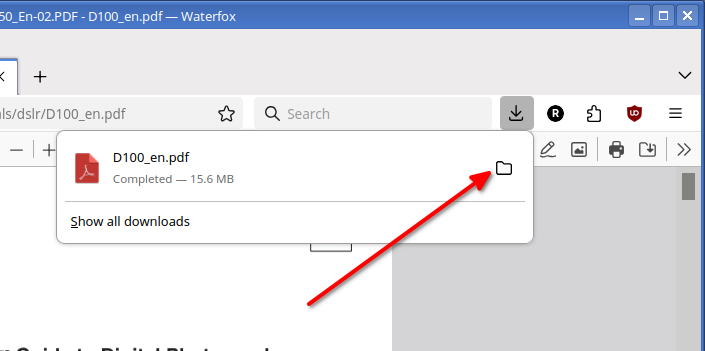
Click the icon and then the folder icon to open the destination folder.
In Waterfox the process does nothing.
In Firefox-esr likewise nothing.
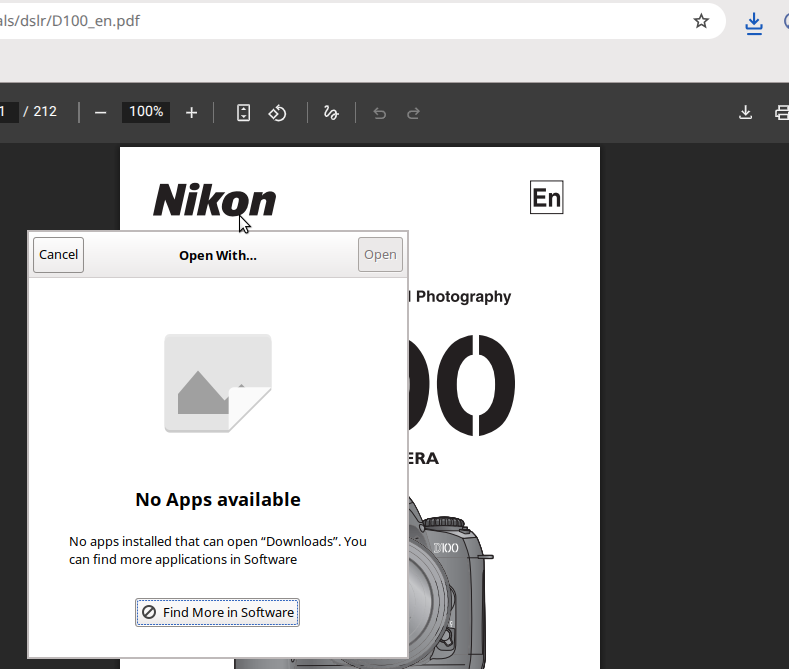
In Chromium this brings up a box saying it cannot find any software to do that - click cancel and it opens the folder.
All three work as expected in Plasma.

Last edited by bin (2026-02-15 07:53)
Offline
#2 2026-02-15 12:18
- q4osteam
- Q4OS Team

- Registered: 2015-12-06
- Posts: 6,430
- Website
Re: Open folder containing download. Works in Plasma not TDE
Procedure:
- Fresh Q4OS-6 Trinity setup, Basic profile
- Installed Chromium and FF-esr
$ sudo apt install chromium firefox-esr
- Reboot and login
- Download an arbitrary "Lorem Ipsum" .pdf file from browser
1. Chromium: We cannot reproduce the OP issue, Chromium downloads and opens Konqueror file manger out of the box - as commanded with "show in folder" icon.
2. Firefox ESR: We can confirm the issue as described in the OP.
Vanilla Debian-13/Trinity desktop setup:
We can confirm the same issue for FF-ESR, so we conclude upstream Trinity issue. It would be valuable to report it for Trinity devs. Chromium opens Konqueror out of the box.
Offline
#3 2026-02-15 16:12
- theasmitkid
- Member
- From: NCT of Delhi
- Registered: 2025-01-26
- Posts: 357
Re: Open folder containing download. Works in Plasma not TDE
I think i used to be able to reproduce this issue with chromium, didn't happen on previous versions, only in Q4OS 6/Trinity
Coding & Robotics Enthusiast | Windows 7 x86 @ n2600 · 2GB · 320GB HDD (No graphics acceleration available in linux)
Offline
#4 2026-02-15 23:28
- q4osteam
- Q4OS Team
- Registered: 2015-12-06
- Posts: 6,430
- Website
Re: Open folder containing download. Works in Plasma not TDE
... i used to be able to reproduce this issue with chromium, didn't happen on previous versions, only in Q4OS 6/Trinity
We are not able to reproduce it on a default Q4OS setup, please post specific steps how to reproduce the issue.
Offline
#5 2026-02-16 12:33
- bin
- Member
- From: U.K.
- Registered: 2016-01-28
- Posts: 1,608
Re: Open folder containing download. Works in Plasma not TDE
I think it is related to the Desktop Profile which I have only recently started using
I confirmed your results as above with the Basic Profile which I have always used in the past.
Agreed anything *fox has a problem.
Fresh install Desktop Profile - then installed Multimedia Codecs (sorry it's just muscle memory)
Open Chromium.
Go to a downloadable item and download.
Click the folder icon and brings up the 'No software available' box as illustrated.
Click Cancel and it takes you to the download location in Konqueror.
.xsession-errors:-
dbus-daemon[4129]: Activating service name='org.a11y.atspi.Registry' requested by ':1.0' (uid=1000 pid=4331 comm="/usr/lib/chromium/chromium --wm-window-animations-")
dbus-daemon[4129]: Successfully activated service 'org.a11y.atspi.Registry'
SpiRegistry daemon is running with well-known name - org.a11y.atspi.Registry
[4426:7:0216/113753.243552:ERROR:gpu/ipc/client/command_buffer_proxy_impl.cc:287] ContextResult::kTransientFailure: Failed to send GpuControl.CreateCommandBuffer.
[4331:4374:0216/113757.054868:ERROR:google_apis/gcm/engine/registration_request.cc:290] Registration response error message: DEPRECATED_ENDPOINT
[4331:4331:0216/113820.745645:ERROR:components/dbus/xdg/request.cc:165] Request cancelled by user.
[2026/02/16 11:38:20.759] X Error: BadWindow (invalid Window parameter) 3
Major opcode: 19
Minor opcode: 0
Resource id: 0x420000a
/usr/bin/xdg-open: 541: test: Illegal number:
/usr/bin/xdg-open: 542: test: Illegal number:
/usr/bin/xdg-open: 543: test: Illegal number:
[4331:4374:0216/113825.822563:ERROR:google_apis/gcm/engine/registration_request.cc:290] Registration response error message: DEPRECATED_ENDPOINT
[tdebuildsycoca] tdebuildsycoca running...
[2026/02/16 11:38:52.136] [tdebuildsycoca] Reusing existing tdesycoca.
[4331:4374:0216/113923.333530:ERROR:google_apis/gcm/engine/registration_request.cc:290] Registration response error message: DEPRECATED_ENDPOINT
Last edited by bin (2026-02-16 12:42)
Offline
#6 2026-02-16 12:49
- q4osteam
- Q4OS Team
- Registered: 2015-12-06
- Posts: 6,430
- Website
Re: Open folder containing download. Works in Plasma not TDE
1. *fox: It's clear upstream bug.
2. Chromium:
... Go to a downloadable item and download. ... Click the folder icon and brings up the 'No software available' box as illustrated.
Please specify the link for us to be able to reproduce.
... brings up the 'No software available' box as illustrated.
Where is it ilustrated ?
Offline
#7 2026-02-16 14:29
- bin
- Member
- From: U.K.
- Registered: 2016-01-28
- Posts: 1,608
Re: Open folder containing download. Works in Plasma not TDE
https://sourceforge.net/projects/q4os/f … t/download
https://cdn-10.nikon-cdn.com/pdf/manual … 100_en.pdf
http://ftp.de.debian.org/debian/pool/ma … _amd64.deb
See OP open-folder-3.png
Last edited by bin (2026-02-16 14:30)
Offline
#8 2026-02-16 15:28
- q4osteam
- Q4OS Team
- Registered: 2015-12-06
- Posts: 6,430
- Website
Re: Open folder containing download. Works in Plasma not TDE
Chromium: We've got it and we are able to reproduce now. We will investigate and post back.
Offline
#9 2026-02-17 22:35
- q4osteam
- Q4OS Team
- Registered: 2015-12-06
- Posts: 6,430
- Website
Re: Open folder containing download. Works in Plasma not TDE
A workaround for Chromium is to remove the "xdg-desktop-portal-gtk" package. We are still investigating the issue and will provide an update as soon as new information becomes available.
Offline
#10 2026-02-18 08:32
- bin
- Member
- From: U.K.
- Registered: 2016-01-28
- Posts: 1,608
Re: Open folder containing download. Works in Plasma not TDE
Thank you - that does work.
Offline
#11 2026-02-18 21:38
- q4osteam
- Q4OS Team
- Registered: 2015-12-06
- Posts: 6,430
- Website
Re: Open folder containing download. Works in Plasma not TDE
We can reproduce the issue on vanilla Debian13/Trinity installation this way:
- Install Debian13 + Trinity desktop
- Install "chromium" and "flatpak" packages
- Follow the steps described in the original post, the same behavior occurs
After deeper investigation, we identified the underlying cause and its consequences. The issue stems from an incompatibility between the Trinity Desktop Environment and the modern GTK portal infrastructure, caused by missing or legacy D-Bus implementation in the Trinity file manager. This appears to be an architectural issue rather than a packaging or configuration problem. Therefore, we conclude that this is an upstream bug in the Trinity desktop, namely Konqueror file manager.
All in all, we need to keep XDG desktop portal packages in the Full desktop profile in order to service Flatpak applications properly.
Offline
#12 2026-02-19 08:25
- bin
- Member
- From: U.K.
- Registered: 2016-01-28
- Posts: 1,608
Re: Open folder containing download. Works in Plasma not TDE
OK - thanks for the explanation. If I never use Flatpak I take it that I can remove xdg portal without any consequences?
One thing does puzzle me - whilst fiddling around with this before reporting I switched inode/directory to Dolphin to see if it made any difference. It didn't.
Offline
#13 2026-02-19 09:59
- q4osteam
- Q4OS Team
- Registered: 2015-12-06
- Posts: 6,430
- Website
Re: Open folder containing download. Works in Plasma not TDE
If I never use Flatpak I take it that I can remove xdg portal without any consequences?
Yes, you can remove the flatpak package as well. We recommend creating your own custom profile based on the Full profile, but excluding flatpak package. You can find more information here: https://www.q4os.org/dqa016.html#boome . This way, xdg-portals won’t be pulled in during the next Q4OS setup.
The original issue can also be worked around by installing the Thunar file manager, which handles portals correctly.
Offline
#14 2026-02-19 16:40
- bin
- Member
- From: U.K.
- Registered: 2016-01-28
- Posts: 1,608
Re: Open folder containing download. Works in Plasma not TDE
Yes, I think it is time I took a look at profiles. Never worried about them too much but they seem like a very useful tool for serial reinstallers like me.
Thunar also has the added advantage of creating thumbnails of PDF files which I do miss in TDE - so I may well take that route permanently.
Thanks for all the feedback.
Offline
- Registered users online in this topic: 0, guests: 1