You are not logged in.
- Topics: Active | Unanswered
#1 2026-01-11 17:35
- frenchdivision
- Member
- Registered: 2026-01-11
- Posts: 10
Help needed: GRUB/boot issue after FreeXP Live session
i can't boot normally i'm always forced to go into the grub and doing this command for loggin :
set root=(hd0,gpt2)
linux /vmlinuz root=/dev/nvme0n1p2 ro
initrd /initrd.img
boot
without that i can't boot and i've got the error "bootloader installation error"
the bootloader could not installed the installation command <pre> grub-install --target=x86_64-efi --efi-directory=/boot/efi --bootloader-id=Q4OS_Aquarius --foce</pre> returned error code 1
now i don't know if its solved or not but i'm stuck on the installer or a sort of the live USB (my usb is not connected to the pc for loggin in) but they keep asking me if i want to install Q4OS since i'm inside it and i have really no idea how to solve it because i think i can't download some software like firefox etc and i had a big problem too that i avoided its about choosing the profil for the desktop that i didn't finished because of a problem about "applying a profil within the live system ins't supported" since i downloaded the installer
thanks you for any help because i have no idea how to solve it anymore.
Offline
#2 2026-01-11 17:40
- frenchdivision
- Member
- Registered: 2026-01-11
- Posts: 10
Re: Help needed: GRUB/boot issue after FreeXP Live session
Warning: /run/live/medium not mounted, please mount it prior to run the install process.
i can't use the installer anymore
Offline
#3 2026-01-11 17:43
- q4osteam
- Q4OS Team

- Registered: 2015-12-06
- Posts: 6,425
- Website
Re: Help needed: GRUB/boot issue after FreeXP Live session
We can recommend you to install Q4OS using install-cd, the third option from our downloads site https://www.q4os.org/downloads1.html . An alternative is to install Debian and setup Q4OS on top of the Debian installation, see https://www.q4os.org/dqa017.html
Offline
#4 2026-01-11 17:49
- frenchdivision
- Member
- Registered: 2026-01-11
- Posts: 10
Re: Help needed: GRUB/boot issue after FreeXP Live session
but how does it work ? do i need again an USB and how do i put it inside from now ? i'm pretty lost to be honest and how can i open this future ISO/files because for what i saw i can't open firefox (files for linux)
Offline
#5 2026-01-11 17:51
- q4osteam
- Q4OS Team
- Registered: 2015-12-06
- Posts: 6,425
- Website
Re: Help needed: GRUB/boot issue after FreeXP Live session
Please see https://www.q4os.org/dqa018.html
Offline
#6 2026-01-11 18:01
- frenchdivision
- Member
- Registered: 2026-01-11
- Posts: 10
Re: Help needed: GRUB/boot issue after FreeXP Live session
if i'm correct for having no issues after
i need to download Q4OS Andromeda, Trinity, install-cd - 64bit / x64 ...
after download Q4OS imager (it worked)
bootable my USB from the ISO i've got and on this imager after i do like before i use the usb for going inside the OS then i click again installer and normally theres no problem from the grub or anything else am i right ? (its for what i understood)
otherwise there's no problem of compability on asus vibebook in general ?
Offline
#7 2026-01-11 18:16
- q4osteam
- Q4OS Team
- Registered: 2015-12-06
- Posts: 6,425
- Website
Re: Help needed: GRUB/boot issue after FreeXP Live session
The issue you are experiencing is hardware dependent. We do not have the hardware in question, so we cannot test it and confirm whether it works or not. You will have to try it yourself to see what happens.
Offline
#8 2026-01-11 18:21
- frenchdivision
- Member
- Registered: 2026-01-11
- Posts: 10
Re: Help needed: GRUB/boot issue after FreeXP Live session
there's not risk from that issue to brick the PC ? and there's no problem if you can't test it right now !! the main goal is having an OS who work a least a bit and not bricking the pc because i have only one so from your own experience normally even with this issue theres a risk that it work normally on my pc ?
Offline
#9 2026-01-11 18:28
- q4osteam
- Q4OS Team
- Registered: 2015-12-06
- Posts: 6,425
- Website
Re: Help needed: GRUB/boot issue after FreeXP Live session
We always recommend backing up data before installing an operating system. Software cannot destroy hardware. Yes, Q4OS may work properly on your hardware, but we are not able confirm this, because we cannot perform testing on that hardware.
Offline
#10 2026-01-11 18:33
- frenchdivision
- Member
- Registered: 2026-01-11
- Posts: 10
Re: Help needed: GRUB/boot issue after FreeXP Live session
i saved everything and from the new installation (who didn't worked i didn't tested with the new ISO), i have nothing to lose, i'm happy to hear it thanks you for the details ! do you think you can confirm this week/month or its not planned ? for me to know if i work on it today or if i have the time for being sure over it. Thanks !!
Offline
#11 2026-01-11 21:13
- frenchdivision
- Member
- Registered: 2026-01-11
- Posts: 10
Re: Help needed: GRUB/boot issue after FreeXP Live session
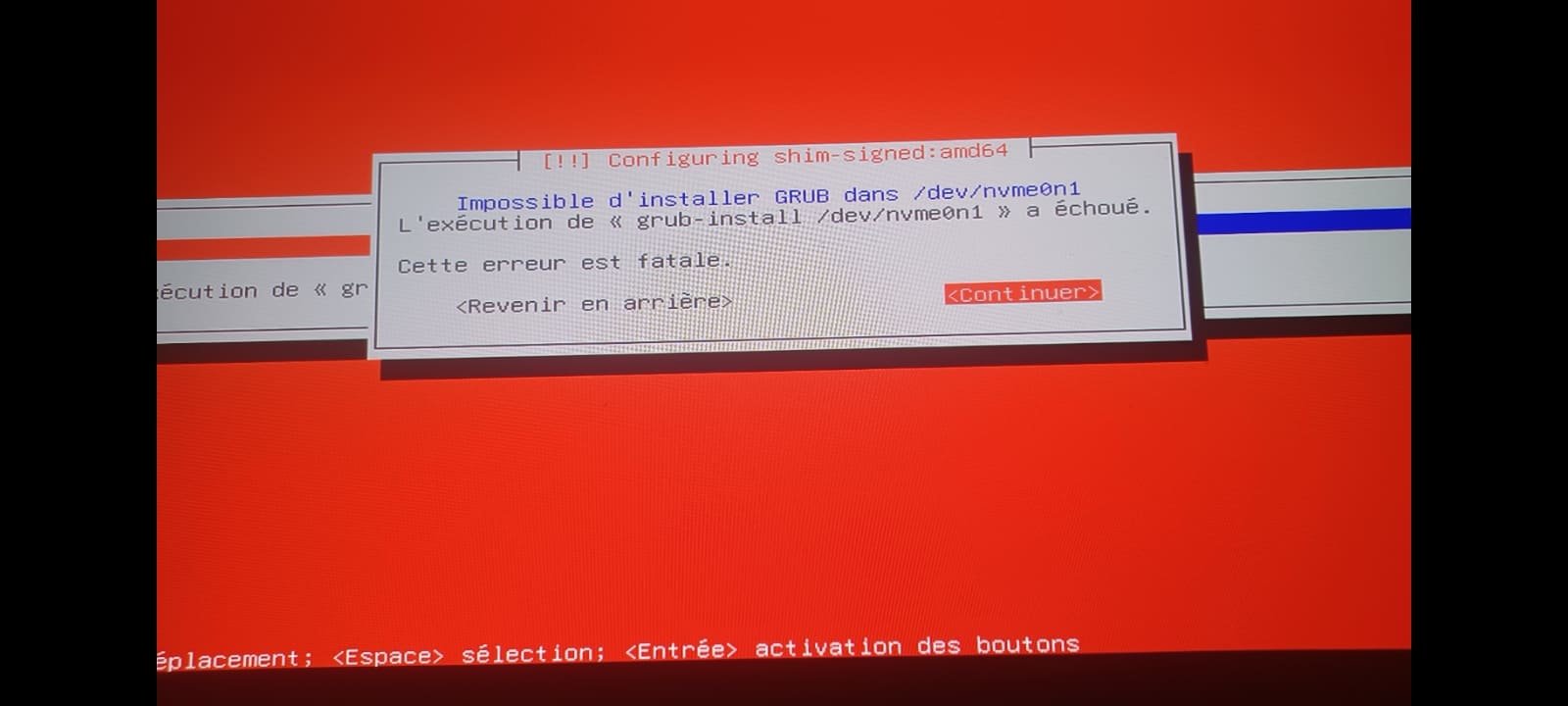
How can i send a screenshot cause i did what you said to do about downloading the install CD and I've got a FATAL ERROR with big red colours on the screen and somehow it glitch and my password I've create and checked twice to see if its correct doesn't work what can i do because for now I can't do anything with the pc
Offline
#12 2026-01-11 21:55
- q4osteam
- Q4OS Team
- Registered: 2015-12-06
- Posts: 6,425
- Website
Re: Help needed: GRUB/boot issue after FreeXP Live session
How can i send a screenshot ...
Post reply > choose file up to 300kB size
Offline
#13 2026-01-11 23:43
- frenchdivision
- Member
- Registered: 2026-01-11
- Posts: 10
Re: Help needed: GRUB/boot issue after FreeXP Live session
Thanks for the help for adding a screenshot and its is the fatal error its in french but it said that there's a BIG problem about the grub and somehow the password doesn't work and the username do even since its the same I'll be grateful for the help
Offline
#14 2026-01-12 09:56
- q4osteam
- Q4OS Team
- Registered: 2015-12-06
- Posts: 6,425
- Website
Re: Help needed: GRUB/boot issue after FreeXP Live session
... i'm always forced to go into the grub and doing this command for loggin :
set root=(hd0,gpt2)
linux /vmlinuz root=/dev/nvme0n1p2 ro
initrd /initrd.img
boot
Are you able to boot Q4OS this way ? If so, run in terminal:
$ sudo grub-install
$ sudo update-grub
and post back what happens.
Offline
#15 2026-01-12 12:51
- frenchdivision
- Member
- Registered: 2026-01-11
- Posts: 10
Re: Help needed: GRUB/boot issue after FreeXP Live session
I was able to do when i tried yesterday but i need to boot again the pc because somehow the password doesn't work and I'm not home for now. From what i remember i already did it with freexp but now since i downloaded what you recommended me (cd ISO) i need to see how if it work again. When I'll be able i will try this but during the installation again of the ISO what do you recommend me to do during the installation and which parameters who's the best for my pc during the installation and choice they give me ? I don't want to do anything wrong thanks !
Offline
#16 2026-01-12 16:30
- frenchdivision
- Member
- Registered: 2026-01-11
- Posts: 10
Re: Help needed: GRUB/boot issue after FreeXP Live session
adminq@q4os-desktop:~$ sudo grub-install
Installation pour la plate-forme x86_64-efi.
grub-install : attention : Cannot set EFI variable Boot0005.
grub-install : attention : efivarfs_set_variable: writing to fd 7 failed: Aucun espace disponible sur le périphérique.
grub-install : attention : _efi_set_variable_mode: ops->set_variable() failed: Aucun espace disponible sur le périphérique.
grub-install : erreur : failed to register the EFI boot entry: Aucun espace disponible sur le périphérique.
adminq@q4os-desktop:~$ sudo update-grub
Generating grub configuration file ...
Found linux image: /boot/vmlinuz-6.12.63+deb13-amd64
Found initrd image: /boot/initrd.img-6.12.63+deb13-amd64
Found linux image: /boot/vmlinuz-6.12.57+deb13-amd64
Found initrd image: /boot/initrd.img-6.12.57+deb13-amd64
Warning: os-prober will not be executed to detect other bootable partitions.
Systems on them will not be added to the GRUB boot configuration.
Check GRUB_DISABLE_OS_PROBER documentation entry.
Adding boot menu entry for UEFI Firmware Settings ...
done
for what i understood the installation went better and was finished i'm not into the live session like i used to be in "freexp"
Offline
- Registered users online in this topic: 0, guests: 1