You are not logged in.
- Topics: Active | Unanswered
Pages: 1
Topic closed
#1 2025-12-25 09:29
- theasmitkid
- Member
- From: NCT of Delhi
- Registered: 2025-01-26
- Posts: 357
See you later, Q4OS
I've moved to Linux Mint 22.2 XFCE Edition as a daily driver and I'm beyond happy! A little config got the memory usage to the same as TDE, I've gotten ppa support, it's a lot faster too since most of the apps i use are based on GTK, mtp works in the default file manager, there's global menu support, wine and android translation layer doesn't randomly crash or disappear anymore, htop no longer makes a process yellow+doesn't make the top bar disappear on clicking anywhere, I can choose mirror for packages easily using the software sources app, xakar works aswell~
I don't see myself switching back in a low end device. But i can see myself using Plasma on QuarkOS or Q4OS Testing on a modern device.
I'll continue being active on the forums like before and report other issues i had faced but thought they were normal.
Thankyou Q4OS team for this wonderful operating system, it really helped me to transition from windows that I've been using for 10 years 
Coding & Robotics Enthusiast | Windows 7 x86 @ n2600 · 2GB · 320GB HDD (No graphics acceleration available in linux)
Offline
#2 2025-12-25 22:26
- q4osteam
- Q4OS Team

- Registered: 2015-12-06
- Posts: 6,437
- Website
Re: See you later, Q4OS
You can also install Q4OS XFCE desktop. Or Quarkos XFCE with PPA support as well.
A little config got the memory usage to the same as TDE ...
XFCE is nowhere near as lightweight as Trinity.
Offline
#3 2025-12-26 00:25
- theasmitkid
- Member
- From: NCT of Delhi
- Registered: 2025-01-26
- Posts: 357
Re: See you later, Q4OS
Here is resource usage in almost similar environment. I have proton vpn, kde connect, gvfs & all backends, blueman and thunar daemon running. +The global menu and the resource monitor (which I wrote) plugins on the top panel.
Idling at 595~610mbs on bootup with all these apps installed n running 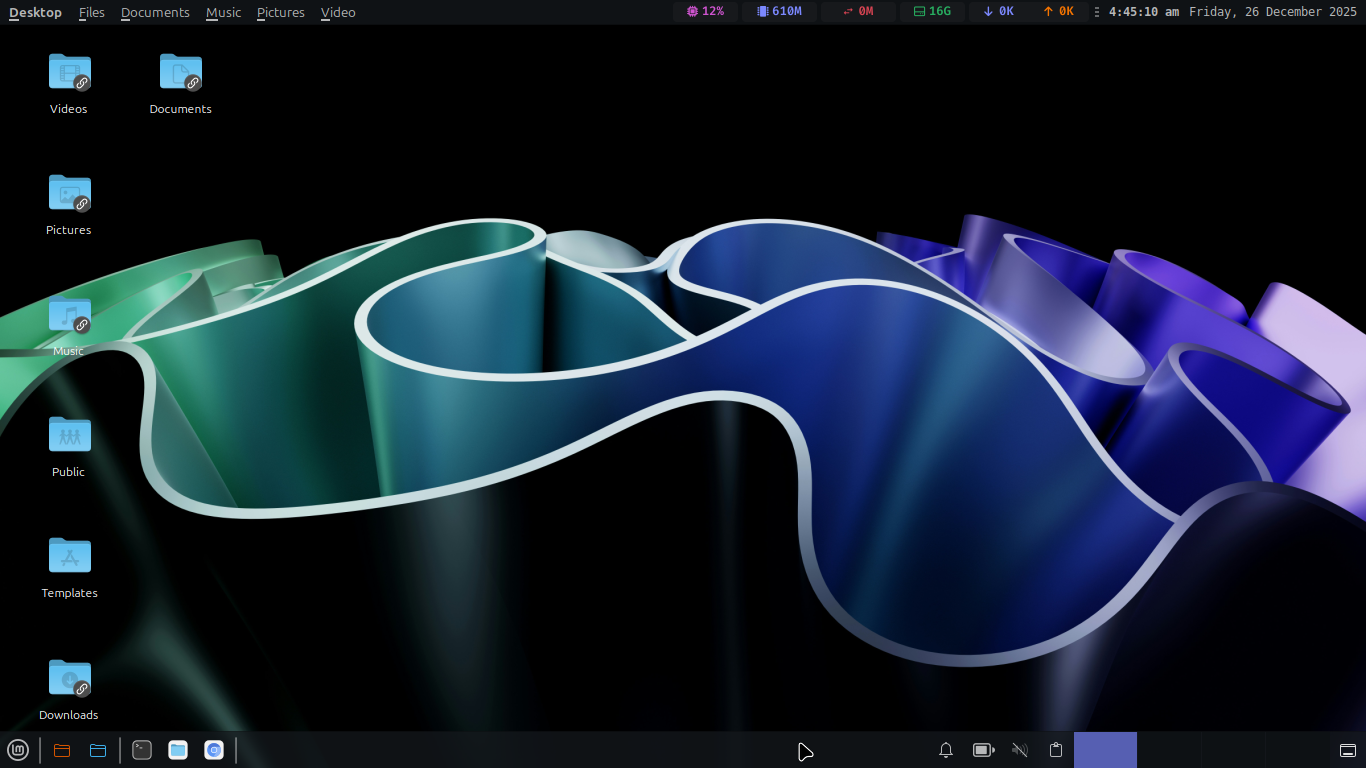
Since I'd need to install either kde or tde along with XFCE, I won't really wanna use QuarkOS on this laptop as sddm (kde) tdm (tde) etc which would run if I have multi DE setup.. and take more resources than plain XFCE.
Coding & Robotics Enthusiast | Windows 7 x86 @ n2600 · 2GB · 320GB HDD (No graphics acceleration available in linux)
Offline
#4 2025-12-26 11:09
- q4osteam
- Q4OS Team
- Registered: 2015-12-06
- Posts: 6,437
- Website
Re: See you later, Q4OS
Here is resource usage in almost similar environment. ...
Again, XFCE is nowhere near as lightweight as Trinity, as we are pretty sure it is. The screenshot you posted doesn't really tell us much about the actual lightness and resource requirements of the desktop environments. If you want to compare desktop environments, you should use more complex and exact metrics side by side. Also, the lightness of a desktop environment is more than just about memory usage.
Since I'd need to install either kde or tde along with XFCE, I won't really wanna use QuarkOS on this laptop as sddm (kde) tdm (tde) etc which would run if I have multi DE setup.. and take more resources than plain XFCE.
If you install Quarkos Trinity and XFCE as a second desktop, you only need about 250 MB of extra disk space for TDE. Trinity will not affect the installation or performance of XFCE in any way. And as a bonus, you will have a Trinity session ready to go. All in all, we will take some steps to allow the installation of XFCE as an exclusive desktop.
Offline
#5 2025-12-26 17:06
- theasmitkid
- Member
- From: NCT of Delhi
- Registered: 2025-01-26
- Posts: 357
Re: See you later, Q4OS
Again, XFCE is nowhere near as lightweight as Trinity, as we are pretty sure it is. The screenshot you posted doesn't really tell us much about the actual lightness and resource requirements of the desktop environments. If you want to compare desktop environments, you should use more complex and exact metrics side by side. Also, the lightness of a desktop environment is more than just about memory usage.
Oh I'm calculating the metrics in python using the same algorithm as htop.. well atleast its what I have experienced on my device, xfce4 (that I have used for 2 days) feels faster than TDE (that i used for 1.5 years)
I still do love TDE the most, but in my use case XFCE feels better
If you install Quarkos Trinity and XFCE as a second desktop, you only need about 250 MB of extra disk space for TDE. Trinity will not affect the installation or performance of XFCE in any way. And as a bonus, you will have a Trinity session ready to go>
I wasn't really talking about storage, when I tried out XFCE as second desktop with TDE, tdm tdewallet artsd etc were running in background as a result their respective TQt shared libraries were loaded in memory with these using~10% idle cpu and ~27mb ram , that won't be used in the gtk apps in XFCE. Other drawback of multi-DE setup I've encountered is that all DEs have different configs, so if i need to change something, I'd have to change in every DE.. which is kind of a pain
All in all, we will take some steps to allow the installation of XFCE as an exclusive desktop.
That's a good news! I'd love to contribute~ gtk with c is great and much more documented than tqt. I've finished making this top panel genmon script, clicking it opens this overview popup written in C/gtk3. I'd love to dedicate it to Q4OS/QuarkOS XFCE Edition 
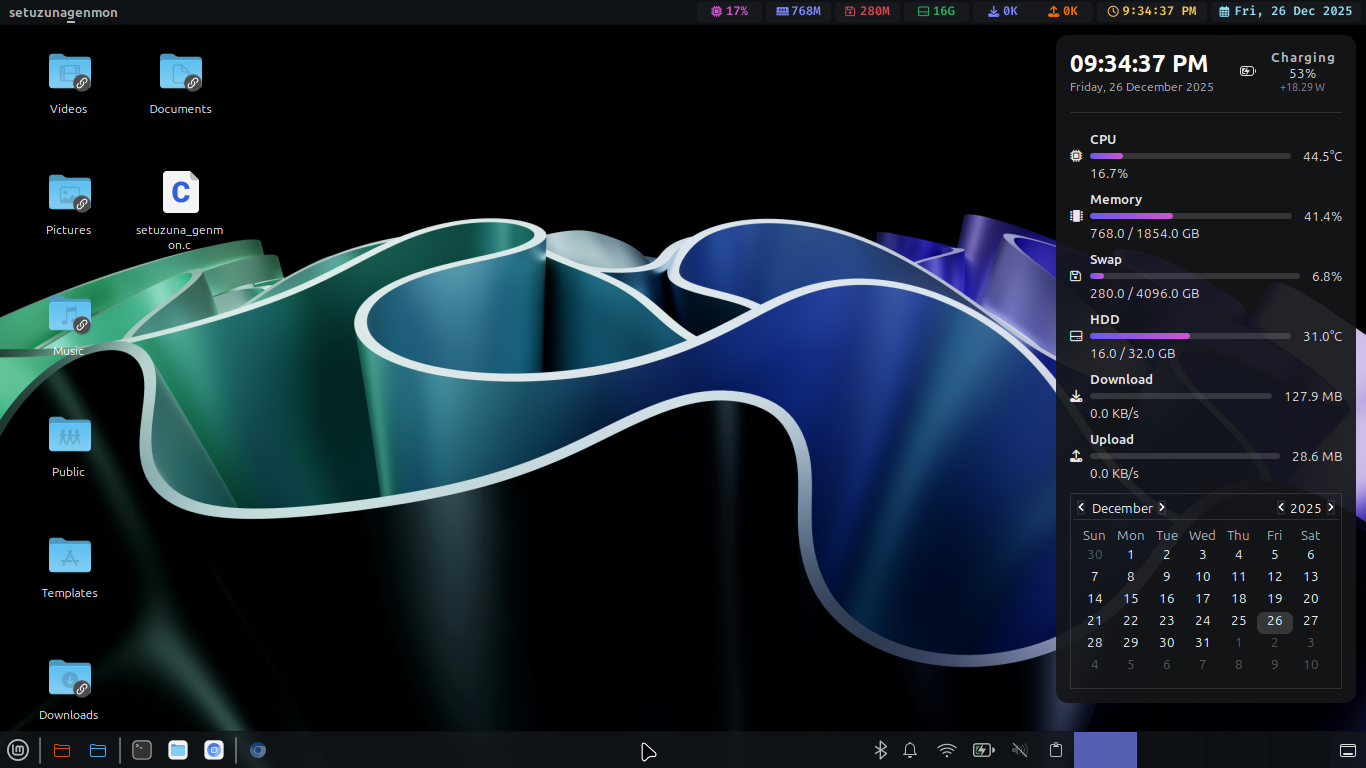
Last edited by theasmitkid (2025-12-26 17:58)
Coding & Robotics Enthusiast | Windows 7 x86 @ n2600 · 2GB · 320GB HDD (No graphics acceleration available in linux)
Offline
#6 2025-12-26 17:39
- q4osteam
- Q4OS Team
- Registered: 2015-12-06
- Posts: 6,437
- Website
Re: See you later, Q4OS
... in my use case XFCE feels better
That's a good point and a reason to use XFCE.
... when I tried out XFCE as second desktop with TDE, tdm (the app where you choose user, DE, etc) was running in background with 3~5% idle ram and 7mb ram, there were also some more applications, which i don't remember.. which loads TQt libraries into memory ...
We likely don't understand what you want to say. If you install TDE + XFCE on Quarkos or Q4OS, you don't need to use TDM nor load any TQt libraries. Just use XFCE exactly as a single desktop and none of TQt need to be loaded.
Offline
#7 2025-12-26 18:12
- q4osteam
- Q4OS Team
- Registered: 2015-12-06
- Posts: 6,437
- Website
Re: See you later, Q4OS
Please double consider editing posts what was replied to. It makes discussion mad. It's always better to make a new post.
... tdm tdewallet artsd etc ...
Again, don't use TDM. No TQt will be loaded in RAM.
Offline
#8 2025-12-26 18:31
- theasmitkid
- Member
- From: NCT of Delhi
- Registered: 2025-01-26
- Posts: 357
Re: See you later, Q4OS
Coding & Robotics Enthusiast | Windows 7 x86 @ n2600 · 2GB · 320GB HDD (No graphics acceleration available in linux)
Offline
#9 2025-12-28 21:51
- Rademes
- Member

- From: Latvia
- Registered: 2015-12-13
- Posts: 681
Re: See you later, Q4OS
Here is resource usage in almost similar environment.
I will totally disagree with you.
I have tried to install and use Linux Mint 22.2 XFCE on my old Intel Core 2 Quad Q9550 PC with 4 GB DDR2 RAM and 240GB modern SSD.
Linux Mint, even after all my optimizations, and despite memory consumption about 800 MB, was slow and sluggish. The programs opened very slowly, Firefox was very slow, there were almost impossible to even watch YouTube videos at 720p, and when I tried to watch videos at 1080p, the computer simply freezed. I was unable to move the mouse, key-presses were not recognized, the only way was hard reboot by pressing a button on PC case. LibreOffice opened after 8 seconds... I have never experienced such sluggishness on this PC. Yes, yes, I know, that this PC is very old, but, XFCE is also the lightweight desktop environment.
Also, I have remembered what Linux Mint developers have said in one of their forum post. "However, modern day operating systems such as Linux Mint are not guaranteed to work on old computers. That is not the purpose of Linux-based distros. They are an alternative to Windows and MacOS and need to run on current hardware." https://forums.linuxmint.com/viewtopic. … 9#p2328149
So, I decided to switch to Q4OS 6 TDE. For my old PC that was like "Throw a mountain off its shoulders". Fast, responsive, without lags, freezes (except some glitches)! I was so thrilled about the ability to resurrect this old PC, that I for the first time since 2016 started to read TDE manuals and LEARN how to use it! Since then my usage was like "try and see the result, and, report the bug if something is wrong". I have never tried to learn in deep.
Yes, you may argue with me, that the RAM usage is the same, but, the main thing is the actual speed an responsiveness of the desktop environment. And in that perspective, TDE is way much better than XFCE. Also, TDE has much more configuration options and it has much better documentation than XFCE.
In conclusion, I must say, that for old computers, TDE is the best! And, believe me, I know, what I am saying, because I have tried many lightweight distros, such as AntiX, Puppy, Fatdog, EasyOS, WattOS.
Update: Here is my memory consumption, while running TDE, Konqueror file manager and VLC player.
Without them, it is around 500-560 MB. Smaller than in Windows XP back in 2008.
Last edited by Rademes (2025-12-28 22:12)
Before asking for help please read this topic: https://www.q4os.org/forum/viewtopic.php?id=3502
Offline
#10 2025-12-29 00:29
- theasmitkid
- Member
- From: NCT of Delhi
- Registered: 2025-01-26
- Posts: 357
Re: See you later, Q4OS
To be honest I only chose mint because I wanted a plain XFCE environment, and ubuntu base (because I find ppa really convenient). I would've had definitely chosen QuarkOS if it had exclusive XFCE support, and I'd still switch the moment q4osteam allows an exclusive XFCE desktop as they mentioned above.
So far there are a few things about mint I've liked so far
- sticky, syncs with styncynotes
- mintbackup, backing up just user configs and files is extremely convenient
- driver updater, it just said that something is wrong with my realtek wifi drivers and i manually downloaded the correct one
- sensor viewer, the Q4OS welcome screen also has something like this.. but can't open with outside of welcome screen, and it's gonna be even nicer in 22.3
- software manager, tho I removed flatpaks instantly, it's still a lot nicer than synaptic package manager
- software sources, finally i can easily choose mirrors from Asia which are so much faster than the default
And what i dislike
- the newer kernel removed kms for older i915 devices.. so no more Plymouth for me
- legacy/bios grub installation failed.. had to install manually.. pain
- bloated base installation.. gosh i miss small isos and profile choosing like Q4OS, but it would have had been really nice if I had zero experience with Linux, coz literally everything i need is preinstalled
- no quick support like Q4OS.. had to use chatgpt for help
As you can see my device is significantly slower than yours, yet XFCE runs definitely faster than TDE for me, all apps are as responsive as the desktop environment itself, the reason being that both are written in GTK (well i use modern qt apps too, they run faster on xfce for some reason).
XFCE is less glitchy than TDE, while having more customizability and properly updated docs and application.. and that's another reason I am liking XFCE now. I still think kate-trinity was the best.. but xed is not that bad afterall..
LXQt and LXDE must be faster than both TDE and XFCE but my last experience with lubuntu a couple years ago was not that fond.. so I'll just stay away from them for now.
TDE doesn't have many maintainers and I was considering being one.. but lol I'll be turning 17 in 2 days.. and this TDE is older than that, there's a small handful of users and at this crucial age, I don't really wanna learn this complete new thing. Docs and APIs have K* and TDE* 3 4 so mixed up it was a headache, i used to dislike GTK but damn it feels so much better now.
Oldest device I've used is XP, and I like modern ui more
Here's screenshot of me running vlc with a movie, thunar file manager, terminal with htop running, and plain unoptimised ungoogled chromium (i turned off the global menu and my panel app so it's fair comparison with TDE). Also full xdg portal, kdeconnect daemon and, gvfs is running in background.. a lot lot more featureful than TDE 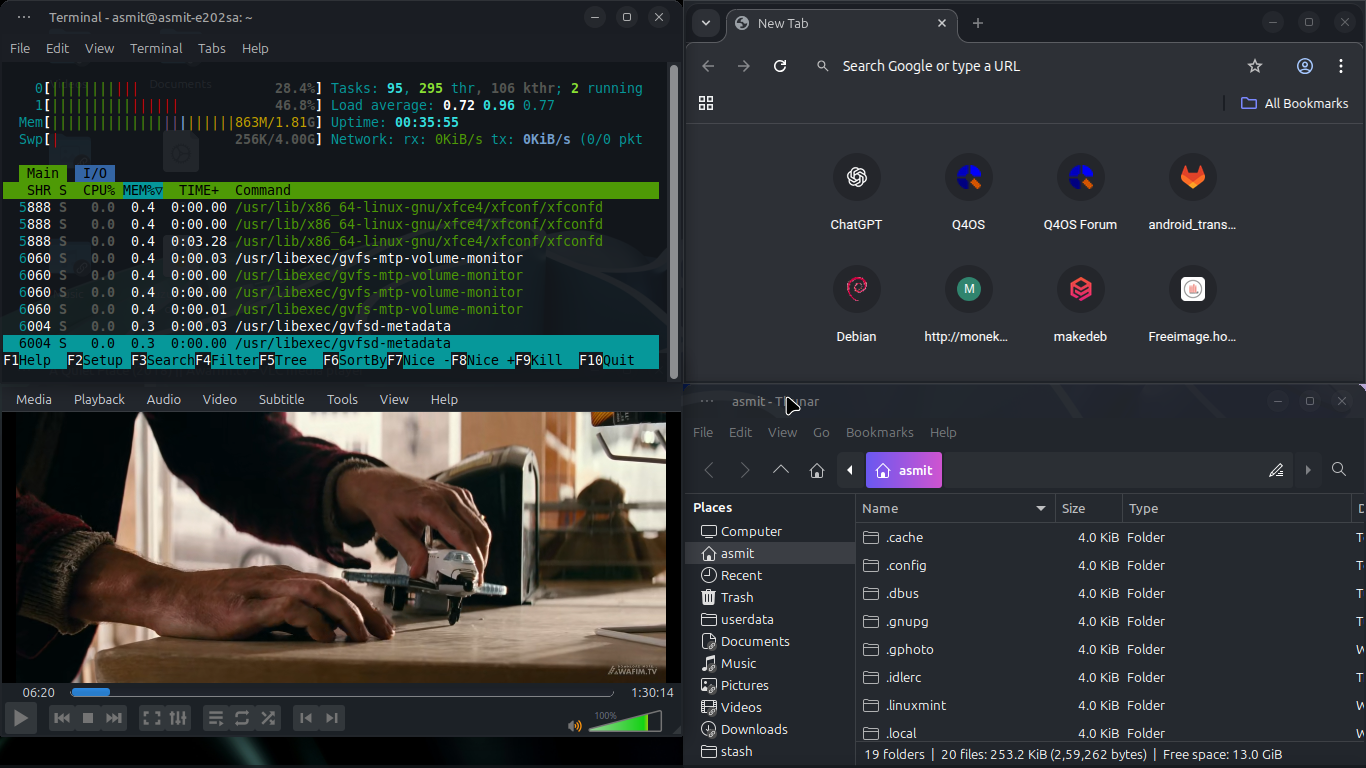
Comparing with your screenshot, there's mtp support, ntfs trash support, kdeconnect, xdg portals support and a fully featured modern browser, all with just 100mb more
Last edited by theasmitkid (2025-12-29 00:38)
Coding & Robotics Enthusiast | Windows 7 x86 @ n2600 · 2GB · 320GB HDD (No graphics acceleration available in linux)
Offline
#11 2025-12-29 12:11
- q4osteam
- Q4OS Team
- Registered: 2015-12-06
- Posts: 6,437
- Website
Re: See you later, Q4OS
Comparing with your screenshot, there's mtp support, ntfs trash support, kdeconnect, xdg portals support and a fully featured modern browser, all with just 100mb more
The only thing your screenshot proves is that your system is much more memory hungry than of @Rademes's. Your system even needs swapping to work
Mint is based on Ubuntu, so the comparable system is Quarkos https://sourceforge.net/projects/quark-os/
sticky, syncs with styncynotes
You can use it on Quarkos as well, even on Q4OS.
mintbackup, backing up just user configs and files is extremely convenient
You can use backintime and deja-dup backup tools on Quarkos and Q4OS.
driver updater, it just said that something is wrong with my realtek wifi drivers and i manually downloaded the correct one
Yes, it may be valuable tool, if it's reliable enough. We will check the code and consider porting to Q4OS.
sensor viewer...
There are a few viewers on Quarkos and Q4OS too, for example psensor.
software manager ...
Synaptic is the best and recommended option by our meaning.
software sources, finally i can easily choose mirrors from Asia which are so much faster than the default
You can select exactly the same Apt mirrors on Quarkos and Q4OS as well. Mint uses the same Ubuntu repositories as Quarkos.
LXQt and LXDE must be faster than both TDE and XFCE ...
Why do you think so ?
... my device is significantly slower than yours, yet XFCE runs definitely faster than TDE for me, all apps are as responsive as the desktop environment ... well i use modern qt apps too, they run faster on xfce for some reason).
We guess it was something wrong with your TDE installation as we can't reproduce that. Qt applications should perform the same on TQt or GTK based X11 desktop.
Last edited by q4osteam (2025-12-29 14:17)
Offline
#12 2025-12-29 17:51
- theasmitkid
- Member
- From: NCT of Delhi
- Registered: 2025-01-26
- Posts: 357
Re: See you later, Q4OS
The only thing your screenshot proves is that your system is much more memory hungry than of @Rademes's. Your system even needs swapping to work
I mean you could say so.. but all the services i use are what I need on daily basis.. can you run chrome or firefox with ~86mb on TDE? Plus a movie cached on movie compared to a song.. sounds pretty unfair of a comparison to me~
Out of the 4gb, 2gb of swap is for hibernation, other 2gb is zram. The 256 kilobytes of zram could be because of different swappiness config and the fact that I have half the amount of ram compared to what they do 
theasmitkid wrote:sticky, syncs with styncynotes
You can use it on Quarkos as well, even on Q4OS.
That's great, i thought it was a mint exclusive app
theasmitkid wrote:mintbackup, backing up just user configs and files is extremely convenient
You can use backintime and deja-dup backup tools on Quarkos and Q4OS.
Oh wow i had no idea!
theasmitkid wrote:driver updater, it just said that something is wrong with my realtek wifi drivers and i manually downloaded the correct one
Yes, it may be valuable tool, if it's reliable enough. We will check the code and consider porting to Q4OS.
Would really appreciate it
theasmitkid wrote:sensor viewer...
There are a few viewers on Quarkos and Q4OS too, for example psensor.
My bad i mixed up the names.. I was actually talking about mintreport, the system information app
theasmitkid wrote:software manager ...
Synaptic is the best and recommended option by our meaning.
Personal choices differs, i feel like their software manager is way easier for beginners to understand, and it'd be a great alternative to q4os's software installer. Meanwhile synaptic is quite confusing and has pretty outdated UI\UX
theasmitkid wrote:software sources, finally i can easily choose mirrors from Asia which are so much faster than the default
You can select exactly the same Apt mirrors on Quarkos and Q4OS as well. Mint uses the same Ubuntu repositories as Quarkos.
Oh are there any gui mirror selector which could test speeds of all the mirrors?
theasmitkid wrote:LXQt and LXDE must be faster than both TDE and XFCE ...
Why do you think so ?
Mmm i guess it's different than them, its not a complete ecosystem and just a collection of pretty light apps, even the wm is openbox
We guess it was something wrong with your TDE installation as we can't reproduce that. Qt applications should perform the same on TQt or GTK based X11 desktop.
I wish that was the case.. but it's not.. I've tried running same portable binary of ungoogled chromium in Q4OS TDE Live and Mint 19 Cinnamon Live and Mint 22 XFCE Live. Speeds were XFCE>cinnamon>TDE. KDE Connect is starts up extremely fast in plasma, a little slower in XFCE, and a lot slower in TDE (on my device, once again it could be a hardware fault) My current Mint
Last edited by theasmitkid (2025-12-29 17:53)
Coding & Robotics Enthusiast | Windows 7 x86 @ n2600 · 2GB · 320GB HDD (No graphics acceleration available in linux)
Offline
#13 2025-12-29 18:40
- q4osteam
- Q4OS Team
- Registered: 2015-12-06
- Posts: 6,437
- Website
Re: See you later, Q4OS
Again, we claim TDE is much more efficient and snappier than Debian XFCE and even more than Ubuntu/Mint XFCE. We guess something was wrong with your installation.
If you would post a testing what we can reproduce and verify, it would be a great base for valuable discussion.
Offline
Pages: 1
Topic closed
- Registered users online in this topic: 0, guests: 1