You are not logged in.
- Topics: Active | Unanswered
#1 2025-12-01 21:10
- That Random Guy
- Member
- Registered: 2018-02-02
- Posts: 12
Cannot get screen temperature adjusted using Q4OS on Raspberry Pi
Hello,
I have been using the "experimental" image for Q4OS on my Raspberry Pi 5 Model B Rev 1.0 for a while now and for the life of me I cannot determine why something like Redshift doesn't work with my monitor.
I have tried other solutions that apparently do like redshift does such as brightnessctl and sct but none of these seem to work.
I even eventually figured out that I can actually just adjust the brightness from Q4OS using the TDE Monitor & Display settings. (see attached)
I tweaked around with those settings but even after changing my monitor and such, the screen never adjusts. It is the same brightness to me as when I first installed and I don't believe it ever worked.
I'm at a loss what to do now and so I was thinking I could get others to chime in or at least help me figure out why. Perhaps the Raspberry Pi image does not include something the regular images do? Maybe it's a driver? Or maybe a bug?
TIA 
Info:
lsb_release
No LSB modules are available.
Distributor ID: Raspbian
Description: Raspbian GNU/Linux 12 (bookworm)
Release: 12
Codename: bookworm
uname
Linux 6.12.47+rpt-rpi-v8 #1 SMP PREEMPT Debian 1:6.12.47-1+rpt1~bookworm (2025-09-16) aarch64 GNU/Linux
P.S. - I actually have another Windows PC that sometimes uses the same monitor but the Windows-native "nightlight" feature works there--so I know it's something I'm not doing right on Q4OS or something just isn't set right yet.
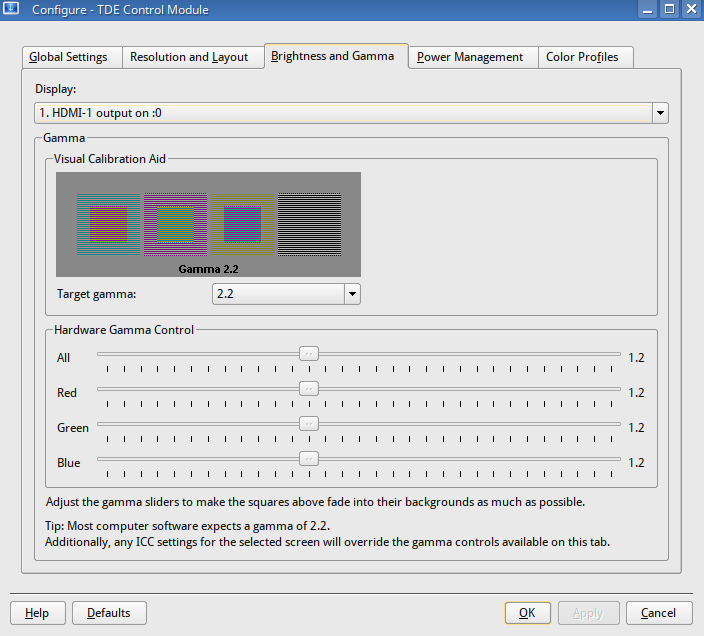
Last edited by That Random Guy (2025-12-01 21:14)
Offline
#2 2025-12-01 21:19
- q4osteam
- Q4OS Team

- Registered: 2015-12-06
- Posts: 6,430
- Website
Re: Cannot get screen temperature adjusted using Q4OS on Raspberry Pi
We can recommend you to install "redshift-gtk" package, login to the session and see the applet icon in system tray. You may need to configure your geo location to make that work properly. Redshift-gtk is small, simple and works just fine in Trinity.
Offline
#3 2025-12-02 01:16
- That Random Guy
- Member
- Registered: 2018-02-02
- Posts: 12
Re: Cannot get screen temperature adjusted using Q4OS on Raspberry Pi
@q4osteam
I remember trying that a while back but I just tried it again and no luck still.
Do you think it maybe has to do with driver? I am trying to use Redshift without geoclue as I don't want to use geoclue.
When I run redshift (not the gtk) from terminal, it runs without error and eventually just spits out the config settings I set in local config file as expected.
I don't think it's redshift in particular since none of the other solutions are doing anything either. I think it's something else related to either Trinity or the video driver or video server.
Offline
#4 2025-12-02 09:07
- q4osteam
- Q4OS Team
- Registered: 2015-12-06
- Posts: 6,430
- Website
Re: Cannot get screen temperature adjusted using Q4OS on Raspberry Pi
What is output of:
$ /usr/bin/redshift -v
Offline
- Registered users online in this topic: 0, guests: 1