You are not logged in.
- Topics: Active | Unanswered
#1 2020-04-03 16:14
- BrJPedro
- Member
- From: Monte
- Registered: 2018-03-20
- Posts: 100
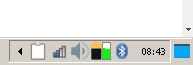
How can I force icons for some TDE icons on the system tray?
Usually the icon theme don't apply icons for TDE applets on the system tray, like TDEPowersave, BT or Klipper.
How can I "force" manually a icon to these applets?
Offline
#2 2020-04-03 16:34
- Dai_trying
- Member

- From: UK
- Registered: 2015-12-14
- Posts: 2,994
Re: How can I force icons for some TDE icons on the system tray?
You have an application that you want to display an icon?
Offline
#3 2020-04-04 12:44
- BrJPedro
- Member
- From: Monte
- Registered: 2018-03-20
- Posts: 100
Re: How can I force icons for some TDE icons on the system tray?
Look on the image. I'm using Paper Q4OS icons. But the Network Manager doesn't use Paper icons, it stays with the default TDE icon. I wanna change that.
Offline
#4 2020-04-04 15:48
- Dai_trying
- Member
- From: UK
- Registered: 2015-12-14
- Posts: 2,994
Re: How can I force icons for some TDE icons on the system tray?
I'm not too sure on that, there is a thread by Jaerrib with information about customizing a theme with new icons and resulted in another icon theme (waterleaf) I would hope that he or the devs might have some better tips on this.
Offline
- Registered users online in this topic: 0, guests: 1