You are not logged in.
- Topics: Active | Unanswered
#1 Yesterday 16:11
- Nifty1955
- Member
- Registered: 2026-10-18
- Posts: 3
Band across image on screen- solved, with thanks for the reply.
Hi all
I'm using TDE, which I really like.
Unfortunately, I have a band across the screen. I've tried all manner of settings, but I can't seem to get it to disappear.
I'm attaching an image, but it's not very good- hard to take a picture of a laptop screen.
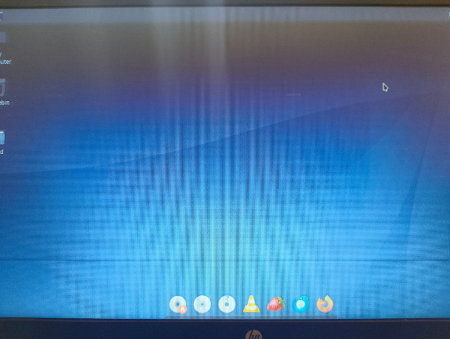
You can see the band about a quarter of the way up the screen.
I'm using an old i5 HP Probook 650 G3 with a resolution of 60
Hope this is enough information.
I'd really appreciate any help.
Regards
D
Last edited by Nifty1955 (Today 14:21)
Offline
#2 Yesterday 21:44
- q4osteam
- Q4OS Team

- Registered: 2015-12-06
- Posts: 6,489
- Website
Re: Band across image on screen- solved, with thanks for the reply.
First, check if the band appears on the BIOS/boot screen or stays in the exact same spot when you take a screenshot and drag the window around - if it doesn't move, it's a hardware issue with the screen or cable.
If it only happens in Q4OS, open Trinity Control Center -> Desktop -> Window Behavior -> Translucency and uncheck "Use translucency/shadows" to rule out a compositor glitch, and verify your native resolution at 60Hz under Peripherals -> Display.
Let us know if it shows up in the BIOS
Offline
#3 Today 12:06
- Nifty1955
- Member
- Registered: 2026-10-18
- Posts: 3
Re: Band across image on screen- solved, with thanks for the reply.
Hi
Many thanks for the reply. I appreciate it.
It turns out that it simply doesn't "like" Plank. As soon as I removed it, the problem disappeared.
I don't know why that should be.
The screen cable has just been replaced, so it's unlikely that was the cause.
Anyway, I'll mark this as solved.
Thanks, again.
Kind regards
D
Offline
#4 Today 12:26
- q4osteam
- Q4OS Team
- Registered: 2015-12-06
- Posts: 6,489
- Website
Re: Band across image on screen- solved, with thanks for the reply.
Thanks for letting us know 
Offline
- Registered users online in this topic: 0, guests: 2