You are not logged in.
- Topics: Active | Unanswered
#1 2026-10-12 06:03
- ChasHenry
- Member
- Registered: 2019-03-13
- Posts: 50
Notification popups no longer disappear automatically.
Hello,
I would appreciate some advice from the Q4OS team or anyone familiar with KDE Plasma on Q4OS Aquarius.
I have a long-standing problem with KDE notification popups. Although the notification settings specify "Hide after: 10 seconds", the popups remain on screen indefinitely, even after the operation that generated them has finished.
Interestingly, the problem disappeared on its own for several weeks, but returned following a system update. I have been unable to determine what caused either the temporary improvement or the recurrence.
My system:
Operating system: Q4OS Aquarius, Debian GNU/Linux 12
KDE Plasma: 5.27.5
KDE Frameworks: 5.103.0
Qt: 5.15.8
Kernel: 6.1.0-53
Graphics: NVIDIA GeForce GT 710
With the help of AI - Troubleshooting undertaken:
1. Verified that System Settings ==> Notifications ==>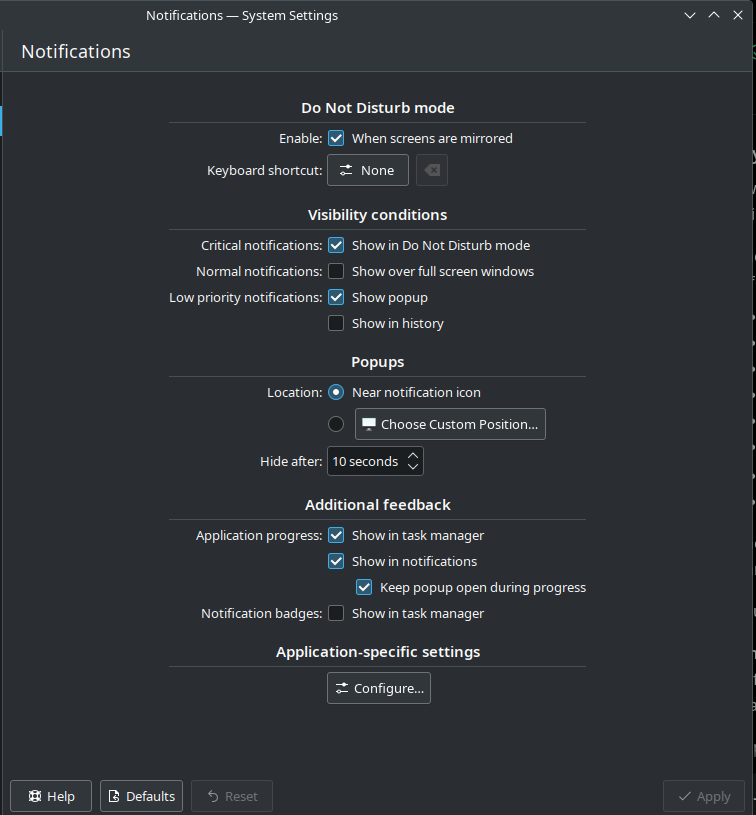 Popups specifies "Hide after: 10 seconds".
2. Restarted plasmashell using the KDE Plasma 5 commands kquitapp5 plasmashell and kstart5 plasmashell. This did not resolve the notification problem. I subsequently restored the desktop shell using plasmashell --replace.
3. Reproduced the problem by copying a small file in Dolphin and waiting for the notification to disappear. It remained on screen indefinitely after the operation had finished.
4. Checked the installed versions and repository candidates using apt policy. Both plasma-workspace and plasma-workspace-data are installed at version 4:5.27.5-2+deb12u2, with no newer candidate available from my configured repositories.
5. Checked the installed Qt packages libqt5core5a, libqt5qml5 and libqt5quick5. No newer candidates were available for these packages either.
6. Examined the Q4OS q4os-desktop-plasma changelog for versions 4.13-deba1 and 4.14-deba1. The entries did not mention notification handling.
7. Ran dpkg -V plasma-workspace-data; it returned no output.
During the restart of Plasma, the following notification-related messages appeared in Konsole:
Cyclic dependency detected between .../org.kde.plasma.notifications/contents/ui/global/Globals.qml and .../NotificationHeader.qml
Cyclic dependency detected between .../org.kde.plasma.notifications/contents/ui/global/Globals.qml and .../ThumbnailStrip.qml
I don't know whether these warnings are relevant to the problem.
My question:
I came across the KDE Discuss thread “Notifications Not Disappearing”, in which a KDE developer attributed the reported issue to a Qt 6.11.1 regression.
However, my system uses Qt 5.15.8 and Plasma 5.27.5, so I understand that this may be an unrelated issue.
Could the Q4OS team advise whether this notification timeout problem is known to affect Aquarius, and whether there is a recommended diagnostic procedure or a compatible package update that might resolve it?
I am particularly reluctant to install a different Qt version, downgrade packages, or make changes that could destabilise my existing desktop. I would therefore prefer to establish the cause before attempting any further modifications.
Thank you for your time and assistance.
Offline
#2 2026-10-12 08:15
- q4osteam
- Q4OS Team

- Registered: 2015-12-06
- Posts: 6,489
- Website
Re: Notification popups no longer disappear automatically.
This isn't specific to Q4OS. Aquarius runs Debian's stock Plasma 5.27.5 (plasma-workspace 5.27.5-2+deb12u2, no newer build in bookworm), and Q4OS doesn't change notification behaviour. It's a known upstream Plasma bug: https://bugs.kde.org/show_bug.cgi?id=413203 . KDE closed it once it stopped reproducing on Plasma 6, so no fix will come to Plasma 5.27. The "Cyclic dependency" lines are normal Plasma 5.27 startup noise and have nothing to do with it.
Workaround: open the notification history in the tray and use "Clear All". Timeouts usually work again for a while after that.
Two things that also hold a popup open by design: the mouse cursor resting over the popup, and, for file copies, the setting "Application progress -> Keep popup open during progress" (System Settings -> Notifications). Turn that setting off if you want copy jobs to close too.
If it still happens after "Clear All" with a plain test like
$ notify-send -t 5000 test
please add your details to the KDE bug above.
Offline
#3 2026-10-12 09:56
- ChasHenry
- Member
- Registered: 2019-03-13
- Posts: 50
Re: Notification popups no longer disappear automatically.
Thank you for your suggestions. I cleared all notifications and tested copying a small file, but the popup still does not disappear after the configured 10-second timeout.
I also unticked “Keep popup open during progress”, but this made no observable difference. The problem persists.
Unless you advise otherwise, I simply regard this as an upstream Plasma bug and keep this post unresolved.
Thanks again for your assistance.
Added later 1 h 39 min 53 s:
This isn't specific to Q4OS. Aquarius runs Debian's stock Plasma 5.27.5 (plasma-workspace 5.27.5-2+deb12u2, no newer build in bookworm), and Q4OS doesn't change notification behaviour. It's a known upstream Plasma bug: https://bugs.kde.org/show_bug.cgi?id=413203 . KDE closed it once it stopped reproducing on Plasma 6, so no fix will come to Plasma 5.27. The "Cyclic dependency" lines are normal Plasma 5.27 startup noise and have nothing to do with it.
Workaround: open the notification history in the tray and use "Clear All". Timeouts usually work again for a while after that.
Two things that also hold a popup open by design: the mouse cursor resting over the popup, and, for file copies, the setting "Application progress -> Keep popup open during progress" (System Settings -> Notifications). Turn that setting off if you want copy jobs to close too.
If it still happens after "Clear All" with a plain test like
$ notify-send -t 5000 test
please add your details to the KDE bug above.
A new Bug report #526965 has been created.
Added later 2 h 08 min 29 s:
An update on my notification problem:
Following your advice, I submitted KDE Bug 526965 concerning notification popups that remain visible indefinitely on Q4OS Aquarius with Plasma 5.27.5.
The KDE Bug Janitor has now closed the report as RESOLVED — DOWNSTREAM, explaining that Plasma 5.27.5 is no longer maintained by KDE and that support for older releases is the responsibility of the distribution.
I understand the reasoning, although the problem remains unresolved on my system.
Could the Q4OS team advise whether there is a supported upgrade path to a maintained version of Plasma, or whether there is another workaround appropriate for Q4OS Aquarius?
Thank you again for your assistance.
Offline
#4 2026-10-12 14:04
- q4osteam
- Q4OS Team
- Registered: 2015-12-06
- Posts: 6,489
- Website
Re: Notification popups no longer disappear automatically.
The KDE Bug Janitor has now closed the report as RESOLVED — DOWNSTREAM, explaining that Plasma 5.27.5 is no longer maintained by KDE and that support for older releases is the responsibility of the distribution.
Well, this should be responsibility of Debian Bookworm. Q4OS follows Debian and may fix only certain upstream bugs. Unfortunately, we know no supported upgrade path excluding a new fresh Q4OS-6 installation.
As a workaround, we would also try to completely reset the user in question configuration in the /home/user/ directory, or even better create new fresh user account and see if the issue happens there too. If it's fixed, migrate data to the new user account.
Offline
#5 2026-10-13 02:08
- ChasHenry
- Member
- Registered: 2019-03-13
- Posts: 50
Re: Notification popups no longer disappear automatically.
Thank you for your time and for the suggestions provided by the Q4OS team.
I appreciate that maintaining older software releases presents challenges, and I understand that this issue may ultimately depend on whether a suitable fix becomes available through Debian. Nevertheless, it is a little disappointing that, despite the problem being reproducible, there appears to be no straightforward solution for Aquarius.
As I have already done more than enough diagnostic work, I am reluctant to continue pursuing the matter indefinitely, particularly given the limited prospect of a resolution. It seems that my most practical option, if I wish to eliminate this persistent annoyance, is to consider moving to Q4OS Andromeda. I will first test it using a Live USB before deciding whether to proceed with a fresh installation.
Thank you again for your time and assistance. It is much appreciated.
Offline
- Registered users online in this topic: 0, guests: 1