You are not logged in.
- Topics: Active | Unanswered
Pages: 1
#1 2025-12-09 22:52
- lngr152
- Member
- Registered: 2025-12-09
- Posts: 6
Q4OS Trinity problems I encountered
Creating a separate topic for this by @q4osteam request
1. Scaling. I have a standard 1920x1080 screen. Switched from Antix, where the normal 1x scaling looked normal, but here the UI is too small with it, so I increased it to 1.25x. But that made other programs too big, for example Firefox. Needed to set the environmental variable GDK_DPI_SCALE to 0.9 to make it look similar to the 1x scale there, and for some programs I changed the scaling in their settings or used --force-device-scale-factor=1.
2. The default browser being Chromium is certainly a weird choice for a Linux distro. @q4osteam made a point that Chromium should be easier for new Linux users, but in my opinion, if people dare to get into Linux, Firefox is going to be the least of their problems, and usually such people already prefer Firefox. Those who use Chrome generally just stay on Windows. Of course, it's not a rule, there are exceptions, but I feel like that's how it is most of the time. Anyways, so I installed Firefox, but making it the default browser wasn't straightforward. The control panel setting located at "Components/Default programs" didn't do anything. The set_default_browser.sh script worked for Discord, but not Telegram. Had to additionally use xdg-settings.
3. For some reason, the Telegram app doesn't have the minimize and maximize buttons. Couldn't find someone else having such a problem on the internet. Not a big deal, and you can also change the title bar to the system's one in settings, but still.
4. Similarly to the default browser problem, the file associations are problematic too. The control panel setting only works for Konqueror. There's a need to set file associations for each filetype manually in ~/.local/share/applications/mimeinfo.cache, so that files can be opened in programs like Firefox. mimeinfo.cache seems to be getting rewritten on restart so it also needs to be made immutable using chattr.
5. A few Konqueror problems. Firstly, its size isn't remembered at launch. It was always opening as a too small window, so there was a need to set a window rule for it. Secondly, the "Open terminal here" option in the context menu doesn't work if the folder you're in has non-ASCII characters (Cyrillic in my case). Seems like it's the "terminalhere" command being faulty, so I replaced it with "konsole" somewhere in a config file, fixing the problem.
6. Not a big problem, but it's weird there are both .config and .configtde folders. Was confused at one point why there wasn't much in my .config folder, realizing later that what I was looking for was in the .configtde folder.
7. The screensaver can activate when watching videos. Annoying.
8. I remember the start menu folder hierarchy being weird after the OS install. Too many nested folders, the existence of many not making sense, as well as the placement of many programs in them. I recall I didn't have to do any adjustments to the Antix's menu.
9. Can't find a button to do a rescan for new Wi-Fi networks in the network manager.
10. My taskbar has uncombined buttons with labels (like in Windows XP), and there's one feature that I can't find a way to disable, which is, when a program is minimized, its icon and title on the taskbar get transparency. The reason I don't like it is because with my color scheme it makes labels harder to read. Seems like someone else reported this issue too before (forum topic id 3745).
11. Emojis are shown as squares in the window title (and in the taskbar button label too), despite an emoji font being installed.
12. Seems like the start button can only be of a fixed square size? Assigned a rectangle png to the button and it got shrunken to form a square. Seems like the XP theme manages to do it somehow though. Also, can't find a way to remove the black triangle on hover and when it's activated. Lastly, the option to show text on the menu button is limited. Firstly, for some reason its vertical alignment is top instead of center, secondly, can't find a way to change color, formatting or add shade. By the way, I'm interested if it's possible to change the button's activation behavior, right now it gets smaller, but can you, for example, make it change to a different icon?
13. No option for the clock applet to add shade to date and time. There is such an option for the language indicator.
Offline
#2 2025-12-10 10:09
- q4osteam
- Q4OS Team

- Registered: 2015-12-06
- Posts: 6,109
- Website
Re: Q4OS Trinity problems I encountered
Thanks for the detailed report 
Offline
#3 2025-12-10 10:09
- q4osteam
- Q4OS Team
- Registered: 2015-12-06
- Posts: 6,109
- Website
Re: Q4OS Trinity problems I encountered
Ad1)
What way exactly did you change the scaling ?
We have tried 1.25x scaling on the Trinity desktop and the result looks consistent for Trinity as well as for Firefox. Font sizes are displayed proportionally to the scale factor for both, so we see no issue here.
1x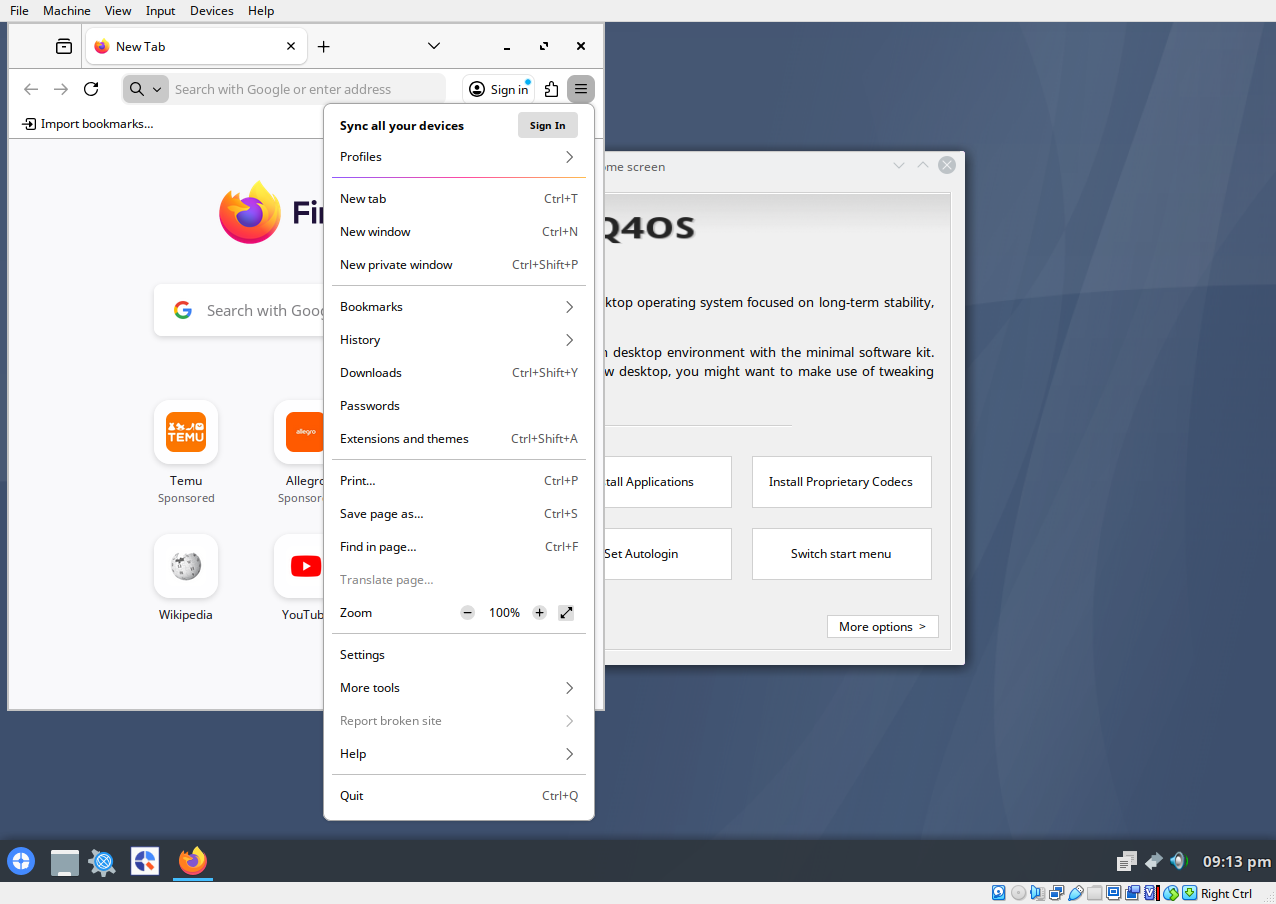
1.25x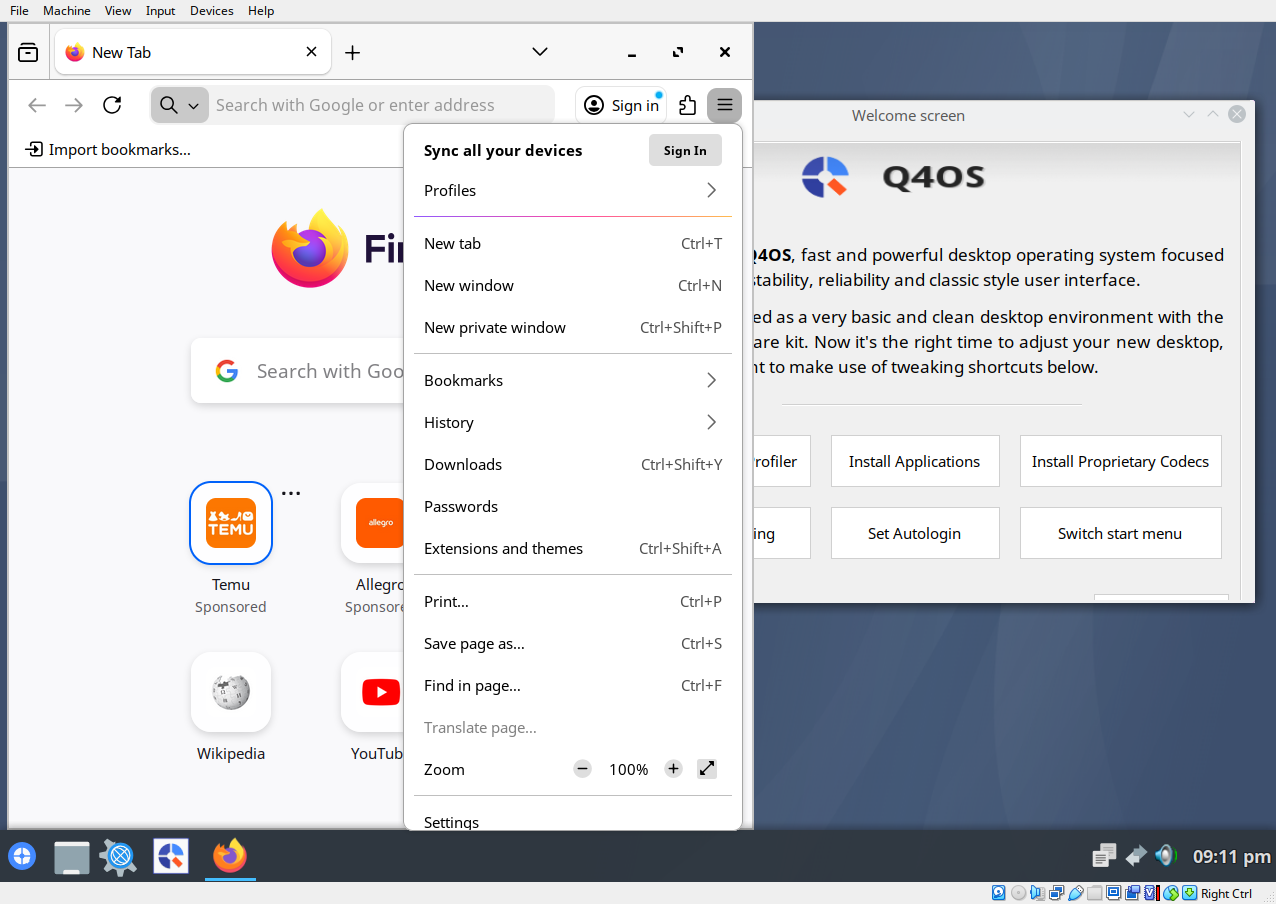
Offline
#4 2025-12-10 20:13
- lngr152
- Member
- Registered: 2025-12-09
- Posts: 6
Re: Q4OS Trinity problems I encountered
Try to look at it from this angle. Here's the 1.25x scaling. Firefox looks bigger than Trinity programs, doesn't it? Especially with how big the tabs are and the toolbar. Certainly bigger than Trinity's interface elements. Most websites feel too scaled up as well
Here the 1.25x scaling stays, but Firefox is scaled down to around 1x by using GDK_DPI_SCALE=0.9. Looks better for me
Of course, there may be subjectiveness. After all, I used Antix for quite a bit prior to this and got used to the scaling there. Here's the start menu size comparison. Text sizes on Antix 1x and Trinity 1.25x look similar, and the Trinity 1x one looks smaller. But I must say, Antix's scaling never caused discomfort for me, while Trinity's did day 1. Having to squint my eyes to properly see in Konqueror or Libreoffice on 1x, and feeling robbed of screen resolution in the browser on 1.25x.
Last edited by lngr152 (2025-12-10 20:20)
Offline
#5 2025-12-11 09:10
- q4osteam
- Q4OS Team
- Registered: 2015-12-06
- Posts: 6,109
- Website
Re: Q4OS Trinity problems I encountered
What way exactly did you change the scaling ?
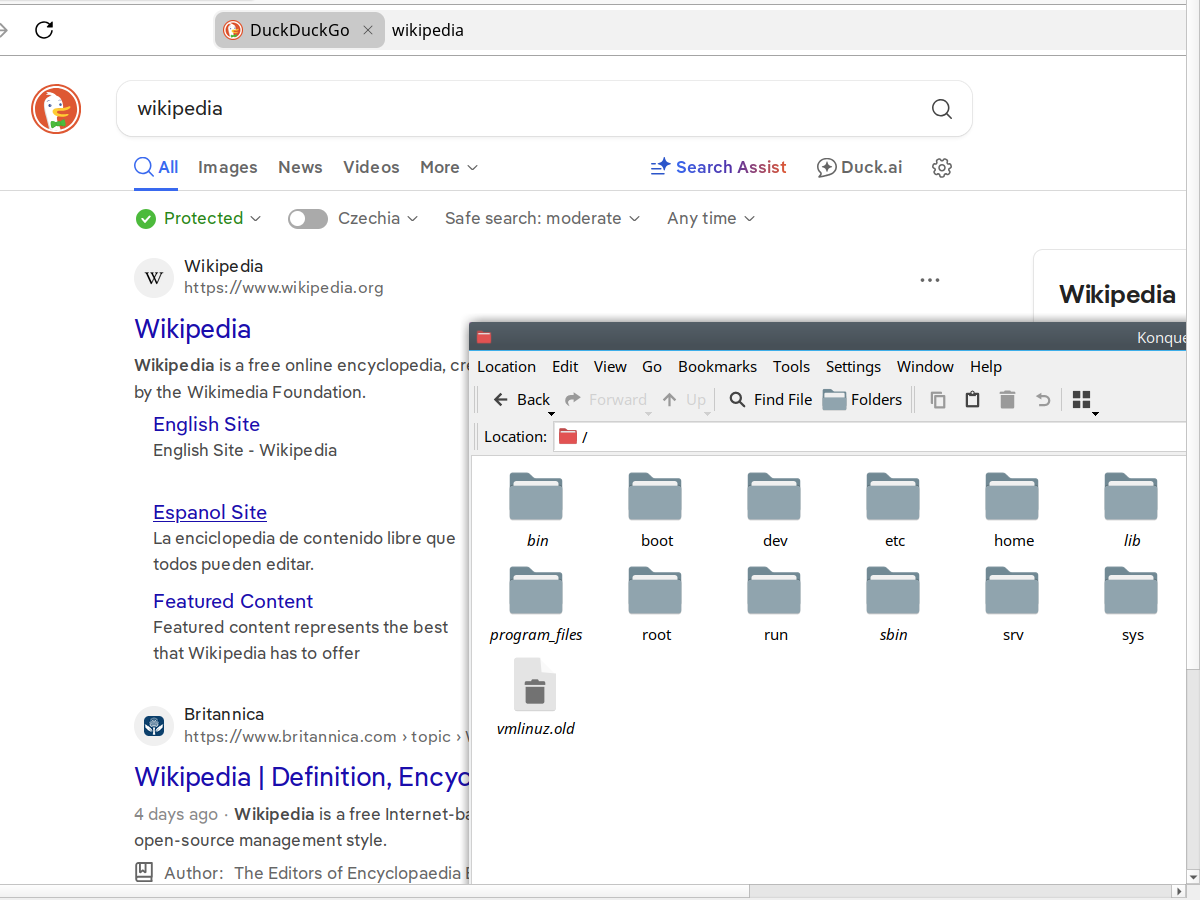
You didn't reply, but it's important for us to reproduce. Maybe you have messed the scaling up somehow ? First we need to reproduce the issue to be able to investigate. We are still not able to reproduce the incorrect scaling as you described and shown on the 1.25x image, see the attachment https://www.q4os.org/forum/qimg/qg0085.png
But I must say, Antix's scaling never caused discomfort for me, while Trinity's did day 1. ..
We are not sure if you have configured scaling properly, see above. Gtk styles and widgets never scale the same way as Tqt and Qt ones. Maybe you just prefer gtk widgets ? In that case, Xfce, Cinnamon or Gnome are the desktops for you regardless of scaling.
Here's the start menu size comparison. Text sizes on Antix 1x and Trinity 1.25x look similar, and the Trinity 1x one looks smaller.
It's no issue. Just another default size factor. As far as we know Plasma has the same as Trinity.
We are not able to reproduce your scaling issue. It's just fine here even though TDE and FF use different visual frameworks (Gtk x Qt). See scaling 1.25x:
Offline
#6 2025-12-11 16:10
- lngr152
- Member
- Registered: 2025-12-09
- Posts: 6
Re: Q4OS Trinity problems I encountered
I used the screen scaling tool in the control panel. I don't think my scaling is incorrect, I compared it to the one in your screenshot and it seems to be identical. I guess my opinion on GTK applications feeling bigger than Qt ones is subjective, making further discussion on this issue pointless, considering there are easy ways of scaling up/down Qt/GTK applications for people like me. Though, I have KDE Plasma on another machine and never felt anything wrong with the default scaling, but the screen resolution there is different so it's hard to compare. Let's move on to the next points on my list that are much more objective
Offline
#7 2025-12-11 16:42
- q4osteam
- Q4OS Team
- Registered: 2015-12-06
- Posts: 6,109
- Website
Re: Q4OS Trinity problems I encountered
Well, we are not able to reproduce the scaling issue at the moment. All in all, if there is anything wrong with screen scaling in Q4OS we would like to investigate and fix that. In order to investigate, we need an exact procedure to reproduce and define the issue. So you are welcome to create a new topic anytime and post the exact steps we can follow.
We will express some opinion on the point 2 here a bit later.
Offline
#8 2025-12-13 14:03
- q4osteam
- Q4OS Team
- Registered: 2015-12-06
- Posts: 6,109
- Website
Re: Q4OS Trinity problems I encountered
Ad2) is not a Trinity issue, just an option.
The default browser being Chromium is certainly a weird choice for a Linux distro.
Why do you think so ? Why do you prefer Firefox ?
... in my opinion, if people dare to get into Linux, Firefox is going to be the least of their problems, and usually such people already prefer Firefox
That's a matter of opinion We still believe that inexperienced new Linux users would prefer Chromium, it's more familiar to them from the Windows world. Moreover, for users who have a little experience, installing a preferred browser is not a problem, it is a really easy and quick task, unlike for Linux beginners.
In anyway, creating custom desktop profile https://www.q4os.org/dqa016.html#boome with FF and without Chromium is possible too.
... Those who use Chrome generally just stay on Windows. Of course, it's not a rule, there are exceptions, but I feel like that's how it is most of the time.
We are not so sure, but again a debatable point. We believe there are quite a few Chrome users who want to switch from Windows and they are trying it at least. It would be a large discussion about why and who wants switch to Linux.
Perhaps we may be at one that Chrome users will have more difficulty installing another browser than Firefox users.
... so I installed Firefox, but making it the default browser wasn't straightforward. The control panel setting located at "Components/Default programs" didn't do anything. ...
Yes, it may be a Trinity issue, however we need to check that and investigate, so we will do and post back.
Last edited by q4osteam (2025-12-13 14:23)
Offline
#9 2025-12-13 15:15
- lngr152
- Member
- Registered: 2025-12-09
- Posts: 6
Re: Q4OS Trinity problems I encountered
Why do you think so ?
Because almost all of Linux distributions have Firefox as the default browser.
Why do you prefer Firefox ?
I think it's clear that Google isn't looked good upon in the FOSS community, leading many, like me, to prefer alternatives to their products. Recent events like them going against ad blockers shows why.
installing a preferred browser is not a problem, it is a really easy and quick task
Not exactly as of now But yeah, once the problems related to switching the default browser get fixed, it's not going to be a big deal anymore. It's just that, you know, being frustrated with why links continue opening in Chromium leads to questioning why it's the default browser in the first place.
Offline
#10 2025-12-13 17:17
- q4osteam
- Q4OS Team
- Registered: 2015-12-06
- Posts: 6,109
- Website
Re: Q4OS Trinity problems I encountered
... once the problems related to switching the default browser get fixed, it's not going to be a big deal anymore.
So 2) is not issue with a choose of a browser, but with switching and configuring new one as the default. Would you please specify the issue, steps to reproduce, etc.. and create a new topic in the support section https://www.q4os.org/forum/viewforum.php?id=3 please ? We will take an attention there in order to investigate it.
Offline
#11 2025-12-14 19:02
- lngr152
- Member
- Registered: 2025-12-09
- Posts: 6
Re: Q4OS Trinity problems I encountered
Taking one more look at the problem I described in 2), I noticed that the "Default applications" tool from control panel just claims to affect TDE programs, and it does. This explains why it doesn't affect other programs, meaning it's not actually a bug. But why only TDE programs? I expected such a tool to affect all programs, and I think it should. Same thing with the file associations tool, a problem I described in 4).
Offline
#12 2025-12-14 19:49
- q4osteam
- Q4OS Team
- Registered: 2015-12-06
- Posts: 6,109
- Website
Re: Q4OS Trinity problems I encountered
Yes, 2) may be submitted as an enhancement request to the Trinity desktop developers. You can pass it here https://www.trinitydesktop.org/ . By the way, which specific programs should this setting apply to ?
Offline
Pages: 1